Free 0.1.1 and Pro 0.1.1 documentation.
Turn Off Image Zoom turns off WooCommerce's gallery hover zoom, lightbox, and slider effects with up to three switches. Only the ticked WooCommerce gallery theme-support flags are removed at load time, after the theme finishes its own setup, so product pages render plain, calm images while every image file, product, template, and theme option stays untouched. It is three bounded gallery switches, not a replacement zoom engine, gallery builder, or performance suite.
Requirements
| Component | Requirement |
|---|---|
| WordPress | 6.2 or newer |
| PHP | 7.4 or newer |
| WooCommerce | 8.9 or newer, active |
| Free rule | Three independent switches that remove only WooCommerce's gallery zoom, lightbox, and slider flags |
| Pro plan | One site, $39/year after a 14-day trial |
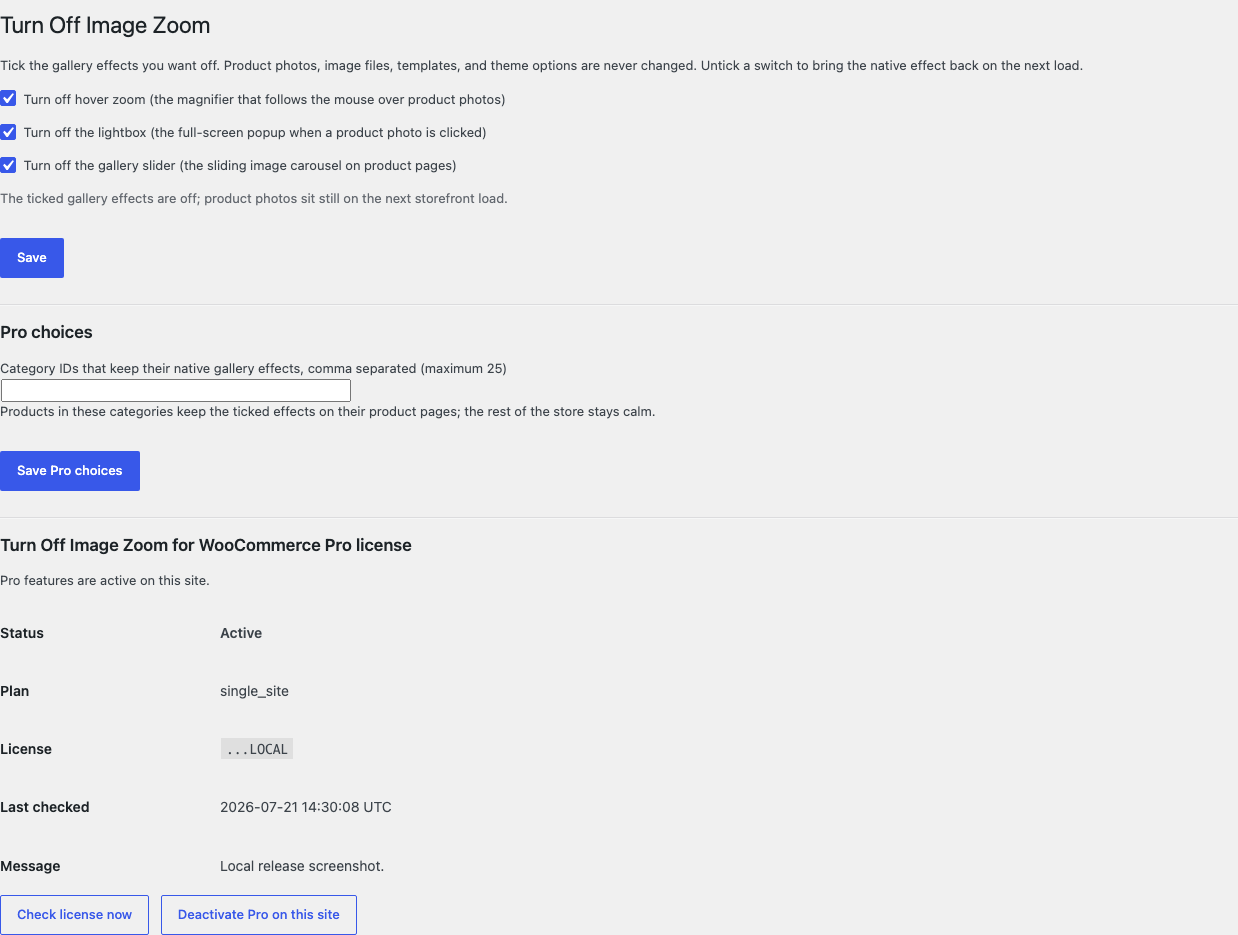
Turn off the Free gallery effects
- Install and activate WooCommerce.
- Install Turn Off Image Zoom for WooCommerce from WordPress.org after its listing is approved, or upload the supplied Free 0.1.1 ZIP.
- Open WooCommerce > Turn Off Image Zoom.
- Tick the effects you want off: Turn off hover zoom, Turn off the lightbox, or Turn off the gallery slider.
- Select Save.
Verify the calm product page
- Open one product page while signed out.
- Move the pointer over the main product photo and confirm no magnifier follows it while the hover zoom switch is ticked.
- Select the photo and confirm no full-screen popup opens while the lightbox switch is ticked.
- Confirm the gallery no longer slides while the slider switch is ticked and the images themselves render natively.
- Untick a switch, save, and confirm the native effect returns on the next load.
What Free changes
Free stores one local option, sfk_toiz_settings, containing three independent switches. At load time, after the theme finishes its own setup, only the ticked WooCommerce gallery theme-support flags are removed: hover zoom, the lightbox, and the gallery slider. A theme that never enabled a ticked flag sees a silent no-op, every other theme support stays exactly as the theme declared it, and product pages render plain images through WooCommerce's own gallery.
Free writes no image, attachment, product, template, stylesheet, script, or theme option. It never regenerates thumbnails, injects CSS or JavaScript, dequeues theme assets, alters gallery markup directly, or ships replacement zoom or lightbox libraries. Missing WooCommerce or any uncertain state removes nothing, and unticking a switch restores the native effect on the next load.
What Pro adds
Pro adds one bounded local choice:
- at most twenty-five excluded categories whose products keep the ticked effects on, while the rest of the store stays calm;
- exact category membership of the current product is decided at read time before the gallery renders;
- nothing else changes: the same three flags are the entire scope.

If Pro, Stripe, the network, or the StoreFixKit license API is unavailable, the valid Free switches continue locally.
Start the 14-day Pro trial
- Open the Turn Off Image Zoom product page.
- Select Start 14-day trial. No card is required to begin.
- Stripe returns to StoreFixKit after checkout; a signed webhook creates a product-bound license.
- Copy the license key and download the Pro 0.1.1 ZIP.
- Keep Free active, upload and activate Pro, then activate its license.
- Add a payment method before day 14 only if you want the $39/year subscription to continue. Without one, Stripe cancels it at trial end.
Compatibility boundary
This release removes only the ticked WooCommerce gallery theme-support flags, after the theme finishes its own setup. A theme that never enabled a flag sees a silent no-op, and a theme or plugin that ships its own zoom, lightbox, or slider engine outside those flags owns that surface; the ticked native flags themselves stay removed.
StoreFixKit does not ship replacement zoom engines, lightbox libraries, sliders, galleries, image CDNs, lazy-load or performance suites, mobile-specific behavior forks, swipe handlers, or gesture configuration, and it removes or adds no theme support other than the three WooCommerce gallery flags.
Privacy, security, and resource use
- Settings writes require
manage_woocommerceand WordPress's settings nonce. - Each load reads at most two options and removes at most three theme-support flags.
- At most twenty-five category terms are evaluated, and only for the current product.
- Images, attachments, products, templates, theme options, carts, orders, and customers are never written.
- The storefront performs no StoreFixKit or third-party HTTP request and stores no personal data.
- There is no custom table, cron, Action Scheduler job, queue, telemetry, JavaScript, or stylesheet.
Troubleshooting
The magnifier or popup is still there
Confirm the switch is saved, then clear object and page caches. A theme or plugin that ships its own zoom or lightbox engine outside WooCommerce's gallery flags owns that effect; only the native flags are removed.
Nothing changed after ticking a switch
The theme never enabled that gallery flag, so removing it is a silent no-op by design. The gallery already behaved as if the effect were off, and nothing else changes.
The gallery looks different without the slider
With the slider flag removed, WooCommerce renders the gallery without the sliding carousel. The images, thumbnails, and markup remain WooCommerce's own; no plugin CSS or JavaScript is added.
One category still zooms
That is a Pro excluded category keeping its native effects on purpose. Remove its ID from the exclusion list to calm those product pages too.
Pro choices do not apply
Confirm Free and Pro are active, the license belongs to Turn Off Image Zoom Pro, and the excluded category IDs were saved. When licensing is unavailable, Free intentionally continues its local switches.
Rollback and uninstall
- Back up the database and keep the deterministic 0.1.1 Free and Pro ZIPs.
- Deactivate Pro and confirm the Free switches remain.
- Deactivate Free and confirm the native gallery effects return on the next load while images, products, templates, and theme options remain unchanged.
- Reinstall the 0.1.1 Free ZIP, then the matching Pro ZIP if needed.
- Verify one calm product page and one restored native effect before relying on the restored release.
The verified release drill installed a synthetic 0.0.1 baseline, updated to 0.1.1, downgraded, rolled forward, deactivated, and exercised both uninstall modes while preserving WooCommerce product and order data.
Normal uninstall preserves Free settings, Pro settings, and the license for accidental recovery. Define STOREFIXKIT_DELETE_DATA as true before deletion only when you deliberately want Free to remove sfk_toiz_settings and Pro to remove sfk_toiz_pro_settings plus its license option. Images, attachments, products, templates, theme options, carts, orders, customers, and third-party data are never deleted.
StoreFixKit Support
Use StoreFixKit Support and include which switches are ticked, the theme name and whether it ships its own gallery effects, any Pro excluded categories, the product URL you checked, expected and actual gallery behavior, Free and Pro versions, WordPress and WooCommerce versions, cache/CDN status, and redacted desktop/mobile screenshots. Never send credentials, customer or order data, API keys, payment details, or a complete license key.
For feedback, describe the shortest repeatable setup and whether a default store renders plain product images after ticking the switches. After resolution, support will provide the correct WordPress.org review link once the official listing exists.