No card required. Add a payment method before day 14 to continue; otherwise Stripe cancels the subscription automatically.
Real WordPress interfaceFree 0.1.1 / Pro 0.1.1
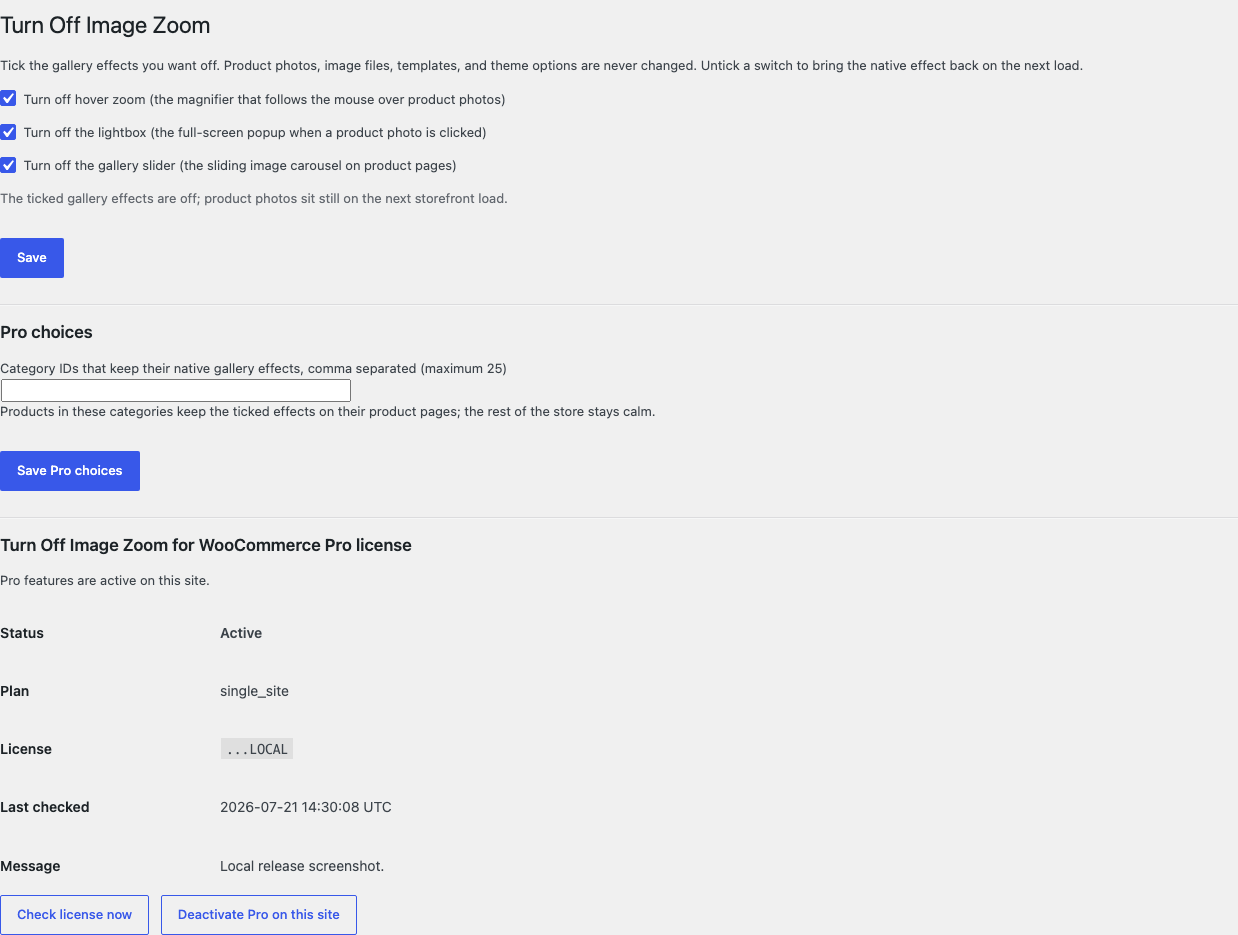
One jobTurn off WooCommerce's native hover zoom, lightbox, and gallery slider with three independent switches that remove only the selected theme-support flags after theme setup, without changing images, templates, theme options, CSS, or JavaScript.
RequiresWooCommerce 8.9 or newer
Free statusRelease candidate prepared for WordPress.org review
Three decisions
Set it up without code.
01
Open WooCommerce > Turn Off Image Zoom and tick the effects you want off.
02
Open one product page while signed out and test hover, click, and slider behavior.
03
Untick one effect and confirm its native behavior returns on the next load.
Actual product
What you configure and what the visitor sees.
Free gives each native gallery effect its own plain-language switch.Product photos sit still while WooCommerce keeps its native images and markup.The calm gallery works at a 390-pixel viewport without plugin CSS or JavaScript.Pro restores the native effects only for at most 25 category exceptions.
Free and Pro
Free keeps working. Pro adds capacity.
Free 0.1.1
No account or license required
Choose hover zoom, the lightbox, and the gallery slider independently with three labeled checkboxes.
Remove only the selected WooCommerce gallery theme-support flags after the theme finishes setup.
Leave image files, attachments, products, templates, markup, theme settings, and every unrelated theme feature unchanged.
Prepared for WordPress.org submission; no public-directory approval is claimed yet.
Pro 0.1.1
$39 per year
Keep the native gallery effects on products in at most 25 excluded categories.
Restore only flags that Free removed on the current request and only for a verified product page.
Make the exception decision at read time without a scan, asset, template override, or image operation.
Designed to stop quietly instead of changing store truth.
The free workflow is independent of Stripe, the StoreFixKit license API, and Pro. A billing or network problem cannot rewrite the parent plugin's data.
Removes only the three documented WooCommerce gallery theme-support flags and silently does nothing when the theme never enabled a selected flag.
Images, attachments, products, templates, theme options, carts, orders, and customers are never written.
Free continues locally when Pro, billing, the network, or the StoreFixKit license service is unavailable.
No replacement gallery, custom table, cron, queue, telemetry, frontend StoreFixKit asset, or storefront StoreFixKit request.
14-day trial
No card required to test Pro on one site.
Stripe hosts checkout and billing. The StoreFixKit success page creates a product-bound license and Pro download. Add a payment method before trial end only if you want the annual plan to continue.