Free 0.1.2 and Pro 0.1.2 documentation.
Sold Out Badge for WooCommerce Products adds one accessible text badge to supported native product image surfaces only when WooCommerce reports that the current product is not in stock. It never changes stock, backorders, price, visibility, or purchasability.
Requirements
| Component | Requirement |
|---|---|
| WordPress | 6.2 or newer |
| PHP | 7.4 or newer |
| WooCommerce | 8.9 or newer, active |
| Storefront | Supported native classic product hooks or WooCommerce Product Image blocks with a current product context |
Install and configure Free
- Install and activate WooCommerce.
- Install Sold Out Badge for WooCommerce Products from WordPress.org after its directory listing is approved, or upload the supplied Free 0.1.2 ZIP.
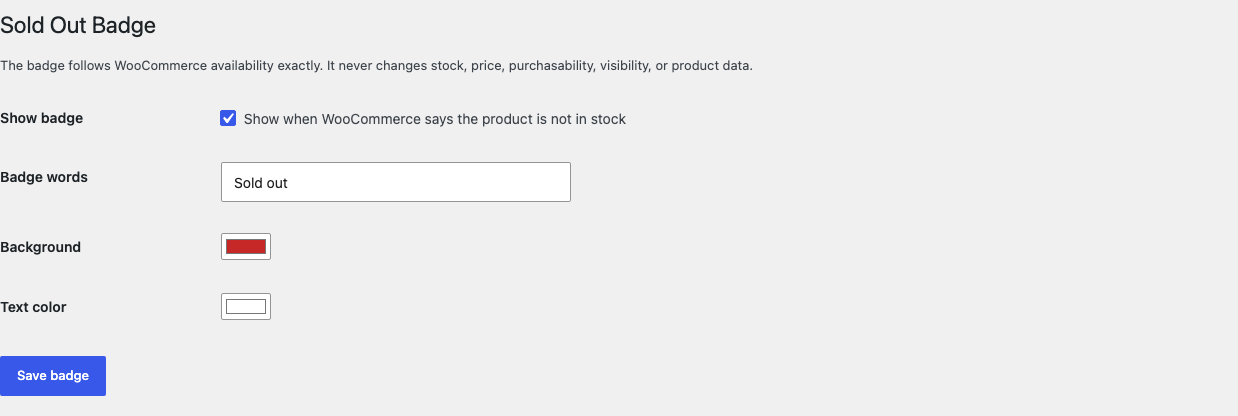
- Open WooCommerce > Sold Out Badge.
- Select Show when WooCommerce says the product is not in stock.
- Keep Sold out or enter another short plain-text label.
- Choose a background and text color with readable contrast.
- Select Save badge.
Check the storefront
- Choose one published in-stock product and one published out-of-stock product.
- Open the shop or category archive on desktop and mobile.
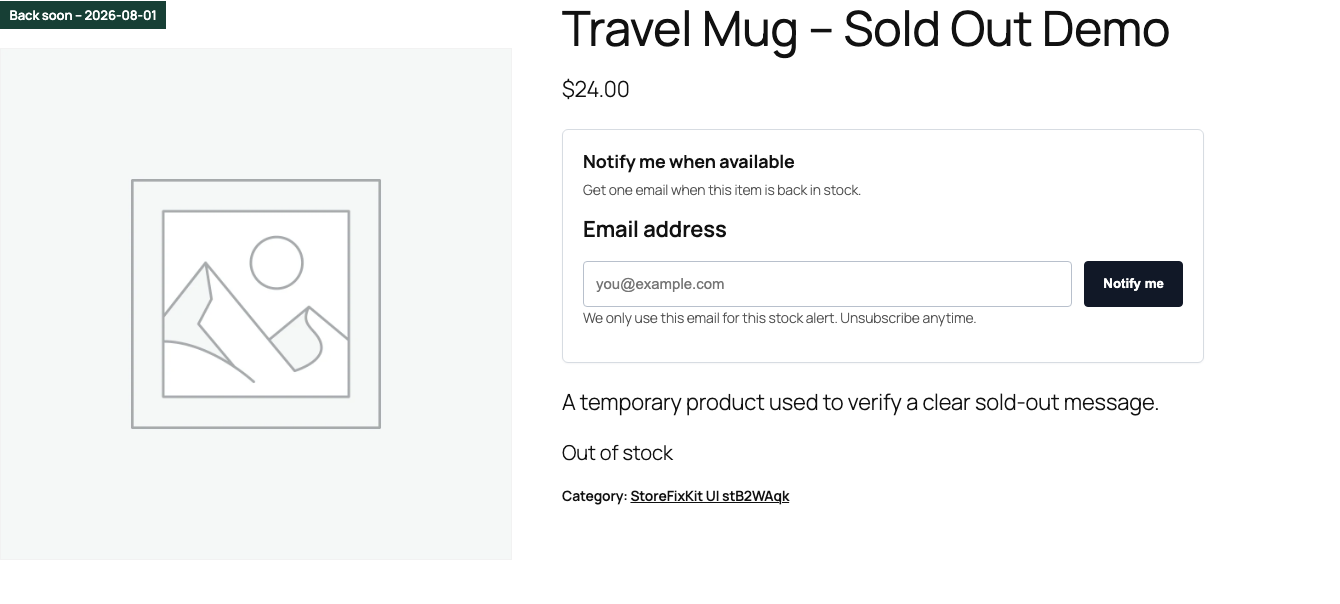
- Confirm the badge appears once on the out-of-stock product and not on the in-stock product.
- Open both single-product pages and repeat the check.
- Confirm product image, price, stock message, Add to cart behavior, and layout remain controlled by WooCommerce and the theme.
What Free changes
Free reads the current WooCommerce product and its is_in_stock() result during a supported product render. When the feature is enabled and WooCommerce says the product is not in stock, StoreFixKit adds one escaped text badge and one small scoped stylesheet.
If the current product is missing or ambiguous, the surface is unsupported, or WooCommerce reports the product is in stock, StoreFixKit does nothing. It does not search for another product or patch arbitrary page markup.
What Pro adds
Pro lets one bounded category selection use different badge words and colors. The category layer is limited to 50 selected categories and does not scan or rewrite products.
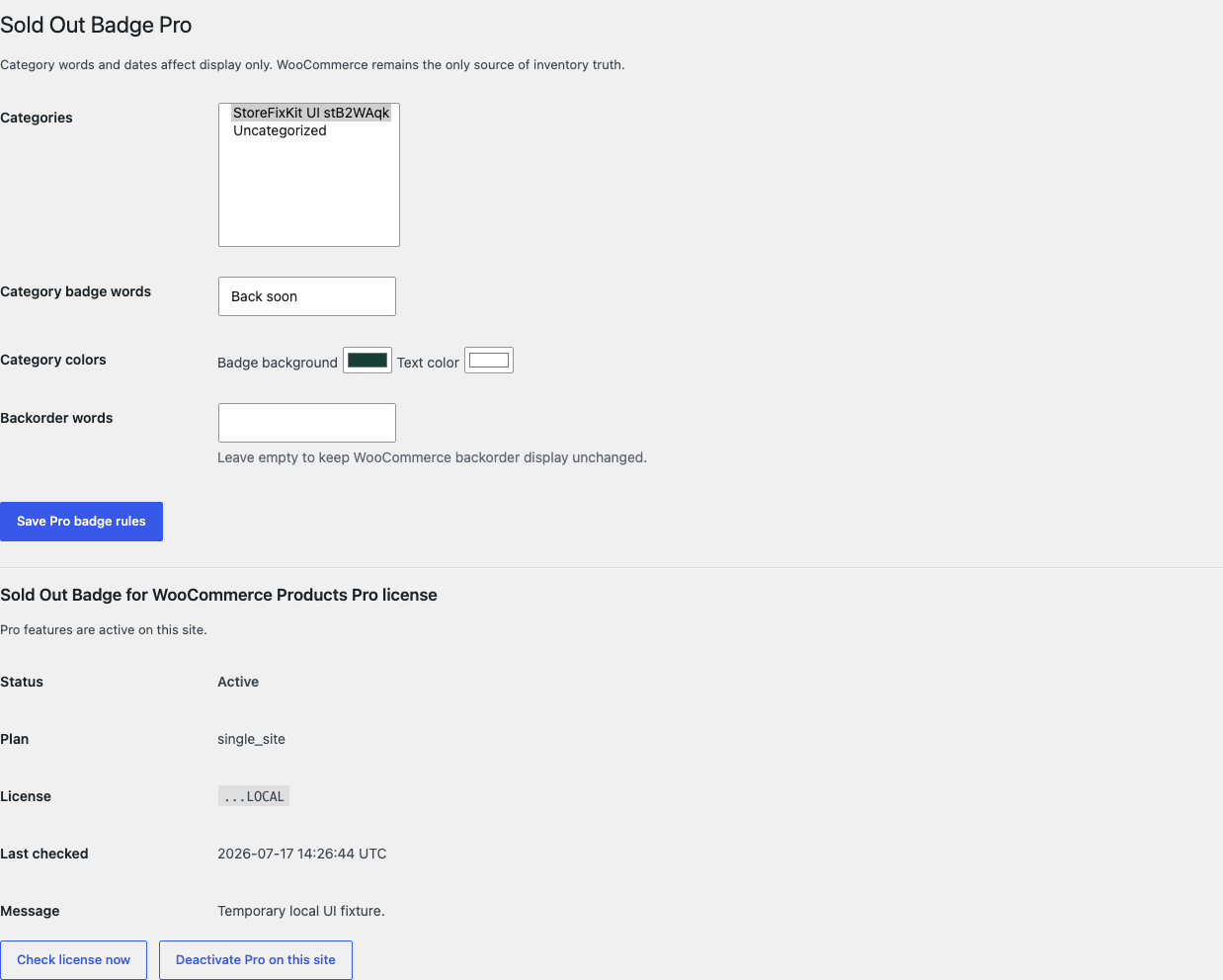
Pro can also save an optional expected return date on an individual product. The date is display-only and appears beside the badge text when valid.

If WooCommerce already allows backorders, Pro can show separate bounded backorder words. Leaving that field empty preserves WooCommerce's normal backorder display.
Start the 14-day Pro trial
- Open the Sold Out Badge product page.
- Select Start 14-day trial. No card is required to begin.
- Stripe returns to the StoreFixKit success page; the signed webhook creates a product-bound single-site license.
- Copy the key and download the Pro 0.1.2 ZIP.
- Add a payment method before day 14 only if you want the $39/year subscription to continue. Without one, Stripe cancels it at trial end.
Keep WooCommerce and Free active. Upload and activate Pro, paste the key in WooCommerce > Sold Out Badge Pro, and select Activate Pro. If Pro, billing, or the license API is unavailable, the Free store-wide badge keeps working locally.
Privacy, security, and resource use
- Settings require
manage_woocommerceand a WordPress nonce. - The optional return date requires permission to edit that exact product and a product-bound nonce.
- Badge words are plain text limited to 40 characters; colors are validated hexadecimal values.
- Return dates must be real calendar dates in
YYYY-MM-DDform. - Storefront rendering performs no product, stock, price, cart, checkout, or order write.
- There is no custom table, cron job, catalog scan, telemetry, customer cookie, frontend JavaScript, image edit, or storefront StoreFixKit request.
- No customer, order, or product content is sent to StoreFixKit.
Troubleshooting
The badge does not appear
Confirm the feature is enabled, the product is published, and WooCommerce reports it as out of stock. Then test a native classic product loop, native single-product image, or supported WooCommerce Product Image block. A builder or theme that replaces those surfaces may own its own badge markup.
The badge appears twice
Clear page, object, and CDN caches, then retest with only one current product surface. StoreFixKit deduplicates its classic and block output for the same surface; a second badge may belong to the theme, WooCommerce, or another badge plugin. Inspect the visible wording and CSS class before removing anything.
A backorderable product shows no Sold out badge
That is expected in Free because WooCommerce still permits purchase. Pro shows backorder words only when WooCommerce already allows backorders and the Pro backorder field is not empty.
The expected return date is missing
Confirm Pro is active, the date is a real calendar date, and the product is on a supported surface. The date is not a stock schedule and does not appear on in-stock products.
Rollback
- Back up the database and both current ZIPs.
- Deactivate Pro, then Free.
- Install the tested Free 0.1.0 and Pro 0.1.0 baseline ZIPs.
- Activate Free first, then Pro.
- Compare one in-stock, one out-of-stock, and one backorderable product on desktop and mobile.
- To return to the current release, repeat the process with 0.1.2.
Versions 0.1.0 and 0.1.2 use the same bounded owned settings and require no schema migration. Rolling back does not change WooCommerce stock, price, visibility, backorders, purchasability, images, carts, checkout, or orders.
Uninstall
Deleting Free removes only sfk_sob_settings. Deleting Pro removes only sfk_sob_pro_rules, sfk_sob_pro_license, and Pro-owned _sfk_sob_return_date product metadata. Product stock, stock status, backorder settings, price, visibility, purchasability, images, categories, carts, checkout, orders, and third-party badges remain untouched.
StoreFixKit Support
Use StoreFixKit Support and include the product URL and ID, WooCommerce stock and backorder state, expected and actual badge words, Free and Pro versions, WordPress and WooCommerce versions, theme/builder, product-block name if used, other badge plugins, cache/CDN state, and desktop/mobile screenshots. Never send credentials, customer data, payment details, or a full license key.