Free 0.1.3 and Pro 0.1.3 documentation.
Rename My Account Menu for WooCommerce changes only the visible words in WooCommerce's existing My Account menu. The keys, destinations, permissions, page content, customer data, and Logout action remain owned by WooCommerce and their original providers.
Requirements
| Component | Requirement |
|---|---|
| WordPress | 6.2 or newer |
| PHP | 7.4 or newer |
| WooCommerce | 8.9 or newer, active |
| Account page | The assigned WooCommerce My Account page using the native menu filter |
Install and configure Free
- Install and activate WooCommerce.
- Install Rename My Account Menu for WooCommerce from WordPress.org after its listing is approved, or upload the supplied Free 0.1.3 ZIP.
- Open WooCommerce > Rename My Account Menu.
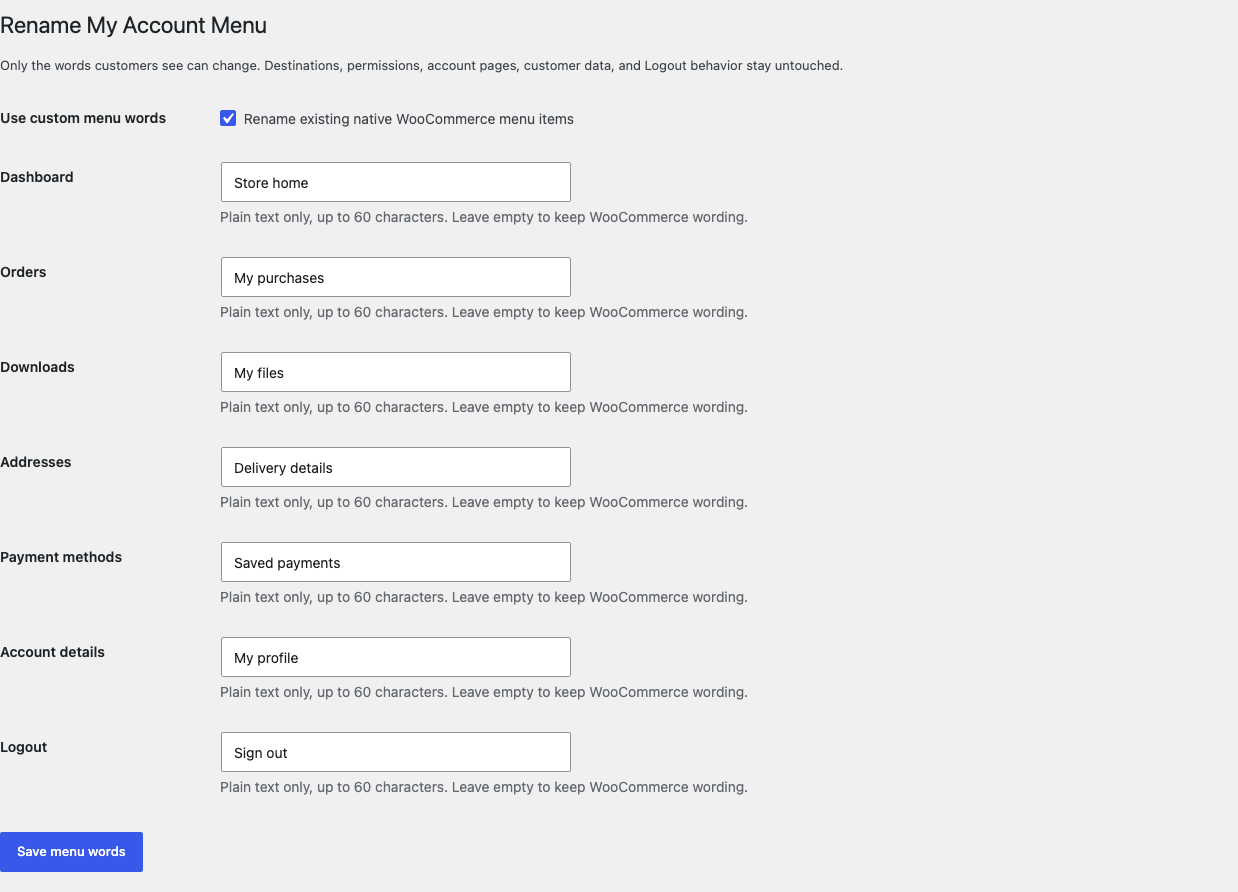
- Select Rename existing native WooCommerce menu items.
- Enter only the words you want to change. Leave a field empty to keep WooCommerce's wording.
- Select Save changes.
Test as a customer
- Sign in with a disposable customer account.
- Open the assigned My Account page.
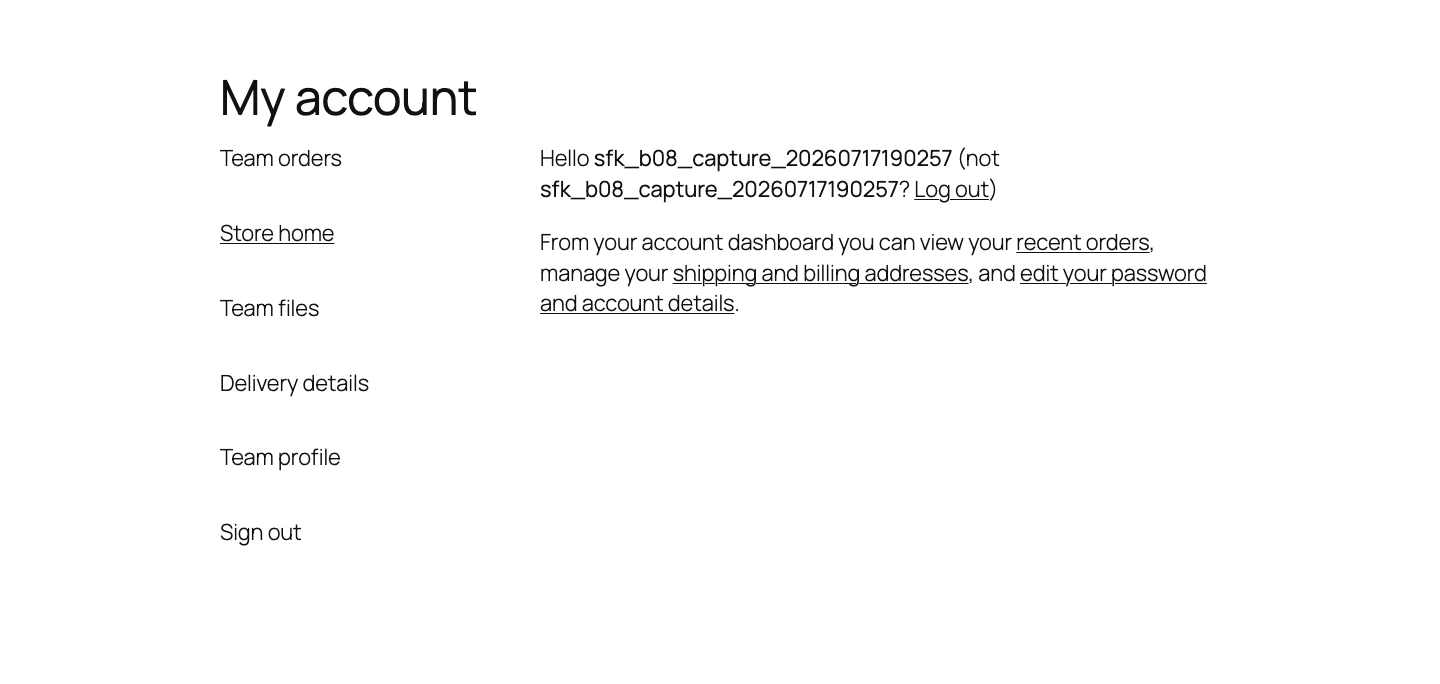
- Confirm the new words appear.
- Select every renamed item and confirm it still opens the same destination.
- Confirm third-party items remain present and Logout still signs out normally.
What Free changes
WooCommerce supplies an ordered array whose keys identify account destinations and whose values are visible labels. Free replaces a value only when its known native key already exists. It does not rename the key, register an endpoint, create a page, redirect a request, or read the customer's orders, downloads, addresses, or payment methods.
Unknown and third-party items are returned exactly as received. A configured item that WooCommerce omitted is not created.
What Pro adds
Pro can assign numbers from 1 to 999 to existing native items and can provide one set of labels for one installed local WordPress role. It does not create roles or inspect customer records.
When ordering is enabled, Pro reuses only existing native items in their existing native slots. Third-party items keep their relative slot, and Logout remains last when WooCommerce supplied it.
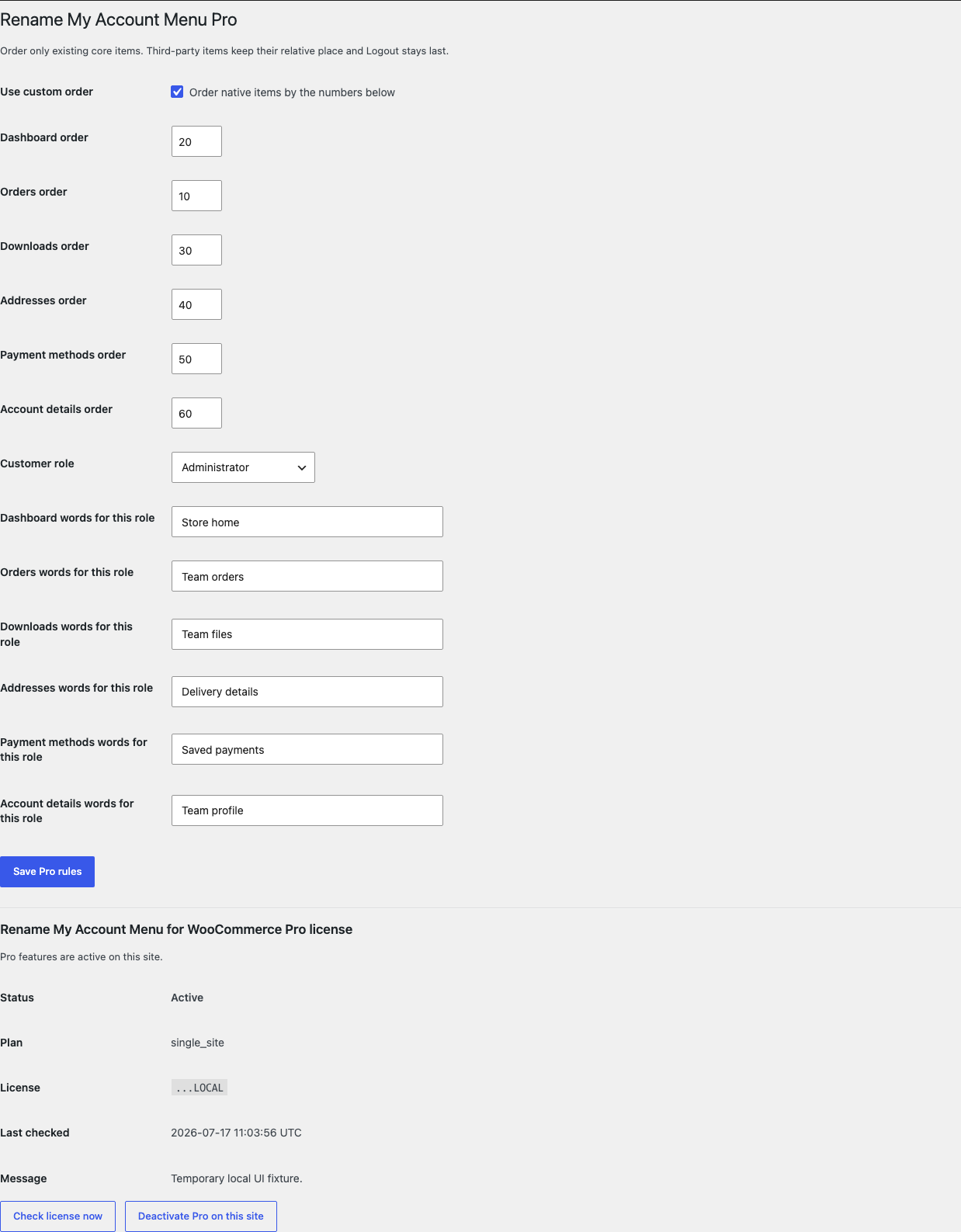
Role-specific non-empty labels apply for the selected role. Empty role fields fall back to Free. Ordering and labels never change a menu key, URL, permission, callback, account page, or Logout behavior.
Start the 14-day Pro trial
- Open the Rename My Account Menu product page.
- Select Start 14-day trial. No card is required to begin.
- Stripe returns to the StoreFixKit success page; the signed webhook creates a product-bound single-site license.
- Copy the key and download the Pro 0.1.3 ZIP.
- Add a payment method before day 14 only if you want the $59/year subscription to continue. Without one, Stripe cancels it at trial end.
Keep WooCommerce and Free active. Upload and activate Pro, activate the license, and then configure order or one role. If Pro, billing, or the license API is unavailable, Free labels continue locally.
Privacy, security, and resource use
- Settings writes require
manage_woocommerceand a WordPress nonce. - Labels are plain text limited to 60 characters and escaped on output.
- Pro accepts only an installed local role slug and bounded order numbers.
- The storefront reads no customer, order, address, download, subscription, membership, or payment-method data.
- There is no custom table, cron job, account write, role write, telemetry, customer cookie, frontend CSS, frontend JavaScript, or public StoreFixKit request.
- No personal or account data is sent to StoreFixKit.
Troubleshooting
The words did not change
Confirm the setting is enabled and saved, clear page/object caches, and verify WooCommerce > Settings > Advanced > Page setup > My account page points to the page you are testing. A builder or account-dashboard plugin may print its own menu without applying WooCommerce's native filter.
A click opens the wrong page
StoreFixKit does not change destinations. Check WooCommerce endpoint settings, page assignment, permalink rules, multilingual routing, and the provider that owns the affected menu key. Record the key and resulting URL for support.
A third-party item appears in an unexpected place
Pro preserves third-party relative slots while reusing native slots. Another plugin can run before or after StoreFixKit and reorder the final array. Disable Pro ordering to prove whether label-only Free behavior is correct, then record filter ownership and priority.
Role-specific words do not appear
Confirm the license is active, the selected role still exists, and the test user actually has that role. Empty role fields intentionally fall back to Free.
Rollback
- Back up the database and current ZIPs.
- Deactivate Pro, then Free.
- Install Free 0.1.2 and Pro 0.1.2.
- Activate Free first, then Pro.
- Sign in as a disposable customer and verify every label, destination, third-party item, and Logout.
- Repeat with 0.1.3 to restore the current release.
The two versions share the same bounded settings and require no schema migration. Rollback does not modify WooCommerce pages, endpoints, users, roles, orders, addresses, downloads, or payment methods.
Uninstall
Deleting Free removes only sfk_rmam_settings. Deleting Pro removes only sfk_rmam_pro_rules and sfk_rmam_pro_license. Account pages, endpoints, users, roles, permissions, customer data, orders, downloads, addresses, payment methods, subscriptions, and third-party menu items remain untouched.
StoreFixKit Support
Use StoreFixKit Support and include the My Account page URL, expected and actual words, affected menu key and destination URL, test role, Free and Pro versions, WordPress and WooCommerce versions, theme/builder, account-related plugins, permalink and cache state, and screenshots. Remove names, addresses, order details, credentials, payment data, and full license keys.