Free 0.1.1 and Pro 0.1.1 documentation.
Remove Product Tabs stops the ticked default WooCommerce product tabs from rendering: description, additional information, and reviews. Only exactly matched, ticked keys are unset from the array WooCommerce passes through its native product-tabs filter, so every description, attribute, and review stays stored and untouched, and unticking a box restores the tab on the next request. It is three bounded checkboxes, not a tab builder, layout converter, or content editor.
Requirements
| Component | Requirement |
|---|---|
| WordPress | 6.2 or newer |
| PHP | 7.4 or newer |
| WooCommerce | 8.9 or newer, active |
| Free rule | Three checkboxes that remove only the native description, additional information, and reviews tabs |
| Pro plan | One site, $39/year after a 14-day trial |
Tick the Free tabs to remove
- Install and activate WooCommerce.
- Install Remove Product Tabs for WooCommerce from WordPress.org after its listing is approved, or upload the supplied Free 0.1.1 ZIP.
- Open WooCommerce > Remove Product Tabs.
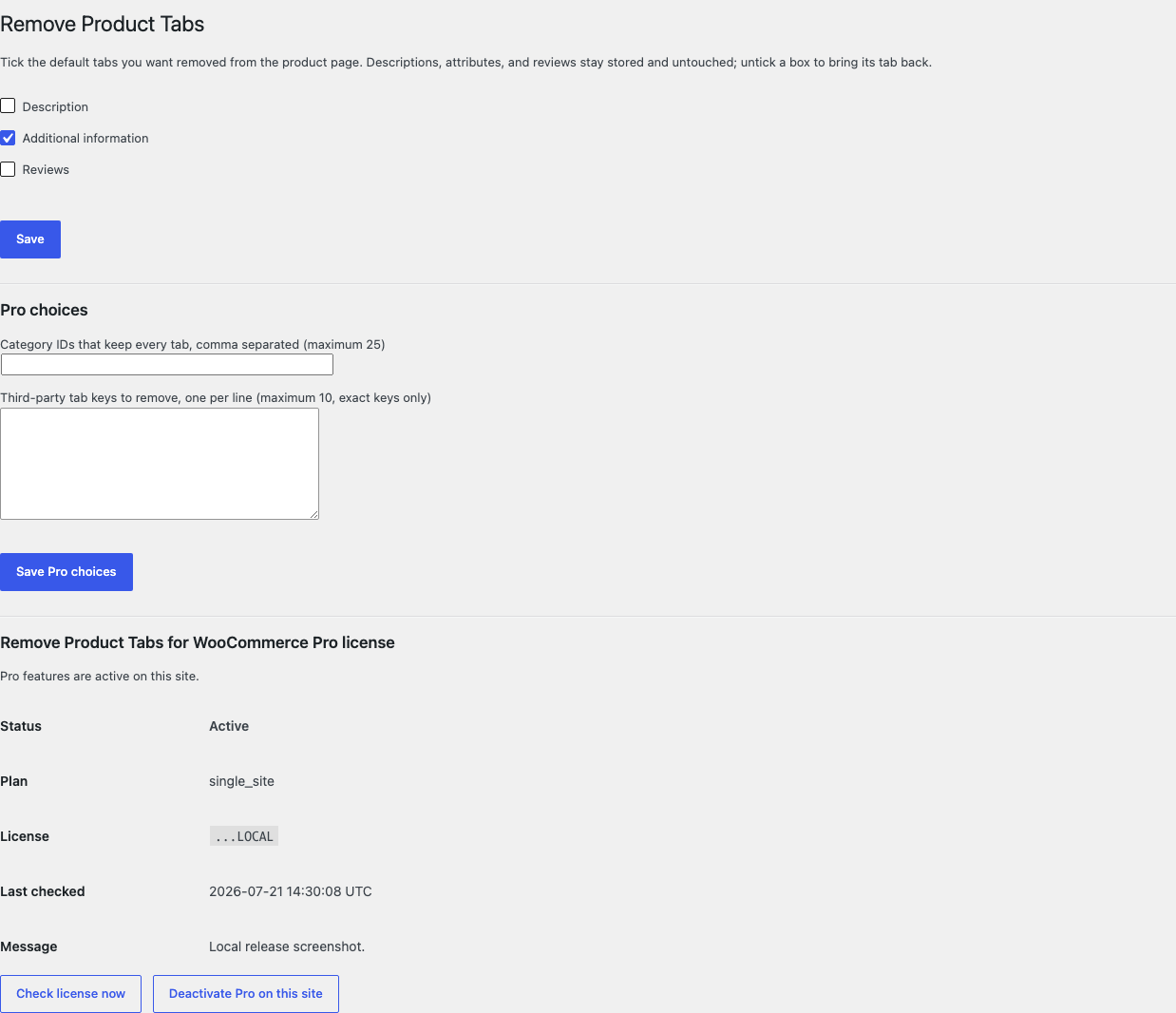
- Tick the default tabs you want removed: Description, Additional information, or Reviews.
- Select Save.
Verify the product page tabs
- Open one product page while signed out.
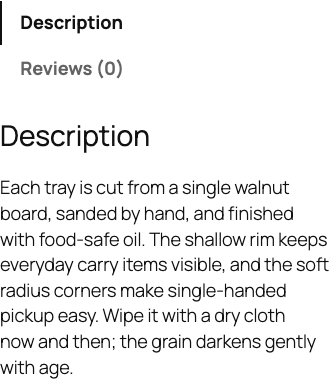
- Confirm the ticked default tabs are gone and the remaining tabs render natively.
- Confirm a tab added by another plugin still renders exactly as before.
- Confirm the product's description, attributes, and reviews still exist in the WordPress admin.
- Untick a box, save, and confirm the tab returns on the next request.

What Free changes
Free stores one local option, sfk_rpt_settings, containing three checkboxes. When WooCommerce's native product-tabs filter runs, only the ticked default keys — description, additional information, and reviews — are unset by exact key from the array WooCommerce passes in. Unknown, renamed, reordered, and third-party tabs pass through exactly as received, a ticked key that is absent from the incoming array is a silent no-op, and a malformed or non-array value returns unchanged.
Free deletes or edits no description, attribute, review, comment, or post content. It never creates, reorders, renames, restyles, or re-registers tabs, never changes tab priorities or callbacks, never touches comment settings, review settings, templates, CSS, or JavaScript, and never disables reviews globally. Unticking a box restores the tab on the next request, and missing WooCommerce leaves everything native.
What Pro adds
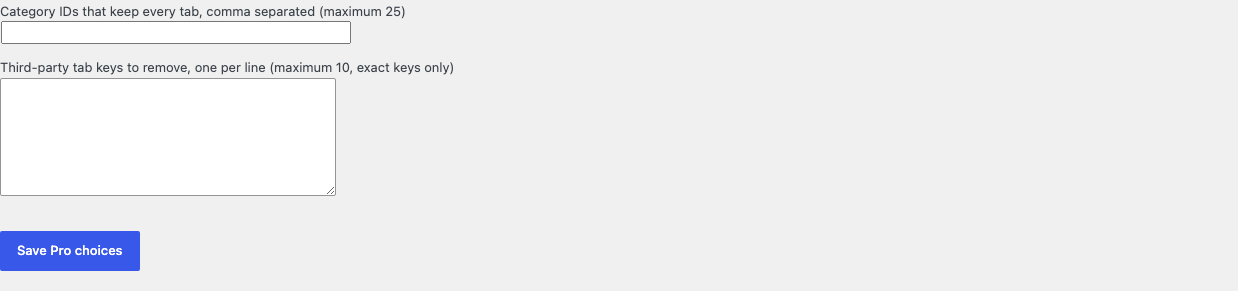
Pro adds two bounded local choices:
- at most twenty-five excluded categories whose products keep every tab, where exact category membership is decided at read time per product;
- at most ten explicitly named third-party tab keys removed with exact-key matching only, with no creation, reordering, renaming, or restyling of any tab.
If Pro, Stripe, the network, or the StoreFixKit license API is unavailable, the valid Free native-tab removal continues locally.
Start the 14-day Pro trial
- Open the Remove Product Tabs product page.
- Select Start 14-day trial. No card is required to begin.
- Stripe returns to StoreFixKit after checkout; a signed webhook creates a product-bound license.
- Copy the license key and download the Pro 0.1.1 ZIP.
- Keep Free active, upload and activate Pro, then activate its license.
- Add a payment method before day 14 only if you want the $39/year subscription to continue. Without one, Stripe cancels it at trial end.
Compatibility boundary
This release unsets exactly matched keys from the array received through WooCommerce's native product-tabs filter. A theme or block layout that renders product sections without that filter owns its own surface, and a plugin that re-adds a tab later in the same filter chain owns that tab. Fuzzy keys are never guessed; only exact keys are matched.
StoreFixKit does not add, create, reorder, rename, restyle, or convert tabs into accordions or other layouts, does not edit tab content, does not delete or moderate reviews or comments, and does not disable reviews globally.
Privacy, security, and resource use
- Settings writes require
manage_woocommerce, WordPress's settings nonce, and the fixed allowlist of tab keys. - Each filter run reads at most two options, removes at most three native keys, and matches at most ten exact third-party keys.
- At most twenty-five category terms are evaluated, and only for the current product.
- Descriptions, attributes, reviews, comments, products, carts, orders, and customers are never written or deleted.
- The storefront performs no StoreFixKit or third-party HTTP request and stores no personal data.
- There is no custom table, cron, Action Scheduler job, queue, telemetry, JavaScript, or stylesheet.
Troubleshooting
A ticked tab still shows
Confirm the checkbox is saved, then clear object and page caches. A plugin that re-adds the tab later in the same filter chain owns it, and a Pro excluded category keeps every tab on purpose.
A third-party tab did not disappear in Free
That is by design. Free removes only the three native default tabs; removing an explicitly named third-party key is a Pro choice with exact-key matching only.
The reviews tab is gone but reviews still exist
That is by design. The tab stops rendering while every review stays stored, and unticking the Reviews box brings the tab back on the next request. Nothing is deleted.
A Pro third-party key did not match
The key must match the registered tab key exactly; fuzzy matching is never used. Take the exact key from the other plugin's documentation, and confirm the tab actually arrives through WooCommerce's native tabs filter.
Pro choices do not apply
Confirm Free and Pro are active, the license belongs to Remove Product Tabs Pro, and the excluded categories and third-party keys were saved. When licensing is unavailable, Free intentionally continues its local native-tab removal.
Rollback and uninstall
- Back up the database and keep the deterministic 0.1.1 Free and Pro ZIPs.
- Deactivate Pro and confirm the Free default-tab removal remains.
- Deactivate Free and confirm every tab returns exactly as WooCommerce builds it while descriptions, attributes, and reviews remain unchanged.
- Reinstall the 0.1.1 Free ZIP, then the matching Pro ZIP if needed.
- Verify one product page with the ticked tabs removed and one with a restored tab before relying on the restored release.
The verified release drill installed a synthetic 0.0.1 baseline, updated to 0.1.1, downgraded, rolled forward, deactivated, and exercised both uninstall modes while preserving WooCommerce product and order data.
Normal uninstall preserves Free settings, Pro settings, and the license for accidental recovery. Define STOREFIXKIT_DELETE_DATA as true before deletion only when you deliberately want Free to remove sfk_rpt_settings and Pro to remove sfk_rpt_pro_settings plus its license option. Descriptions, attributes, reviews, comments, products, carts, orders, customers, and third-party data are never deleted.
StoreFixKit Support
Use StoreFixKit Support and include which boxes are ticked, any Pro excluded categories and third-party keys, the product URL you checked, the tabs that currently render, expected and actual tabs, other tab or product-page plugins, theme, cache/CDN status, Free and Pro versions, WordPress and WooCommerce versions, and redacted desktop/mobile screenshots. Never send credentials, customer or order data, API keys, payment details, or a complete license key.
For feedback, describe the shortest repeatable setup and whether a default store hides exactly the ticked default tabs while their content stays stored. After resolution, support will provide the correct WordPress.org review link once the official listing exists.