Free 0.1.1 and Pro 0.1.1 documentation.
Ask About This Product adds one shopper-initiated WhatsApp button to an exact WooCommerce product page. It is deliberately not a chat widget, enquiry form, bot, inbox, tracker, order system, or WhatsApp Business API integration.
Requirements
| Component | Requirement |
|---|---|
| WordPress | 6.2 or newer |
| PHP | 7.4 or newer |
| WooCommerce | 8.9 or newer, active |
| Business number | 8 through 15 digits after spaces and punctuation are removed |
| Message | Plain text, maximum 180 characters, with product name and URL tokens only |
| Pro plan | One site, $79/year after a 14-day trial |
Add the question button with Free
- Install and activate WooCommerce.
- Install Ask About This Product from WordPress.org after its directory listing is approved, or upload the supplied Free 0.1.1 ZIP.
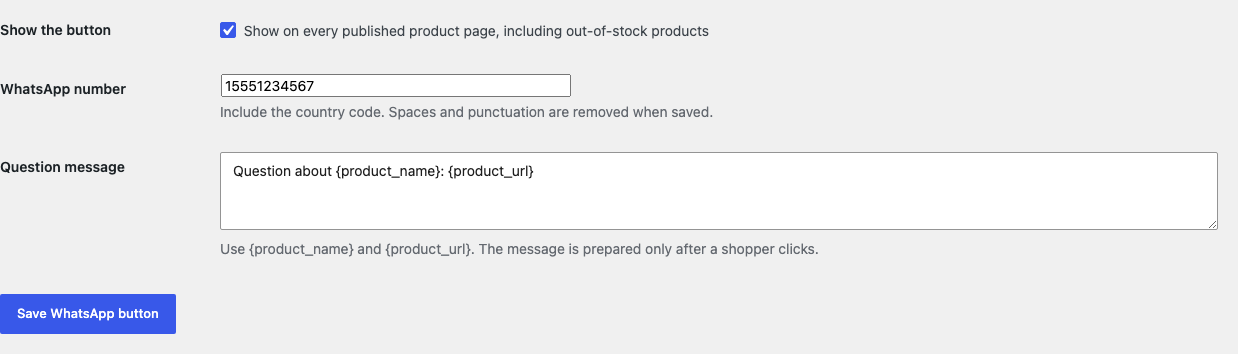
- Open WooCommerce > Product WhatsApp.
- Enter the business number including country code.
- Review the message using
{product_name}and{product_url}only. - Enable the button and save.
Verify before giving the button to customers
- Open one published in-stock product and confirm exactly one button appears.
- Click the button and inspect the destination before sending. It must open
https://wa.me/for the configured digits and prefill only the public product message. - Open an out-of-stock product. The question button should still be available.
- Check a shop archive, cart, checkout, order, and ordinary post. The button should not appear there.
- Disable the setting and confirm the button disappears without changing the product or buy form.


What Free changes
Free stores sfk_wq_settings, then renders one escaped GET form and native submit button through WooCommerce's single-product summary only when the queried and runtime products match. The form action is a fixed HTTPS wa.me number, the hidden message contains only public product context, and the new window uses rel="noopener noreferrer nofollow".
Nothing is sent until the shopper clicks. Free does not read or store customer names, phone numbers, emails, accounts, carts, checkouts, orders, payments, shipping details, cookies, IP addresses, referrers, or analytics identifiers. It does not add a popup, QR code, floating widget, tracking event, script, stylesheet, form, bot, or server-side WhatsApp request.
What Pro adds
Pro can save one product-specific business number and up to 25 category fallbacks. Resolution is product, then lowest matching configured category ID, then the Free global number. It also offers three fixed locations and one 40-character plain-text label.

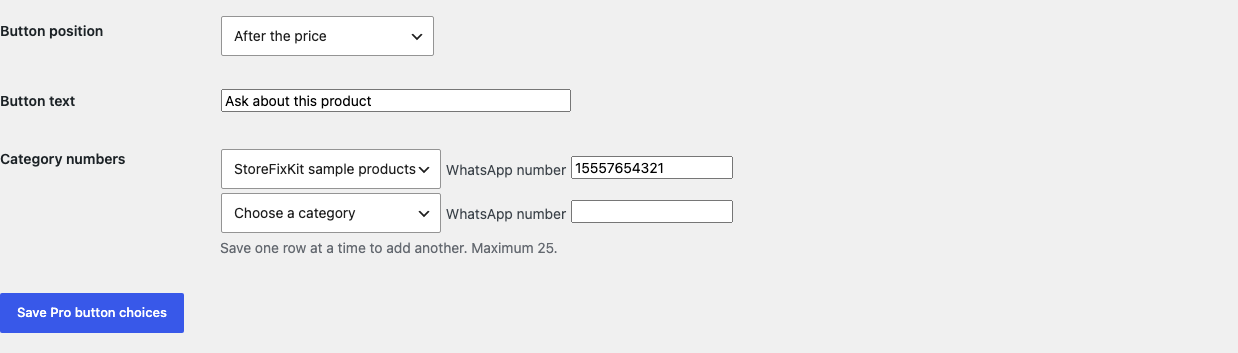
Free remains independent. If Pro, billing, or the StoreFixKit license API is unavailable, the valid global Free button continues locally.
Start the 14-day Pro trial
- Open the Ask About This Product page.
- Select Start 14-day trial. No card is required to begin.
- Stripe returns to StoreFixKit after checkout; a signed webhook creates a license bound to this Pro add-on.
- Copy the key and download the Pro 0.1.1 ZIP.
- Keep Free active, upload and activate Pro, and paste the key in WooCommerce > Product WhatsApp.
- Add a payment method before day 14 only if you want the $79/year subscription to continue. Without one, Stripe cancels it at trial end.
Privacy, security, and external service disclosure
- Settings require
manage_woocommerceand a WordPress settings nonce. - Product-specific Pro saves require permission to edit that exact product and WooCommerce's product-save nonce.
- Phone values are restricted to 8 through 15 digits; message and label values are bounded plain text.
- The destination is always
https://wa.me; arbitrary schemes and arbitrary domains are not accepted. - The browser sends the configured business number and product message to WhatsApp only after the shopper chooses the button.
- The plugin itself sends no storefront request to WhatsApp or StoreFixKit and stores no shopper data.
- There is no tracking, telemetry, custom table, cron, queue, JavaScript, or stylesheet.
Troubleshooting
The button does not appear
Confirm WooCommerce, Free, and the setting are active; the number and template are valid; and the page is the exact published single product. The plugin deliberately renders nothing on archives, search results, posts, carts, checkouts, orders, feeds, REST responses, and mismatched product contexts.
The button appears as plain text
Free 0.1.1 uses a native submit button with WooCommerce's button class and WordPress's wp-element-button class. Clear page and CSS caches, then inspect whether the active theme deliberately removes both standard button styles.
WhatsApp opens the wrong number
Check the product-specific Pro field first, then matching Pro category rules, then the global Free number. Remove punctuation and confirm the country code. The plugin never reads a customer phone number.
The message contains the token text
Use exactly {product_name} and {product_url}. Unknown braces or malformed templates are rejected rather than sent as guessed data.
The button is missing on an out-of-stock product
Confirm the theme still renders the native single-product summary. The plugin does not depend on the Add to cart form, but a template that removes the documented summary hook leaves no supported insertion point.
Rollback and uninstall
- Back up the database and both installed ZIPs.
- Record the global number, template, label, position, product overrides, and category rules.
- Deactivate Pro. The valid global Free button should continue.
- Deactivate Free. The button disappears immediately; products, prices, stock, carts, orders, and templates remain unchanged.
- Install the previous deterministic ZIP, activate it, and verify an in-stock and out-of-stock product before returning to 0.1.1.
Normal uninstall preserves Free settings, Pro settings, license state, and product-specific numbers for accidental recovery. Define STOREFIXKIT_DELETE_DATA as true before deletion only when you deliberately want each plugin to remove its own options or meta. WooCommerce product, cart, customer, and order data are never deleted.
StoreFixKit Support
Use StoreFixKit Support and include the affected product URL, expected location, number suffix only, Free and Pro versions, WordPress and WooCommerce versions, theme, cache status, and redacted desktop/mobile screenshots. Never send credentials, customer or order data, API keys, full business numbers, message links containing private text, or a complete license key.
For feedback, state the result you expected, what happened, and the shortest repeatable steps. After the issue is resolved, the support reply will include the correct WordPress.org review link once the official listing exists.