No card required. Add a payment method before day 14 to continue; otherwise Stripe cancels the subscription automatically.
Real WordPress interfaceFree 0.1.1 / Pro 0.1.1
One jobAdd one shopper-initiated WhatsApp question button to an exact WooCommerce product page without forms, bots, tracking, customer-data reads, or server-side WhatsApp requests.
RequiresWooCommerce 8.9 or newer
Free statusRelease candidate prepared for WordPress.org review
Three decisions
Set it up without code.
01
Open WooCommerce > Product WhatsApp and enter the business number with country code.
02
Review the short message template and enable the button.
03
Open an in-stock and an out-of-stock product, then inspect the destination before sending.
Actual product
What you configure and what the visitor sees.
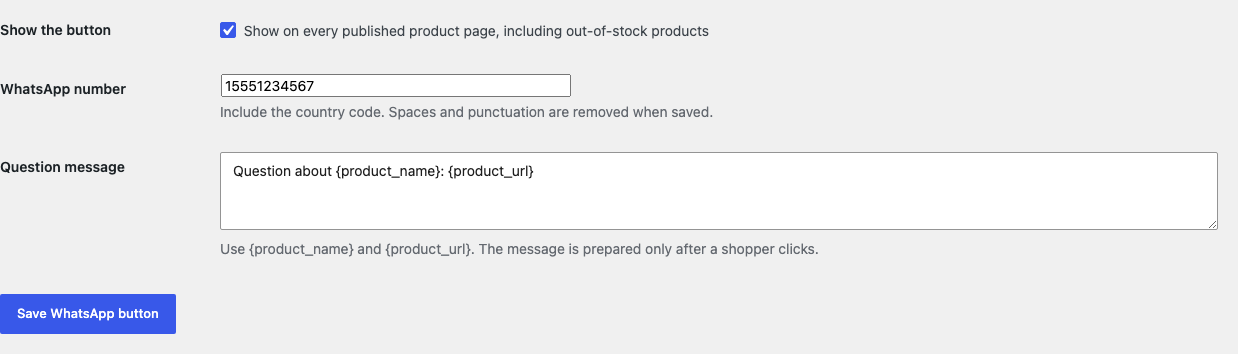
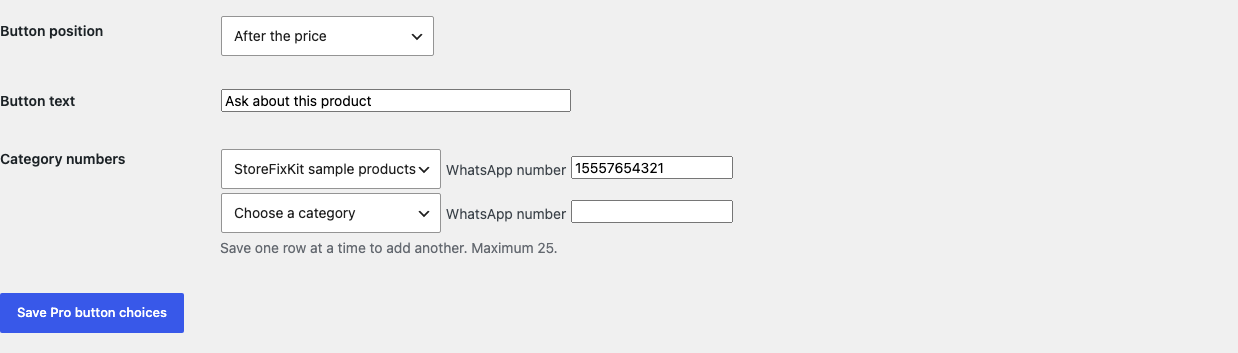
Free asks for one number, one message, and one visible switch.The native submit button reuses the theme's standard style without loading plugin CSS.The complete label remains visible at 390 pixels wide.Pro can override the global number on one product without changing Free settings.Every Pro choice is local, capped, and expressed in ordinary store language.
Free and Pro
Free keeps working. Pro adds capacity.
Free 0.1.1
No account or license required
Save one business number and one 180-character plain-text message template using only product name and URL tokens.
Show exactly one normal button on the exact published product page, including an out-of-stock product.
Open wa.me only after the shopper clicks; nothing is sent automatically.
Prepared for WordPress.org submission; no public-directory approval is claimed yet.
Pro 0.1.1
$79 per year
Use one product-specific number or up to 25 bounded category fallbacks before the global number.
Choose after price, before Add to cart, or after the product summary.
Set one plain-text button label of at most 40 characters while Free stays independent.
Designed to stop quietly instead of changing store truth.
The free workflow is independent of Stripe, the StoreFixKit license API, and Pro. A billing or network problem cannot rewrite the parent plugin's data.
No customer, cart, checkout, order, cookie, referrer, IP, or analytics data is read or stored.
The destination is always a bounded HTTPS wa.me URL with a digits-only business number and escaped message.
The bounded GET form uses noopener, noreferrer, and nofollow and renders nothing in mismatched or uncertain contexts.
No popup, bot, form, tracking, custom table, cron, JavaScript, stylesheet, or storefront StoreFixKit request.
14-day trial
No card required to test Pro on one site.
Stripe hosts checkout and billing. The StoreFixKit success page creates a product-bound license and Pro download. Add a payment method before trial end only if you want the annual plan to continue.