Free 0.1.3 and Pro 0.1.3 documentation.
Purchase Order Number collects one customer-supplied reference through WooCommerce's supported additional checkout field API and preserves it on the order. It is not a purchase-order payment gateway and does not approve credit, create an invoice, change totals, or change order status.
Requirements
| Component | Requirement |
|---|---|
| WordPress | 6.2 or newer |
| PHP | 7.4 or newer |
| WooCommerce | 8.9 or newer, active |
| Checkout surface | Supported native classic or block checkout |
Install and configure Free
- Install and activate WooCommerce.
- Install Purchase Order Number for WooCommerce Checkout from WordPress.org after its directory listing is approved, or upload the supplied Free 0.1.3 ZIP.
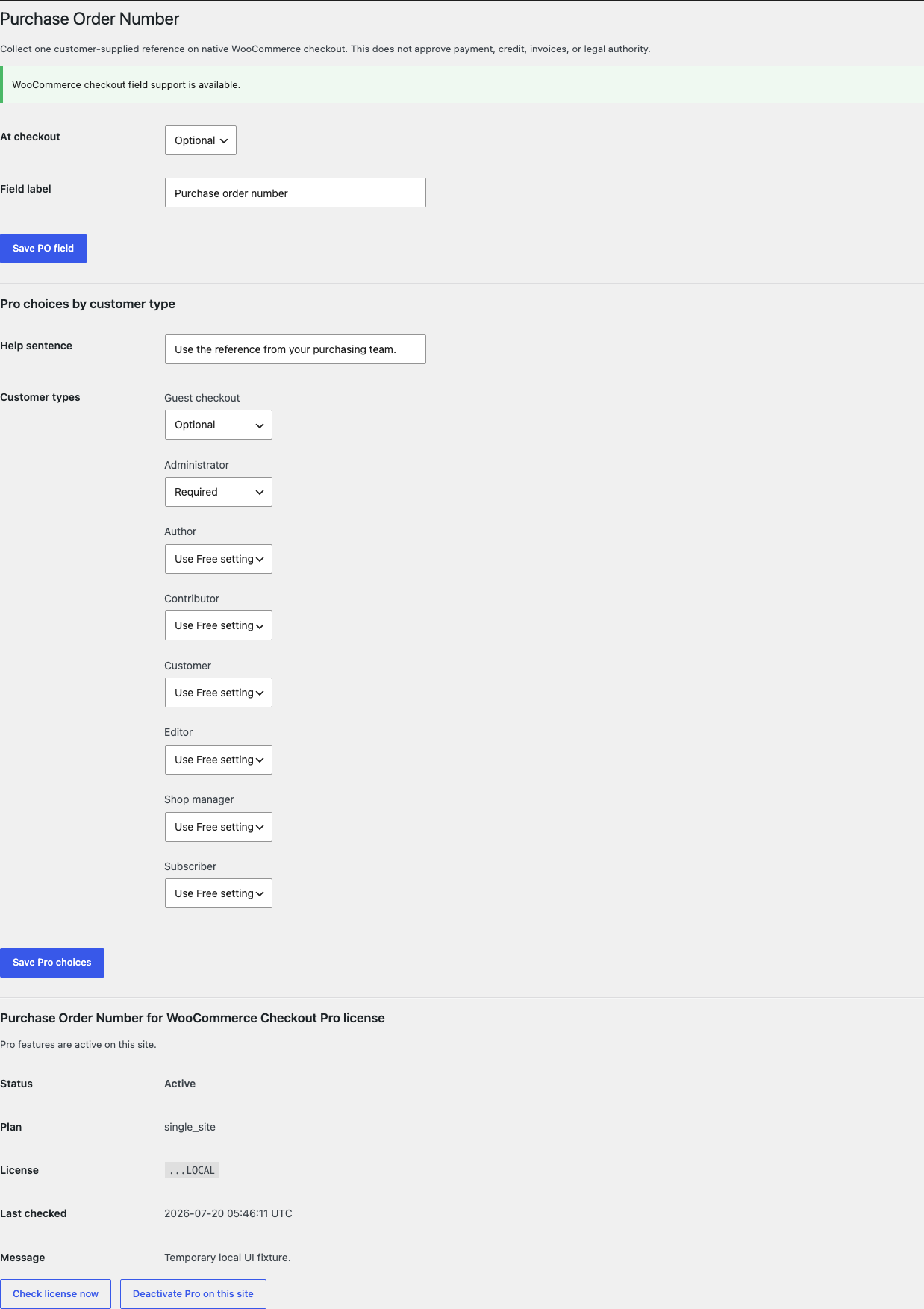
- Open WooCommerce > PO Number.
- Confirm the notice says WooCommerce checkout field support is available.
- Choose Optional or Required.
- Enter a short field label such as Purchase order number.
- Select Save PO field.
Test checkout and the saved order
- Use a disposable product and customer account.
- Open the store's native checkout.
- Confirm the PO number field appears under the order section.
- If the field is required, submit once while empty and confirm WooCommerce blocks only that checkout request with a field error.
- Enter a recognizable test value of 64 characters or fewer and place the order.
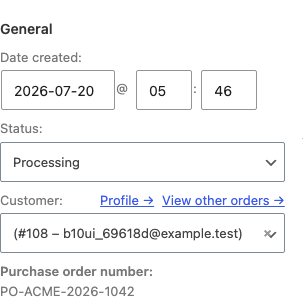
- Open the order as an authorized WooCommerce manager and confirm the same escaped value appears under Purchase order number.
- Compare payment method, total, status, addresses, items, stock, and notes with the expected WooCommerce result.


What Free changes
Free registers one storefixkit/po-number text field through WooCommerce's additional checkout field API. WooCommerce saves the sanitized value with the order. The plugin displays the stored value on the authorized administrative order screen.
The field is plain text and limited to 64 characters. Free does not add a payment method, payment terms, credit approval, signatures, invoices, accounting integration, tax behavior, or a general checkout field builder.
What Pro adds
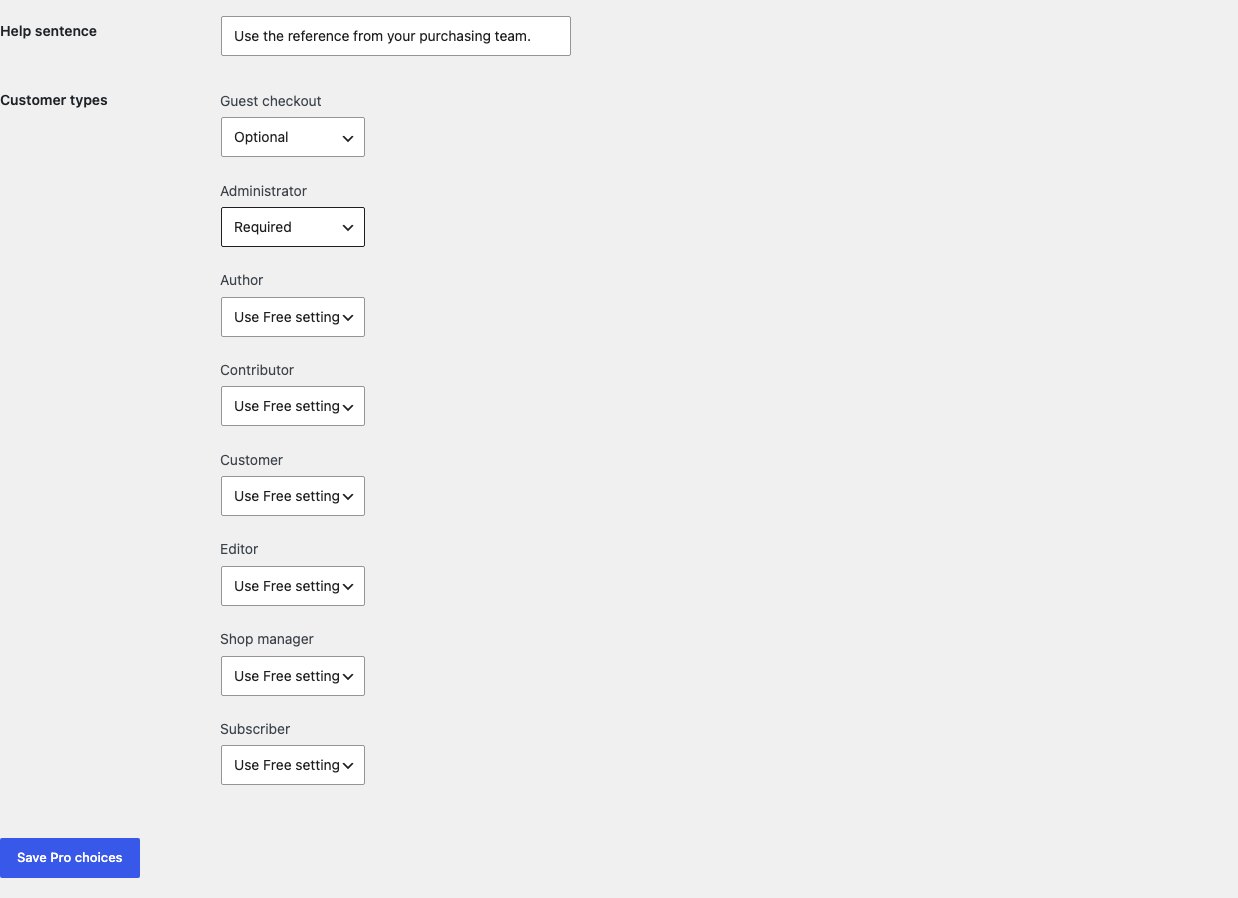
Pro can set the field to Use Free setting, Optional, Required, or Hide the field for guest checkout and up to 19 named WordPress user roles. It can also add one plain-text help sentence of 160 characters or fewer.
With an active product-bound license, Pro can display the saved PO number in WooCommerce order emails and authorized native My Account order details. It does not send an email, bypass order authorization, or expose a public order lookup.
Start the 14-day Pro trial
- Open the PO Number product page.
- Select Start 14-day trial. No card is required to begin.
- Stripe returns to the StoreFixKit success page; the signed webhook creates a product-bound single-site license.
- Copy the key and download the Pro 0.1.3 ZIP.
- Add a payment method before day 14 only if you want the $79/year subscription to continue. Without one, Stripe cancels it at trial end.
Keep WooCommerce and Free active. Upload and activate Pro, paste the key in WooCommerce > PO Number, and select Activate Pro. If Pro, billing, or the license API is unavailable, Free keeps collecting and preserving the configured field locally.
Privacy, security, and resource use
- Settings require
manage_woocommerceand WordPress nonces. - WooCommerce owns checkout rendering, required-field handling, sanitation callback execution, and order persistence through its supported API.
- The value is plain text limited to 64 characters and escaped on every StoreFixKit output.
- The administrative value requires WooCommerce management permission; customer output uses WooCommerce's already-authorized order details.
- There is no custom table, cron job, order scan, telemetry, customer cookie, frontend asset, accounting request, or checkout StoreFixKit request.
- Payment, totals, taxes, status, addresses, line items, stock, notes, gateways, invoices, and customer roles are never written.
Troubleshooting
The settings page says checkout field support is unavailable
Update WooCommerce to 8.9 or newer and confirm it is active. The plugin deliberately leaves checkout unblocked when the supported API is unavailable rather than injecting an untested replacement field.
The field is missing from checkout
Confirm the checkout is a supported native classic or block checkout and the saved mode is not hidden. If Pro is active, check the current guest or user-role choice. Temporarily test without a checkout replacement or page-builder checkout.
Required does not apply to one customer
If Pro is active, that customer's role may override the Free setting. Open WooCommerce > PO Number, find the named customer type, and choose Use Free setting or Required.
The value is missing from email or My Account
Those customer displays require active Pro and a saved non-empty order value. Confirm the email was generated after checkout, the user is viewing an order WooCommerce authorizes for that account, and the email or checkout customization still runs the native WooCommerce hooks.
I need payment by purchase order
This plugin is intentionally not a gateway. Use a separately reviewed payment or invoicing workflow for payment terms, credit approval, tax, accounting, and fulfillment decisions.
Rollback
- Back up the database and both current ZIPs.
- Record a disposable order's PO number, payment, total, status, addresses, items, stock, and notes.
- Deactivate Pro, then Free. New checkout fields disappear; the historical order value remains.
- Install the tested Free 0.1.0 and Pro 0.1.0 baseline ZIPs.
- Activate Free first, then Pro, and place another disposable native checkout order.
- Confirm both historical and new StoreFixKit values without changes to WooCommerce business data.
- To return to the current release, repeat the process with 0.1.3.
Versions 0.1.0 and 0.1.3 use the same WooCommerce-owned field key and require no schema migration.
Uninstall
Default uninstall preserves settings and historical order values so an accidental deletion does not erase business references. To erase only StoreFixKit-owned settings during uninstall, define STOREFIXKIT_DELETE_DATA as true before deleting the plugins. Free then removes sfk_pon_settings; Pro removes sfk_pon_pro_rules and sfk_pon_pro_license.
Historical _wc_other/storefixkit/po-number order values remain preserved. WooCommerce payments, totals, statuses, addresses, items, stock, notes, gateways, invoices, users, and customer data are never deleted.
StoreFixKit Support
Use StoreFixKit Support and include a disposable order ID, expected and actual field behavior, whether checkout is classic or block, guest or redacted user role, Free and Pro versions, WordPress and WooCommerce versions, theme, checkout or email customizer, cache state, and screenshots. Replace the real PO number with a test value. Never send credentials, customer addresses, payment details, accounting exports, API keys, or a full license key.