Free 0.1.1 and Pro 0.1.1 documentation.
Minimum Quantity sets the smallest whole-number quantity a customer can buy for one native simple WooCommerce product. It keeps WooCommerce's price, stock, quantity field, Add to cart form, cart, checkout, and orders in control.
Requirements
| Component | Requirement |
|---|---|
| WordPress | 6.2 or newer |
| PHP | 7.4 or newer |
| WooCommerce | 8.9 or newer, active |
| Free rule | One whole number from 2 through 999 per simple product |
| Pro plan | One site, $79/year after a 14-day trial |
Set a product minimum with Free
- Install and activate WooCommerce.
- Install Minimum Quantity per Product for WooCommerce from WordPress.org after its directory listing is approved, or upload the supplied Free 0.1.1 ZIP.
- Edit a native simple product.
- Open Product data > Inventory.
- Enter a whole number from 2 through 999 in Minimum quantity.
- Update the product.

Verify the product and cart
- Open the published product and confirm the native quantity input starts at the saved minimum.
- Try to add one fewer unit. WooCommerce should reject the request with one normal notice.
- Add the exact minimum. WooCommerce should continue its normal validation.
- In the cart, lower the quantity below the minimum and update. The invalid value should be rejected, not silently corrected.
- Clear the product field, update, and confirm native WooCommerce behavior returns.


What Free changes
Free stores only _sfk_mq_minimum on the product you edit. It increases WooCommerce's returned quantity-input minimum when a valid rule is greater than the native minimum and rejects a provably smaller value through WooCommerce's add-to-cart, cart-update, and final-cart checks.
Free does not change a price, sale, coupon, tax, stock value, backorder setting, product type, variation, cart line, order, checkout field, payment, shipping method, customer, template, script, or stylesheet. It does not support decimal quantities, maximums, steps, packs, role rules, scheduled rules, or block-cart mutation.
What Pro adds
Pro adds variation and parent-product precedence, at most 25 category fallback minimums, and one short plain-text validation sentence. A variation rule wins first, then its parent product rule, then the lowest matching configured category ID.
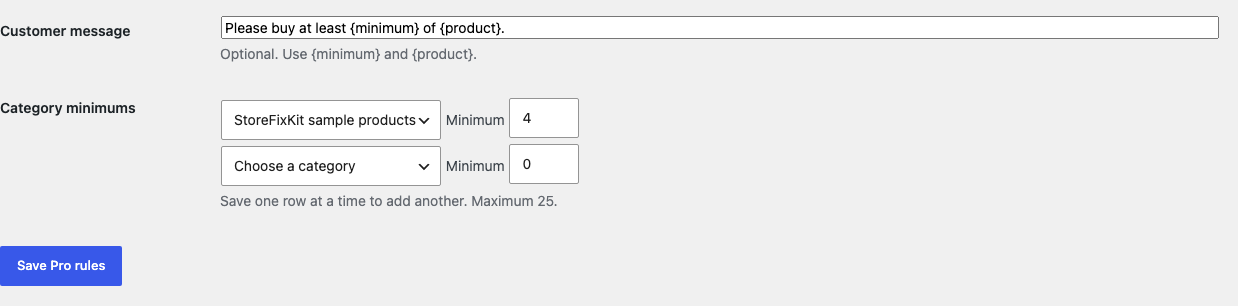
Free remains authoritative. If Pro, Stripe, or the StoreFixKit license API is unavailable, every valid Free simple-product minimum continues locally.
Start the 14-day Pro trial
- Open the Minimum Quantity product page.
- Select Start 14-day trial. No card is required to begin.
- Stripe returns to StoreFixKit after checkout; a signed webhook creates a license bound to Minimum Quantity Pro.
- Copy the license key and download the Pro 0.1.1 ZIP.
- Keep Free active, upload and activate Pro, and paste the key in WooCommerce > Minimum Quantity.
- Add a payment method before day 14 only if you want the $79/year subscription to continue. Without one, Stripe cancels it at trial end.
Privacy, security, and resource use
- Product saves require permission to edit the exact product and WooCommerce's product-save nonce.
- Values are restricted to whole numbers from 2 through 999 and revalidated at runtime.
- Output uses WooCommerce's escaped notice system; the optional Pro sentence is plain text and capped at 160 characters.
- Invalid, unsupported, mismatched, or uncertain product contexts return native behavior.
- The storefront performs no StoreFixKit or third-party HTTP request and stores no personal data.
- There is no catalog scan, custom table, cron, queue, telemetry, JavaScript, or stylesheet.
- Pro license requests occur only from authenticated administrator actions.
Troubleshooting
The Minimum quantity field is missing
Confirm WooCommerce 8.9 or newer and the Free plugin are active. Edit a native simple product and open Product data > Inventory. Free intentionally does not apply its rule to grouped, external, variable, subscription, bundle, composite, or unknown product types.
The quantity field still starts at one
Update the product and clear all page, object, and full-page caches. Confirm the saved value is between 2 and 999 and that the public page belongs to the same product. A theme or plugin that replaces WooCommerce's native quantity form may not expose the documented input arguments.
A customer can still enter a smaller number
The browser field is only a hint. The server validation is the authority. Submit Add to cart and update the cart to verify the request is rejected. Free does not silently increase a customer's cart quantity.
A block-based cart does not show the same behavior
Free 0.1.1 supports the documented classic WooCommerce validation path and does not mutate the Store API or Cart and Checkout blocks. Use the tested classic path or wait for an explicitly scoped block-compatible release.
Pro rules do not apply
Confirm Free is active and the product-specific Free rule is not already the winner. Check the license status, variation value, parent value, category membership, and the maximum of 25 category rules.
Rollback and uninstall
- Back up the database and both installed ZIPs.
- Record the product, variation, category, and message settings you need to compare.
- Deactivate Pro. Valid Free simple-product rules should continue.
- Deactivate Free. Native WooCommerce quantity behavior returns immediately; prices, stock, carts, orders, and products remain unchanged.
- Reinstall the previous deterministic ZIP and recheck one below-minimum and one exact-minimum request before returning to 0.1.1.
Normal uninstall preserves _sfk_mq_minimum, Pro settings, and the license for accidental recovery. Define STOREFIXKIT_DELETE_DATA as true before deletion only when you deliberately want each plugin to remove its own data. Products, prices, stock, carts, customers, orders, and third-party metadata are never deleted.
StoreFixKit Support
Use StoreFixKit Support and include the affected product URL, product type, saved minimum, submitted quantity, Free and Pro versions, WordPress and WooCommerce versions, theme, cart type, cache status, and redacted desktop/mobile screenshots. Never send credentials, customer or order data, API keys, or a complete license key.
For feedback, state the result you expected, what happened, and the shortest repeatable steps. After the issue is resolved, the support reply will include the correct WordPress.org review link once the official listing exists.