No card required. Add a payment method before day 14 to continue; otherwise Stripe cancels the subscription automatically.
Real WordPress interfaceFree 0.1.1 / Pro 0.1.1
One jobSet one whole-number minimum for a simple WooCommerce product and reject lower quantities without changing price, stock, cart contents, orders, templates, or customer data.
RequiresWooCommerce 8.9 or newer
Free statusRelease candidate prepared for WordPress.org review
Three decisions
Set it up without code.
01
Edit the simple product that must be sold in a minimum amount.
02
Open Product data > Inventory and enter a whole number from 2 through 999.
03
Update the product and test one quantity below the minimum and one at the minimum.
Actual product
What you configure and what the visitor sees.
Free adds one bounded number to the familiar Inventory panel.The native form remains intact and starts at the saved minimum.The quantity and Add to cart controls remain visible in a 390-pixel viewport.Pro adds bounded fallbacks instead of a broad quantity-rules engine.
Free and Pro
Free keeps working. Pro adds capacity.
Free 0.1.1
No account or license required
Save one whole-number minimum from 2 through 999 on a simple product.
Use WooCommerce's native quantity input and reject a proven lower value during add to cart, cart update, and final cart validation.
Clear the field or deactivate Free to restore native quantity behavior immediately.
Prepared for WordPress.org submission; no public-directory approval is claimed yet.
Pro 0.1.1
$79 per year
Add bounded minimums to variations while variation and parent-product values stay ahead of category fallbacks.
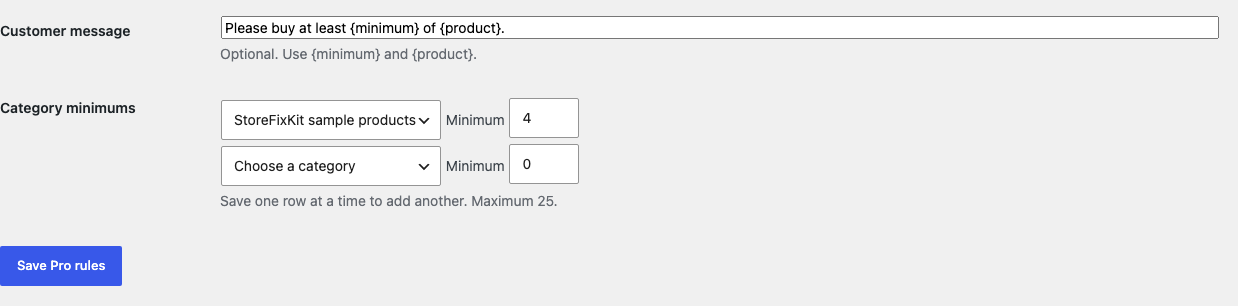
Configure at most 25 category fallback minimums with deterministic precedence.
Write one short plain-text validation message without adding a quantity widget, script, stylesheet, or pricing engine.
Designed to stop quietly instead of changing store truth.
The free workflow is independent of Stripe, the StoreFixKit license API, and Pro. A billing or network problem cannot rewrite the parent plugin's data.
Changes only one owned product-meta value and native quantity validation; price, stock, tax, shipping, carts, orders, and customers remain with WooCommerce.
Unsupported, malformed, missing, mismatched, or uncertain product contexts return native behavior instead of guessing.
Free remains local and authoritative when Pro, billing, or the StoreFixKit license service is unavailable.
No catalog scan, custom table, cron, queue, telemetry, frontend asset, or storefront StoreFixKit request.
14-day trial
No card required to test Pro on one site.
Stripe hosts checkout and billing. The StoreFixKit success page creates a product-bound license and Pro download. Add a payment method before trial end only if you want the annual plan to continue.