Free 0.1.3 and Pro 0.1.3 documentation.
Keep Local Pickup preserves existing Free Shipping and Local Pickup choices when WooCommerce has already calculated Free Shipping. It hides only the other calculated rates in that package. It never creates, edits, reprices, or recalculates a shipping method.
Requirements
| Component | Requirement |
|---|---|
| WordPress | 6.2 or newer |
| PHP | 7.4 or newer |
| WooCommerce | 8.9 or newer, active |
| Shipping setup | At least one working Free Shipping and one Local Pickup or pickup-location rate |
Prepare WooCommerce first
- Open WooCommerce > Settings > Shipping > Shipping zones.
- Configure and test Free Shipping in the target zone.
- Configure and test Local Pickup or the Checkout Blocks pickup-location method.
- Confirm both methods appear without StoreFixKit when the test cart qualifies.
StoreFixKit cannot repair an invalid shipping zone, make a cart qualify for Free Shipping, or create a missing pickup method.
Install and configure Free
- Install and activate WooCommerce.
- Install Keep Local Pickup with Free Shipping for WooCommerce from WordPress.org after its directory listing is approved, or upload the supplied Free 0.1.3 ZIP.
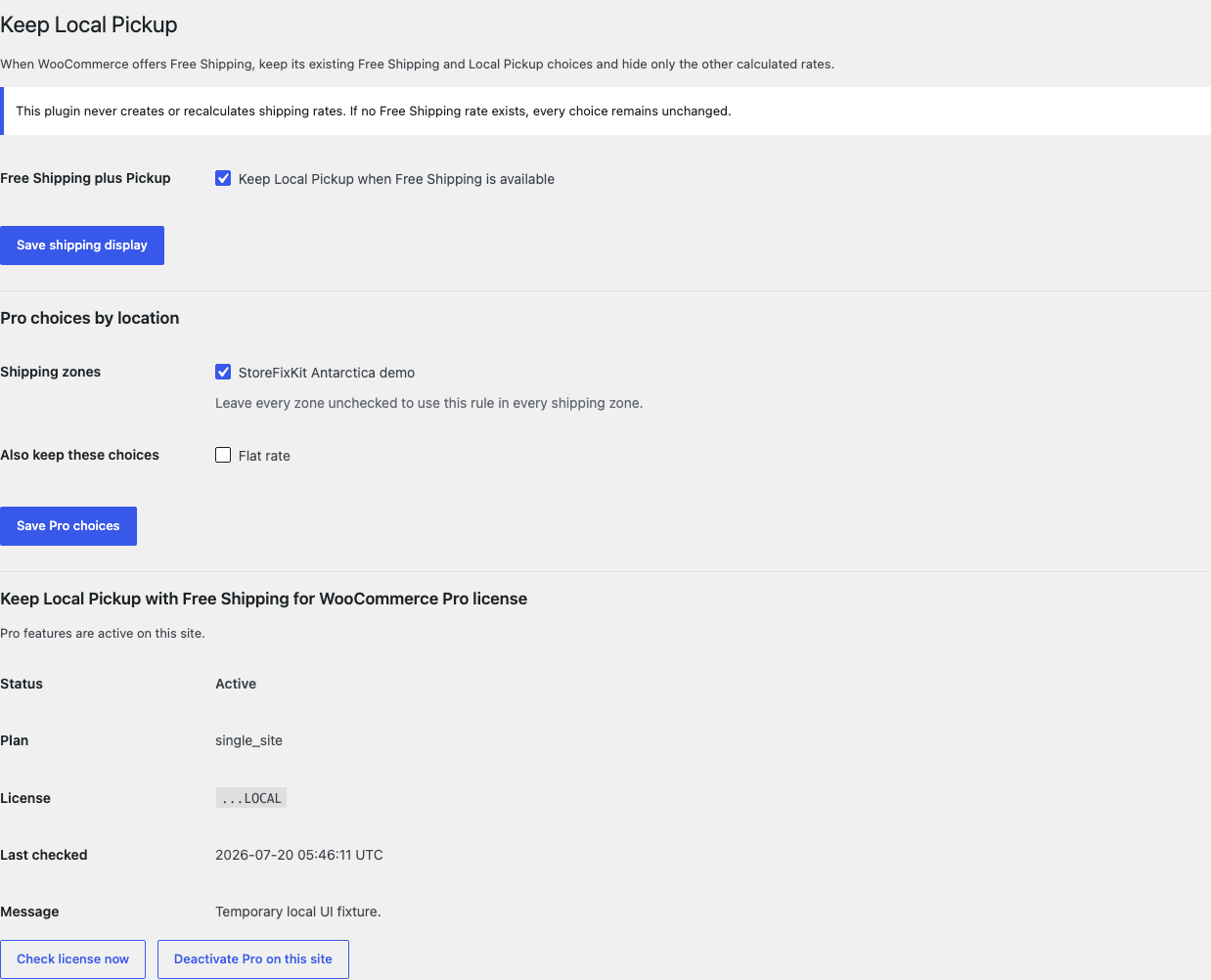
- Open WooCommerce > Keep Local Pickup.
- Select Keep Local Pickup when Free Shipping is available.
- Select Save shipping display.
Test the complete cart boundary
- Build a disposable cart below the Free Shipping threshold.
- Confirm every normal paid and pickup choice remains available.
- Raise the cart above the threshold or satisfy the store's Free Shipping condition.
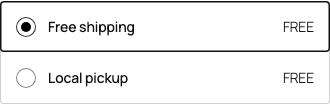
- Confirm Free Shipping and Local Pickup remain visible together.
- Confirm unrelated paid delivery choices are hidden only in that qualifying package.
- Repeat on mobile and for each shipping zone that matters.

What Free changes
For each valid shipping package, Free first checks whether WooCommerce returned at least one Free Shipping rate. If it did, Free keeps all existing rates whose method is Free Shipping, Local Pickup, or a Checkout Blocks pickup location. It omits the other rates from that returned package list.
When no Free Shipping rate exists, the feature is disabled, WooCommerce is missing, or any rate object is malformed, Free returns the complete original list unchanged.
What Pro adds
Pro can limit the rule to selected named shipping zones. Leaving every zone unchecked applies the Free rule to all zones.
Pro can also keep up to ten additional existing method types, such as Flat rate, beside Free Shipping and Pickup. The choices are populated from WooCommerce and shown by name.

Pro never creates a rate, changes a rate cost, changes a threshold, determines a customer's zone, or recalculates a package.
Start the 14-day Pro trial
- Open the Keep Local Pickup product page.
- Select Start 14-day trial. No card is required to begin.
- Stripe returns to the StoreFixKit success page; the signed webhook creates a product-bound single-site license.
- Copy the key and download the Pro 0.1.3 ZIP.
- Add a payment method before day 14 only if you want the $129/year subscription to continue. Without one, Stripe cancels it at trial end.
Keep WooCommerce and Free active. Upload and activate Pro, paste the key in WooCommerce > Keep Local Pickup, and select Activate Pro. If Pro, billing, or the license API is unavailable, the Free store-wide rule continues locally.
Privacy, security, and resource use
- Settings require
manage_woocommerceand WordPress nonces. - Free reads only the current bounded package rate list after WooCommerce calculates it.
- Pro reads current WooCommerce zone and method names only on the authorized settings screen.
- Unknown, incomplete, or malformed rate objects trigger the unchanged-list fallback.
- There is no checkout JavaScript, frontend asset, custom table, cron job, cart scan, order write, telemetry, or storefront StoreFixKit request.
- Shipping zones, methods, costs, taxes, package contents, totals, addresses, orders, payments, and status are never written.
Troubleshooting
Local Pickup is still missing
Deactivate StoreFixKit and confirm WooCommerce itself returns Local Pickup for the same cart and destination. Check the zone, method enablement, location configuration, address, and cart conditions. The plugin cannot keep a rate that WooCommerce did not calculate.
Paid delivery is still visible with Free Shipping
Confirm the setting is enabled and that WooCommerce's returned method ID is a normal paid delivery method. If Pro is active, confirm the method was not deliberately selected under Also keep these choices and the current shipping zone is included.
All rates remain visible
The cart may not have a valid Free Shipping rate, the plugin may be disabled, or a rate object may be malformed. Returning everything is the intentional fail-passive behavior; it avoids hiding checkout choices on uncertain input.
A zone rule seems wrong
Reopen the Pro settings and use the current zone names. If a zone was deleted and recreated, select the new named zone and retest below and above the Free Shipping condition.
Rollback
- Back up the database and both current ZIPs.
- Record one disposable cart, its address, package contents, totals, and native rate list.
- Deactivate Pro, then Free. Confirm the complete WooCommerce rate list returns immediately.
- Install the tested Free 0.1.0 and Pro 0.1.0 baseline ZIPs.
- Activate Free first, then Pro, and repeat the below-threshold and above-threshold tests.
- To return to the current release, repeat the process with 0.1.3.
Versions 0.1.0 and 0.1.3 use the same small owned settings and require no schema migration. Neither version writes WooCommerce shipping configuration or order data.
Uninstall
Default uninstall preserves settings so an accidental deletion is reversible. To erase only StoreFixKit-owned settings during uninstall, define STOREFIXKIT_DELETE_DATA as true before deleting the plugins. Free then removes sfk_klp_settings; Pro removes sfk_klp_pro_rules and sfk_klp_pro_license.
WooCommerce zones, method instances, rates, thresholds, tax settings, orders, carts, addresses, totals, and customer data are never deleted.
StoreFixKit Support
Use StoreFixKit Support and include the shipping zone name, destination with personal address details removed, cart subtotal and coupon state, expected and actual method names, whether the cart currently qualifies for Free Shipping, Free and Pro versions, WordPress and WooCommerce versions, classic or block checkout, shipping extensions, cache state, and screenshots. Never send credentials, customer addresses, payment details, API keys, or a full license key.