Free 0.1.2 and Pro 0.1.2 documentation.
Buy Now Button adds a second submit button to native simple and variable product forms. WooCommerce still validates and adds the selected product, the existing cart remains intact, and the redirect goes to WooCommerce's native checkout only after a successful add.
Requirements
| Component | Requirement |
|---|---|
| WordPress | 6.2 or newer |
| PHP | 7.4 or newer |
| WooCommerce | 8.9 or newer, active |
| Product types | Purchasable, in-stock simple and variable products on the native single-product form |
Install and configure Free
- Install and activate WooCommerce.
- Install Buy Now Button for WooCommerce from WordPress.org after its directory listing is approved, or upload the supplied Free 0.1.2 ZIP.
- Open WooCommerce > Buy Now Button.
- Select Show Buy now for supported products.
- Select Save button setting.

Test the cart-preserving path
- Add product A to the cart with the normal Add to cart button.
- Open a different supported product B.
- For a variable product, select a valid variation first.
- Select Buy now.
- Confirm native checkout opens and contains both product A and product B.
- Repeat with an invalid or unavailable variation and confirm WooCommerce shows its normal notice without redirecting.

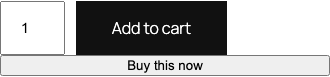
What Free changes
Free emits one nonce-protected button after WooCommerce's native Add to Cart control for an eligible product. The button submits the normal add-to-cart value through the existing form. After WooCommerce reports no add-to-cart error, the normal redirect filter returns WooCommerce's checkout URL.
The button renders nothing for grouped, external, unsupported, unavailable, out-of-stock, or non-purchasable products. A failed validation keeps WooCommerce's original URL and notices.
Free never empties, replaces, or rebuilds the cart. It does not use a custom AJAX add handler, remove Add to Cart, replace checkout, or add storefront JavaScript.
What Pro adds
Pro can change the button label, show it to everyone, guests only, or signed-in customers only, and limit it to up to 50 named products or 20 named product categories. Leave both selection fields empty to keep the button on every supported product.
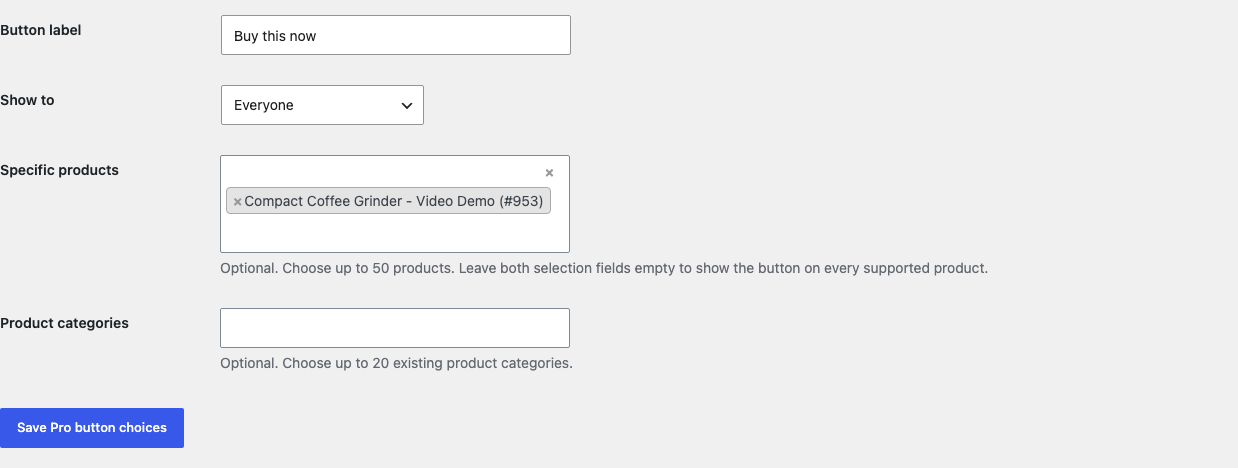
Product and category selections use an OR rule: a product is eligible when it is selected directly or belongs to a selected category. Audience filtering is applied as a separate requirement.
Pro does not add archive-page quick buy, grouped-product handling, popups, one-page checkout, checkout-field removal, funnels, tracking, or a cart-replacement mode. If Pro, billing, or the license service is unavailable, the complete global Free button continues locally.
Start the 14-day Pro trial
- Open the Buy Now Button product page.
- Select Start 14-day trial. No card is required to begin.
- Stripe returns to the StoreFixKit success page; the signed webhook creates a product-bound single-site license.
- Copy the key and download the Pro 0.1.2 ZIP.
- Keep Free active, upload and activate Pro, and paste the key in WooCommerce > Buy Now Button.
- Add a payment method before day 14 only if you want the $79/year subscription to continue. Without one, Stripe cancels it at trial end.
Security and resource use
- Settings require
manage_woocommerceand WordPress nonces. - The Buy Now request carries a WordPress nonce bound to the custom action.
- WooCommerce remains responsible for product, variation, stock, quantity, sold-individually, and cart validation.
- Pro caps labels at 40 characters, products at 50, and categories at 20.
- The named WooCommerce selectors load only on this plugin's authorized settings screen.
- There is no frontend script or stylesheet, AJAX add layer, cron job, custom table, telemetry, remote storefront request, or catalog scan.
Troubleshooting
The button is missing
Confirm Free is enabled and the product is a purchasable, in-stock simple or variable product. Grouped and external products are deliberately unsupported. If Pro is active, check the audience, selected product, and category choices.
A variable product does not go to checkout
Choose every required variation attribute first. The plugin does not bypass WooCommerce's variation validation. An unavailable combination should stay on the product page with the native notice.
A sold-individually product is already in the cart
WooCommerce decides whether another add is valid. If it rejects the request, Buy Now does not force a duplicate or redirect. The existing cart remains unchanged.
Checkout opens without the expected existing item
Deactivate StoreFixKit and verify that normal WooCommerce cart persistence works across the same browser, cookies, cache, and checkout. This plugin never calls an empty-cart method. Exclude cart and checkout from full-page caching according to WooCommerce's hosting guidance.
Another quick-buy plugin is active
Run only one product-form quick-buy implementation at a time. Two plugins can add competing submit buttons or redirect filters. Deactivate the other implementation and repeat the complete cart test.
Rollback
- Back up the database and both current ZIPs.
- Record the Free switch, Pro label, audience, products, and categories.
- Create a disposable cart with an existing product and record its quantity and total.
- Deactivate Pro, then Free. The extra button disappears immediately; the recorded cart and native checkout remain.
- Install the tested Free 0.1.0 and Pro 0.1.0 baseline ZIPs if an older-code comparison is required.
- Repeat the simple, variation, failed-validation, and existing-cart tests before returning to 0.1.2.
Versions 0.1.0 and 0.1.2 use the same bounded options and require no schema migration.
Uninstall
Default uninstall preserves settings. To erase only StoreFixKit-owned options during uninstall, define STOREFIXKIT_DELETE_DATA as true before deleting the plugins. Free removes sfk_bnb_settings; Pro removes sfk_bnb_pro_rules and sfk_bnb_pro_license.
Products, variations, categories, carts, sessions, checkout settings, orders, customers, stock, prices, and payment data are never deleted.
StoreFixKit Support
Use StoreFixKit Support and include the product type, stock and purchasable state, whether a variation was selected, existing cart item count, expected and actual destination, Free and Pro versions, WordPress and WooCommerce versions, theme, cart/checkout extensions, cache state, and screenshots. Never send credentials, customer data, payment details, API keys, session cookies, or a full license key.