No card required. Add a payment method before day 14 to continue; otherwise Stripe cancels the subscription automatically.
Real WordPress interfaceFree 0.1.2 / Pro 0.1.2
One jobAdd a second Buy Now button to native simple and variable product forms, keep the current cart, and redirect only after WooCommerce successfully adds the selection.
RequiresWooCommerce 8.9 or newer
Free statusRelease candidate prepared for WordPress.org review
Three decisions
Set it up without code.
01
Open WooCommerce > Buy Now Button and enable the product-page button.
02
Add one product to a disposable cart, then open a different supported product.
03
Select Buy now and confirm native checkout contains both the old and new items.
Actual product
What you configure and what the visitor sees.
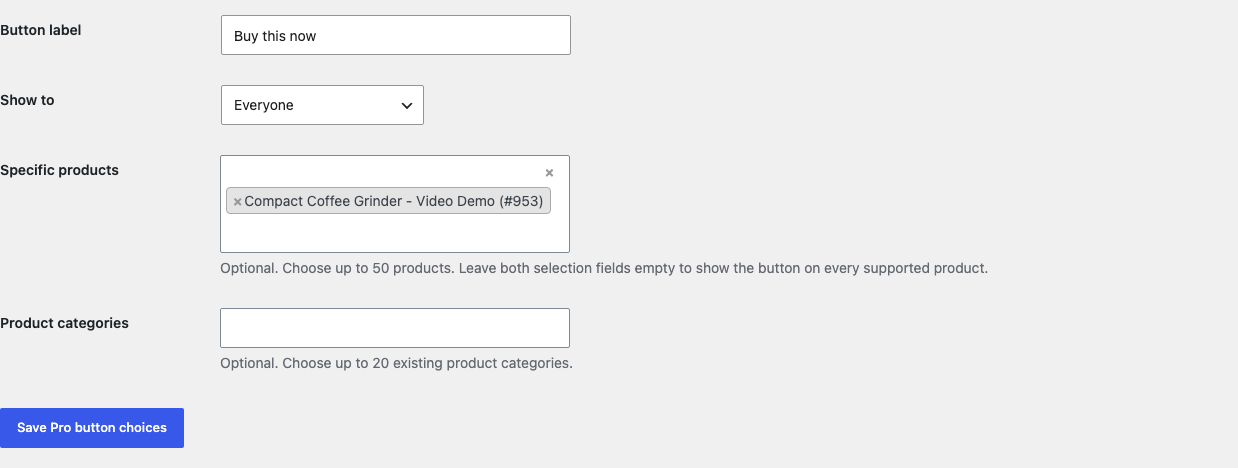
Buy now uses the existing product form while the normal Add to cart choice stays available.Free has one explicit switch and no cart-clearing or checkout-builder mode.Pro uses searchable names instead of manual product and category IDs.The native-form controls remain inside a narrow storefront viewport.
Free and Pro
Free keeps working. Pro adds capacity.
Free 0.1.2
No account or license required
Add Buy now beside native Add to cart for eligible simple and variable products.
Use WooCommerce's native form, variation, stock, quantity, and add-to-cart validation.
Preserve existing cart items and open native checkout only after a successful add.
Prepared for WordPress.org submission; no public-directory approval is claimed yet.
Pro 0.1.2
$79 per year
Change the bounded button label and show it to everyone, guests, or signed-in customers.
Choose up to 50 products and 20 categories through familiar named WooCommerce selectors.
Keep the complete global Free button local when Pro or licensing is unavailable.
Designed to stop quietly instead of changing store truth.
The free workflow is independent of Stripe, the StoreFixKit license API, and Pro. A billing or network problem cannot rewrite the parent plugin's data.
Never empties or replaces the cart, skips WooCommerce validation, removes Add to Cart, or replaces checkout.
A failed product or variation add returns WooCommerce's original URL and notice without redirecting.
Unsupported product types render no extra button and retain their native behavior.
No frontend asset, AJAX add layer, cron, custom table, telemetry, catalog scan, or storefront StoreFixKit request.
14-day trial
No card required to test Pro on one site.
Stripe hosts checkout and billing. The StoreFixKit success page creates a product-bound license and Pro download. Add a payment method before trial end only if you want the annual plan to continue.