Free 0.1.1 and Pro 0.1.3 documentation.
Free Shipping Amount Left for WooCommerce does one read-only job: it shows the amount still needed for the shopper's matched native WooCommerce minimum-order free-shipping method. When WooCommerce cannot determine a reliable rule, the message stays hidden instead of guessing.
Requirements
| Component | Requirement |
|---|---|
| WordPress | 6.0 or newer |
| PHP | 7.4 or newer |
| WooCommerce | 8.0 or newer, active |
| Shipping | At least one enabled native Free shipping method with a minimum-order requirement |
| Address | Enough customer address data for WooCommerce to match a shipping package and zone |
Configure WooCommerce first
- Open WooCommerce > Settings > Shipping > Shipping zones.
- Open the zone that should offer free shipping.
- Add or edit the native Free shipping method.
- Choose a requirement that includes a minimum order amount.
- Enter the threshold and decide whether the minimum rule applies before coupon discounts.
- Save the method.
StoreFixKit reads this native rule. It does not create, replace, or edit it.
Install and configure the free plugin
- Install Free Shipping Amount Left for WooCommerce from WordPress.org after its directory listing is approved, or upload the release ZIP supplied for testing.
- Activate the plugin.
- Open WooCommerce > Free Shipping Amount Left.
- Turn the message on.
- Choose cart, checkout, or both.
- Edit the before-goal and goal-reached messages, then select Save changes.
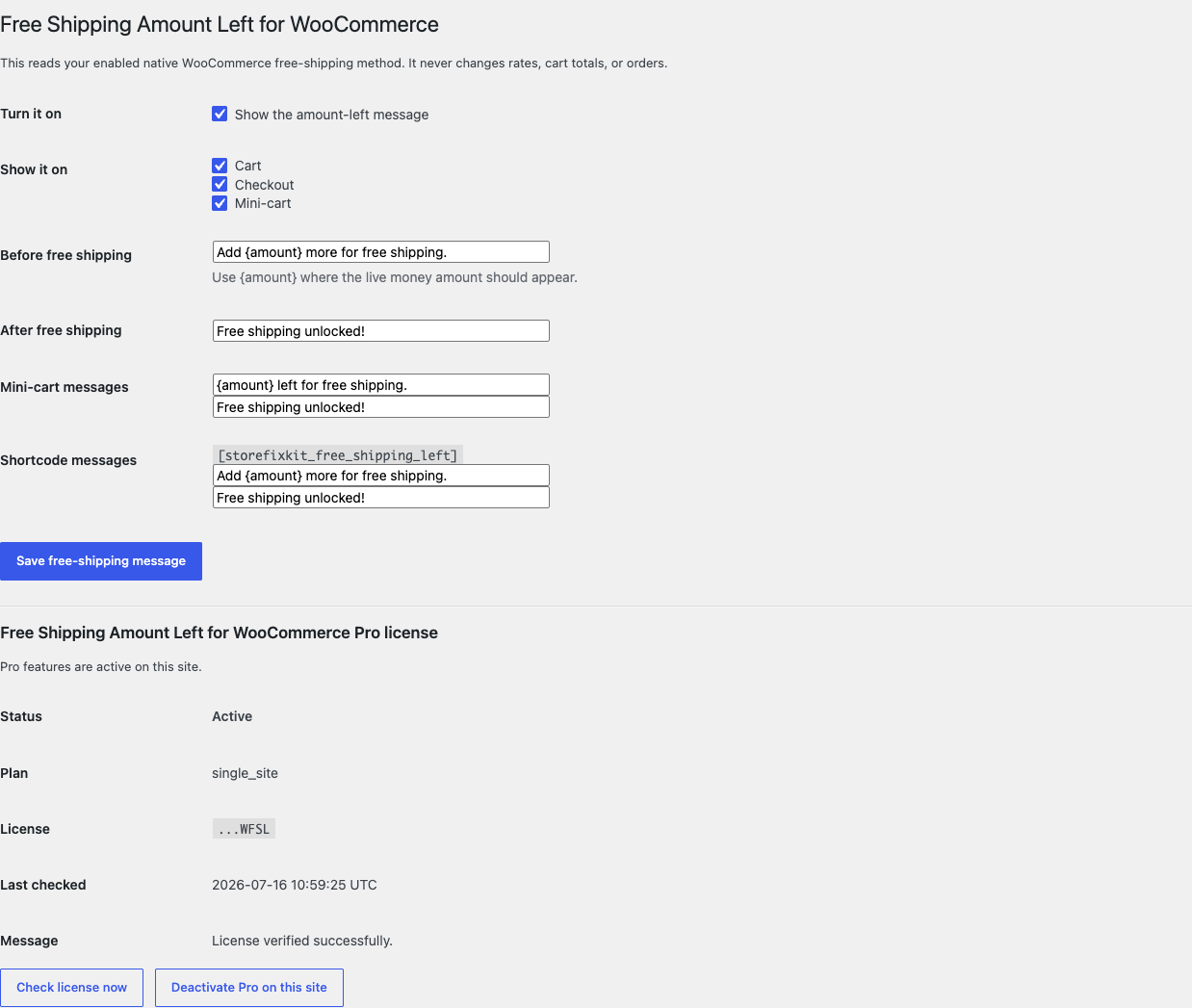
Use {amount} in the before-goal message. StoreFixKit replaces it with WooCommerce's formatted amount in the store currency.
Test the shopper flow
- Open a private browser window.
- Add a shippable product below the free-shipping threshold.
- Enter a shipping address that matches the configured zone.
- Confirm that the amount-left message matches the threshold and current calculation basis.
- Add enough value to pass the threshold and confirm the goal-reached message.
- Apply a coupon and verify both settings of WooCommerce's discount-basis option if your store uses coupons.
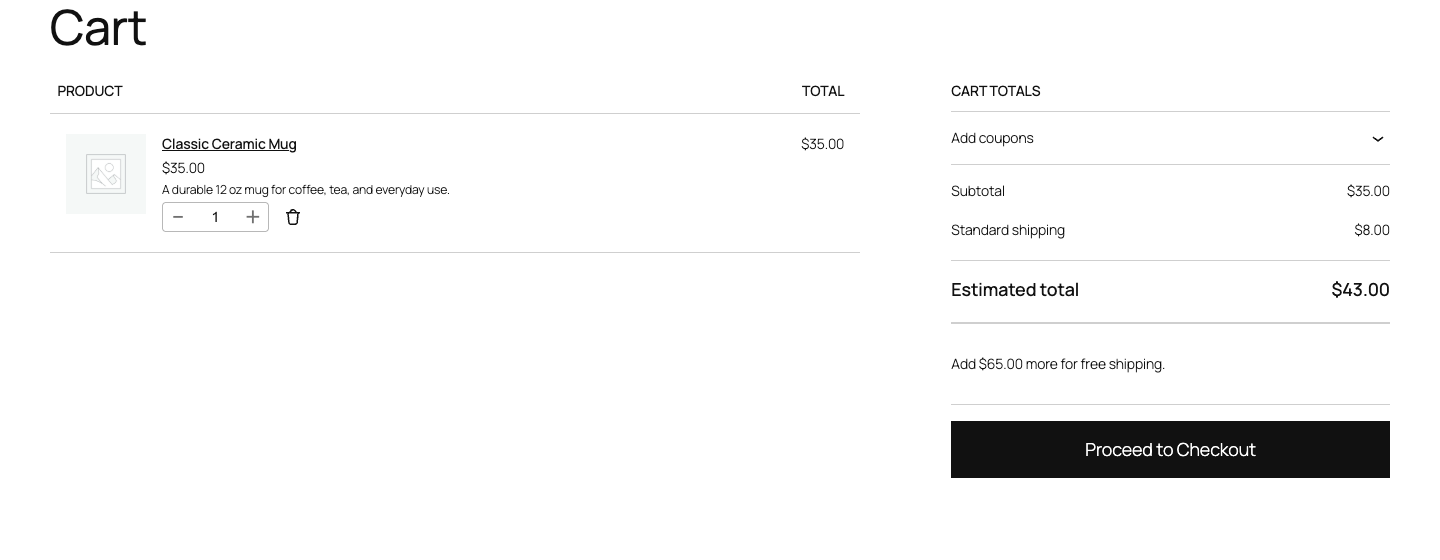
Classic cart and checkout pages use server-rendered notices. Cart and Checkout Blocks receive a small read-only Store API extension value and update when the cart response changes.
How the amount is chosen
StoreFixKit looks at the shopper's current WooCommerce shipping package and matched zone. It considers enabled native free_shipping methods that require a minimum amount, follows the method's before-or-after-coupon basis, and uses the lowest reachable matching minimum when more than one native method is available.
The plugin returns no message when the package, zone, method, requirement, or minimum is missing or malformed. It also avoids claiming success merely because a rate label happens to contain the words "free shipping."
Free and Pro
Free keeps working on cart and checkout pages, including Cart and Checkout Blocks. Pro adds mini-cart placement and a shortcode, each with separate before-goal and goal-reached messages.
Pro does not add progress animation, cross-sells, shipping-rate editing, location guessing, analytics, or checkout manipulation. It remains a placement add-on to the same read-only calculation.
Start the 14-day Pro trial
- Open the product page.
- Select Start 14-day trial. No card is required to begin.
- Stripe returns to the StoreFixKit success page; the signed webhook creates the product-bound license.
- Copy the key and download the Pro 0.1.3 ZIP.
- Use Add payment method / manage billing before day 14 if you want the annual subscription to continue. With no payment method, Stripe cancels it at trial end.
Install and activate Pro
- Keep WooCommerce and the free plugin active.
- Upload and activate the Pro ZIP.
- Return to WooCommerce > Free Shipping Amount Left.
- Paste the license key in the Pro panel and select Activate Pro.
- Enable mini-cart placement or insert the documented shortcode where needed.
The Pro panel can refresh or deactivate the site license. If Pro is removed, expired, or temporarily cannot reach the license API, Free keeps working on the cart and checkout.
Privacy, security, and resource use
- The calculator reads shipping packages, method settings, coupon state, and cart totals already held by WooCommerce.
- It never writes shipping zones, methods, rates, totals, coupons, taxes, addresses, products, orders, or payments.
- Settings writes require
manage_woocommerceand a WordPress nonce. - No custom table, cron job, telemetry event, or frontend remote request is created.
- Placement assets load only where the selected placement can render.
- No customer address or cart content is sent to StoreFixKit.
Troubleshooting
No message appears
Enter a complete shipping address and confirm that WooCommerce matches a zone containing an enabled native Free shipping method with a minimum-order requirement. Test the actual cart with shipping calculation enabled. The message intentionally stays hidden when the correct rule cannot be known.
The amount is different from the threshold
Check the current cart basis and the free-shipping method's Apply minimum order rule before coupon discount option. Coupons, tax display, virtual products, and package contents can make the displayed merchandise subtotal different from the basis WooCommerce uses for the method.
The wrong zone seems to be used
Use WooCommerce's shipping debug mode and test the full destination postcode. StoreFixKit reads the matched package; it does not choose or override a zone.
The classic cart works but the Cart Block does not
Confirm that both WooCommerce and StoreFixKit are current, clear block and page caches, and inspect a fresh Store API cart response. Record the WooCommerce version, active block template, address, expected threshold, and whether the read-only extension value is present.
The mini-cart or shortcode disappears
Free keeps working on cart and checkout. Confirm that Pro is active and select Check license now. Then verify the Pro placement is enabled and the theme actually renders a WooCommerce mini-cart or the page contains the shortcode.
Rollback
- Back up the database and current plugin ZIPs.
- Deactivate Pro and Free.
- Install the previous known-good versions.
- Activate Free first, then Pro.
- Test one address below and above the threshold.
- Compare the WooCommerce shipping zone, method, rates, totals, coupons, taxes, address, and orders before and after the drill.
The plugin has no schema migration and owns only its settings. Rollback does not modify any WooCommerce shipping or commerce record. Removing Pro leaves the free cart and checkout placements available.
Uninstall
Deleting Free removes only sfk_wfsl_settings. Deleting Pro removes only its own license and placement settings. Shipping zones, methods, rates, store addresses, customer data, carts, coupons, orders, taxes, and payments remain untouched.
StoreFixKit Support
Use StoreFixKit Support and include the WooCommerce version, Free and Pro versions, store currency, destination country/postcode with personal details removed, matched zone name, free-shipping requirement and threshold, coupon state, placement, expected amount, actual result, and screenshots. Never send credentials, a full customer address, or a full license key.