Free 0.1.1 and Pro 0.1.3 documentation.
Coupon Links for WooCommerce does one job: it turns one existing native WooCommerce coupon into a readable link. A recognized link remembers the mapped coupon when the cart is empty, then asks WooCommerce to apply it after the cart becomes eligible.
Requirements
| Component | Requirement |
|---|---|
| WordPress | 6.0 or newer |
| PHP | 7.4 or newer |
| WooCommerce | 8.0 or newer, active |
| Coupon | An existing published WooCommerce coupon |
| Permalinks | A working public site URL; pretty permalinks are recommended but not required |
Install the free plugin
- Install and activate WooCommerce.
- Create the promotion in Marketing > Coupons and set its real restrictions and expiry there.
- Install Coupon Links for WooCommerce from WordPress.org after its directory listing is approved, or upload the release ZIP supplied for testing.
- Activate the plugin.
- Open WooCommerce > Coupon Links.
The free plugin has no StoreFixKit account requirement, frontend JavaScript, analytics service, or scheduled job.
Create the first coupon link
- Choose an existing coupon from the selector.
- Enter a readable short word such as
summer. - Turn the link on and select Save changes.
- Select Copy beside the generated URL.
- Test once with an empty cart and once with an eligible product already in the cart.
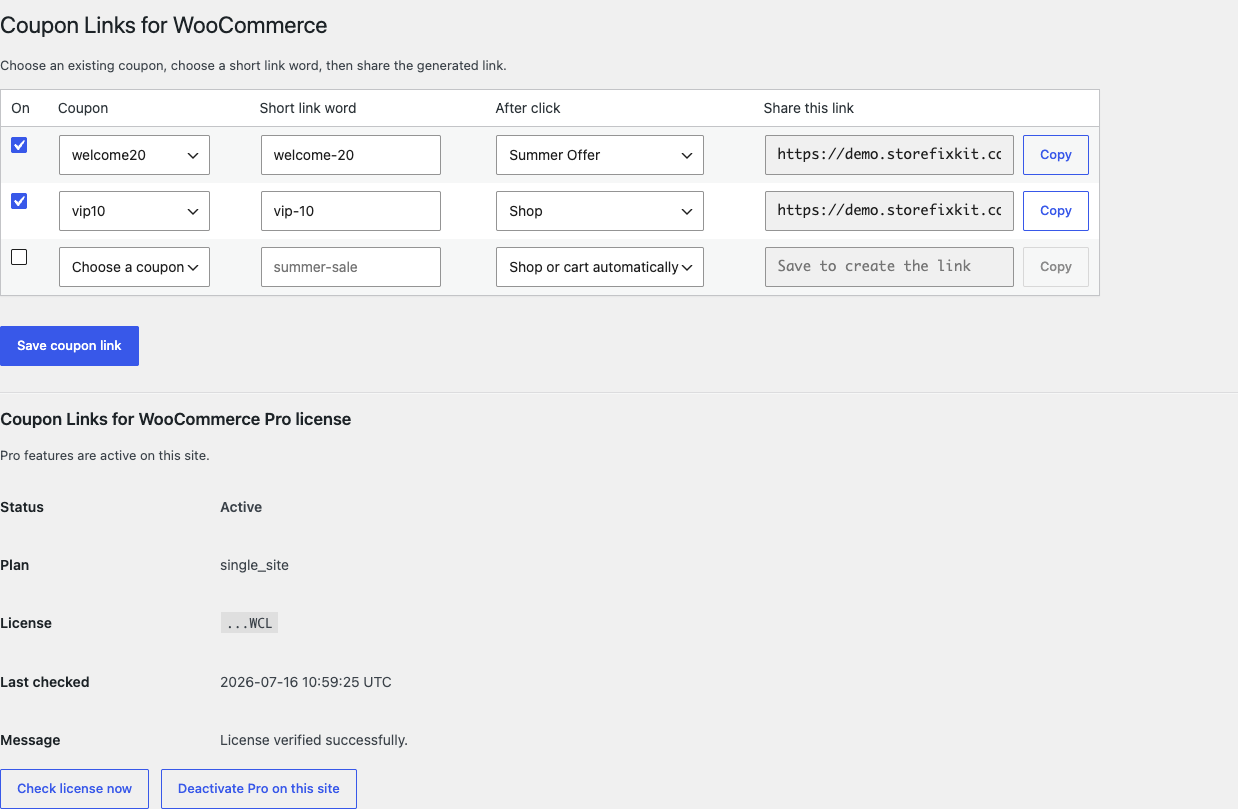
The URL contains the known short word, not a customer-controlled coupon code. An unknown or malformed word is treated as an ordinary page view and writes nothing.
Empty-cart behavior
Applying a coupon to an empty cart usually produces the wrong experience. StoreFixKit instead stores one owned pending coupon value in the shopper's WooCommerce session for up to 24 hours. After the shopper adds a product, WooCommerce validates the real coupon against the cart. If it is eligible, WooCommerce applies it once and StoreFixKit clears the pending value.
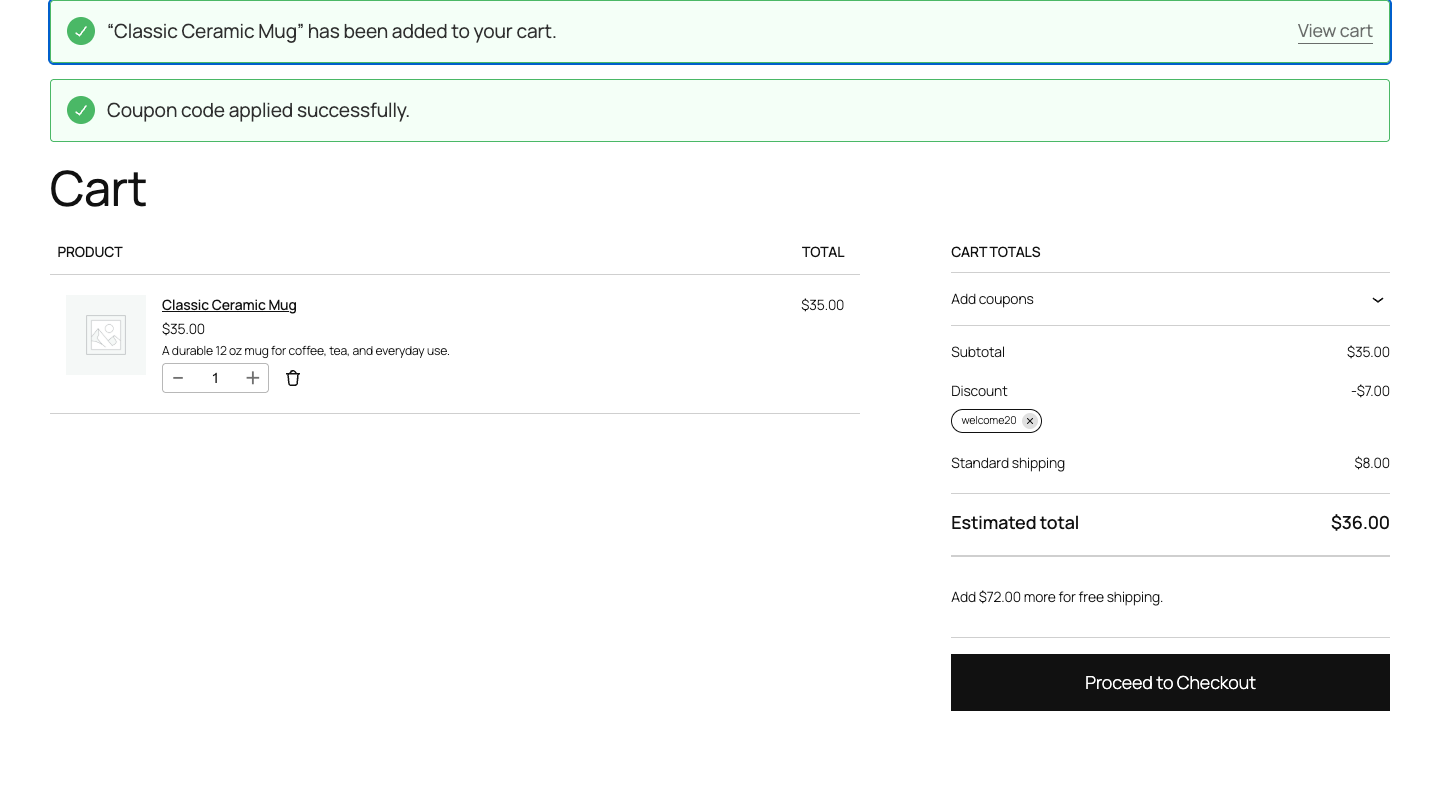
The plugin never bypasses minimum spend, product, category, usage, email, or expiry restrictions. A missing, disabled, expired, or ineligible coupon produces the native outcome and clears only the owned pending session value when the failure is final.
Free and Pro
Free keeps working with one coupon link. Pro raises the safety limit to 1,000 links and lets each link continue to a published page on the same WordPress site after the coupon has been remembered.
Pro does not create coupons, add products, edit prices or orders, redirect off-site, or track clicks and revenue. Those jobs remain outside this focused plugin.
Start the 14-day Pro trial
- Open the product page.
- Select Start 14-day trial. No card is required to begin.
- Stripe returns to the StoreFixKit success page and the signed webhook creates a product-bound license.
- Copy the key and download the Pro 0.1.3 ZIP.
- Add a payment method through Add payment method / manage billing before day 14 if you want the annual subscription to continue. Stripe cancels the subscription at trial end when no payment method has been added.
Install and activate Pro
- Keep WooCommerce and the free plugin active.
- Upload and activate the Pro ZIP beside Free.
- Return to WooCommerce > Coupon Links.
- Paste the product license key into the Pro license panel and select Activate Pro.
- Create additional rows and, when needed, choose a published internal destination.
Use Check license now to refresh the status or Deactivate Pro on this site before moving the license. Removing Pro leaves the first valid free link available.
Cache and CDN behavior
A recognized coupon-link request is marked non-cacheable before StoreFixKit performs a safe internal redirect. This prevents one shopper's promotion response from becoming a shared full-page cache object. Preserve query strings in your CDN configuration and avoid rules that strip storefixkit_coupon before WordPress receives it.
The final cart state still comes from the WooCommerce session. Cart and Checkout Blocks read that same server-side cart, so there is no separate client-side coupon implementation to drift out of sync.
Privacy, security, and resource use
- The plugin accepts only short words saved by an authorized WooCommerce manager.
- Settings writes require
manage_woocommerceand a WordPress nonce. - It stores no personal data and creates no analytics table.
- It never changes coupon definitions, product prices, inventory, orders, payments, taxes, or shipping.
- There is no public remote request, cron event, catalog scan, frontend script, or frontend stylesheet.
- The only persistent free setting is
sfk_wcl_links; the only shopper value is the owned pending coupon session key.
Troubleshooting
The link opens but no coupon appears
If the cart is empty, add an eligible product first. Then check the coupon in Marketing > Coupons for expiry, minimum spend, product/category restrictions, individual-use settings, and usage limits. StoreFixKit cannot and should not override those rules.
The coupon is rejected after adding a product
Open the cart and read the native WooCommerce notice. Test the coupon code manually on the same cart. If manual entry also fails, fix the coupon configuration rather than the link.
The link works for an administrator but not a new visitor
Test in a private window. Confirm that the CDN forwards the query string and does not cache recognized promotion requests. Purge the specific landing page after changing cache rules.
Blocks do not show the discount
Refresh the Cart Block after adding the product. The coupon must be present in the server-side WooCommerce cart. If it is present in a classic cart but absent in Blocks, capture the Store API response and report the WooCommerce and Blocks versions.
Pro rows become unavailable
Free keeps working with the first valid link. Confirm that Pro is active, select Check license now, and verify that the key belongs to Coupon Links for WooCommerce and the current site.
Rollback
- Back up the database and current plugin ZIPs.
- Deactivate Pro and Free.
- Install the previous known-good ZIPs.
- Activate Free first, then Pro.
- Confirm the saved link still points to the intended existing coupon.
- Test empty-cart, add-to-cart, and already-applied cases.
Rollback does not change or recreate coupons. Products, carts, orders, payment data, tax settings, shipping settings, and coupon definitions remain owned by WooCommerce. Removing Pro leaves the first valid free link intact.
Uninstall
Deleting Free removes only the owned sfk_wcl_links option and current owned pending session value. Deleting Pro removes its license option. Existing WooCommerce coupons and all commerce records remain untouched.
StoreFixKit Support
Use StoreFixKit Support and include the coupon-link URL with the short word visible, coupon name, WooCommerce version, Free and Pro versions, cart contents, expected result, native WooCommerce notice, cache/CDN name, and screenshots. Remove customer email addresses, order details, full license keys, and credentials.