Free 0.1.2 and Pro 0.1.2 documentation.
Required Product Checkbox for WooCommerce adds one plain-language checkbox to explicitly enabled products on supported native add-to-cart forms. It rejects only that product's supported add-to-cart request when the checkbox is present but not confirmed. This is a product-confirmation tool, not legal advice, identity proof, or consent certification.
Requirements
| Component | Requirement |
|---|---|
| WordPress | 6.2 or newer |
| PHP | 7.4 or newer |
| WooCommerce | 8.9 or newer, active |
| Product form | Native simple or variable product add-to-cart form |
Install and configure Free
- Install and activate WooCommerce.
- Install Required Product Checkbox for WooCommerce from WordPress.org after its directory listing is approved, or upload the supplied Free 0.1.2 ZIP.
- Open Products and edit the product.
- In Product data > General, select Require product checkbox.
- Enter the short plain-text statement the shopper must confirm.
- Update the product.
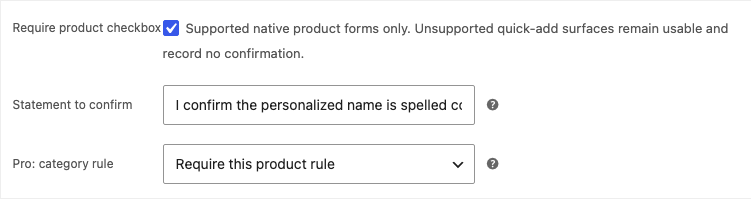
Check the product form
- Open the product in a private browser window.
- Confirm one labeled checkbox appears immediately before the native Add to cart button.
- Leave it unchecked and select Add to cart. The request must be rejected with a clear message.
- Select the checkbox and try again. The item should enter the cart normally.
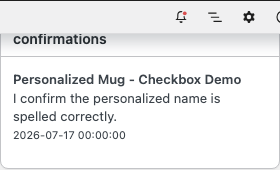
- Complete a disposable order and confirm the exact accepted statement appears in native item data.
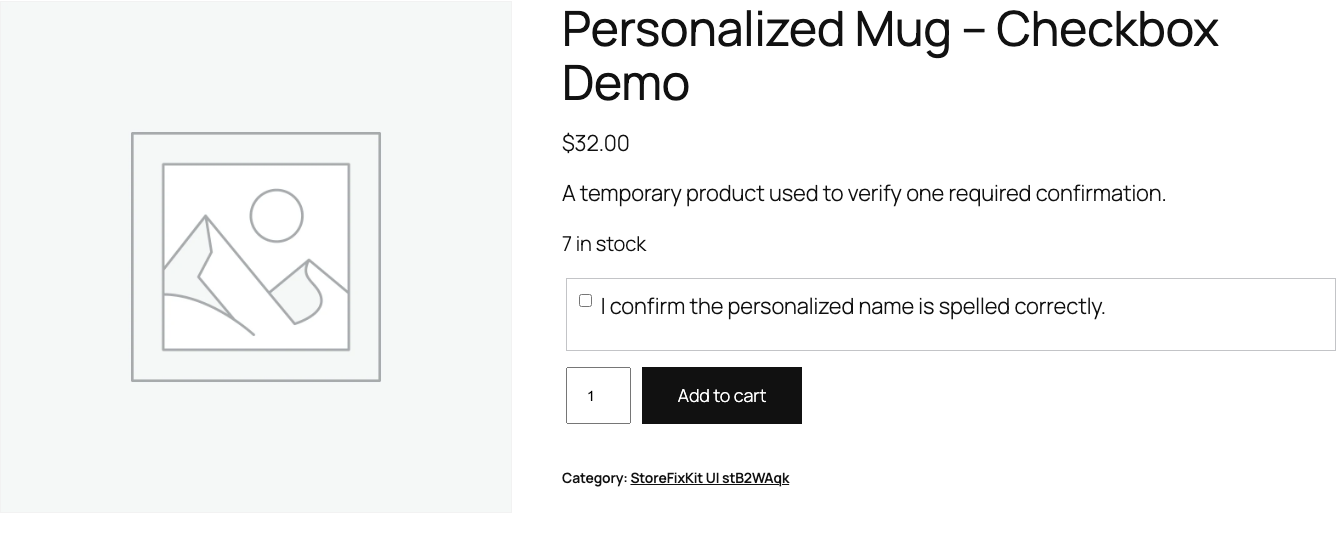
What Free changes
Free saves one enabled flag and one statement on each explicitly selected simple or variable parent product. On a supported native form, it prints the checkbox, a product-bound form token, and a hidden marker for that exact product.
When a valid confirmation is submitted, the exact statement is kept in bounded cart data and copied to the order item with its version and UTC acceptance time. Free does not change price, stock, quantity, variation choice, checkout, payment, order status, or any unrelated add-to-cart request.
If an enabled product is added from an unsupported quick-add, builder, Store API, or another surface where StoreFixKit did not render its owned field, the plugin fails passive: native add-to-cart stays usable and no false confirmation is recorded.
What Pro adds
Pro can apply one bounded statement to up to 50 selected product categories. An individual product can inherit, require its own Free rule, or disable the category rule.
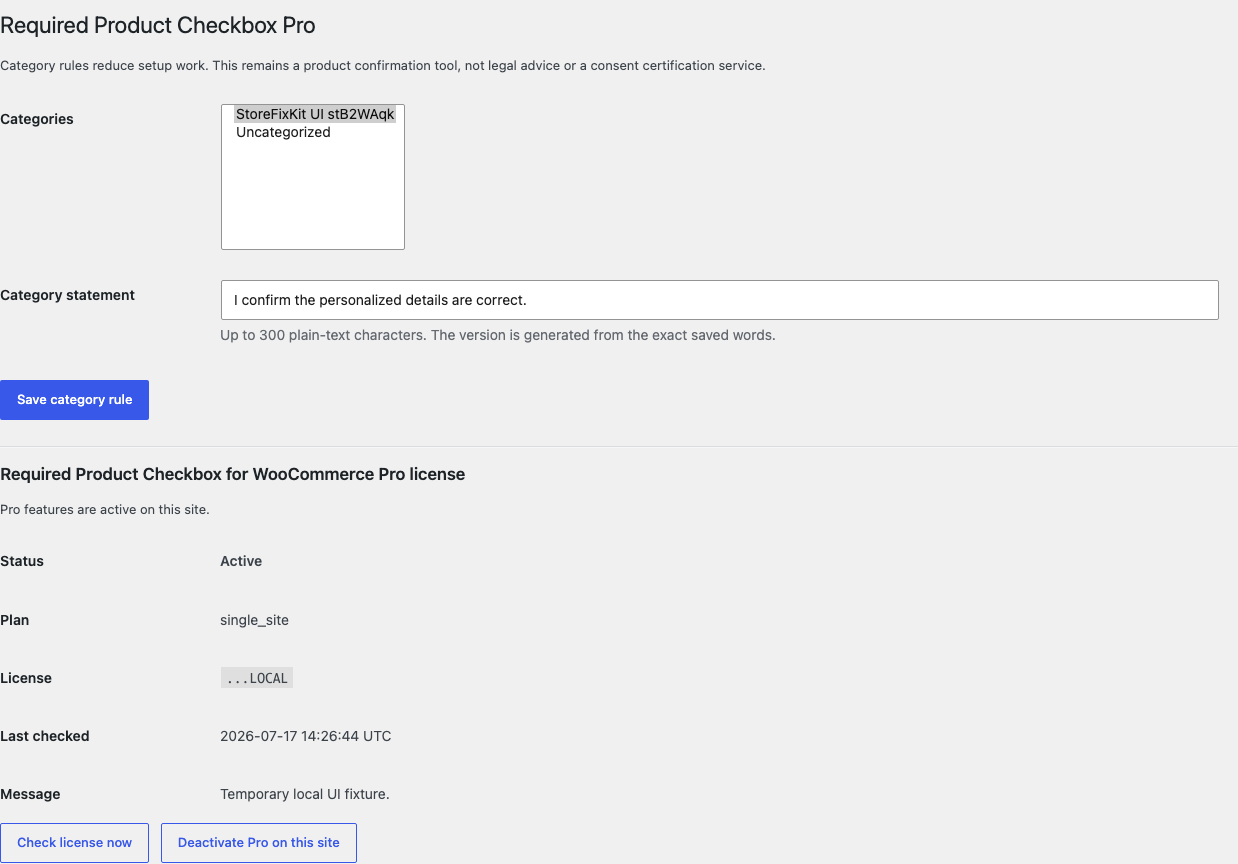
Pro also adds a read-only Product checkbox confirmations panel to an authorized order screen. It shows the product, exact stored statement, and local acceptance timestamp for that order only.
Start the 14-day Pro trial
- Open the Required Product Checkbox product page.
- Select Start 14-day trial. No card is required to begin.
- Stripe returns to the StoreFixKit success page; the signed webhook creates a product-bound single-site license.
- Copy the key and download the Pro 0.1.2 ZIP.
- Add a payment method before day 14 only if you want the $49/year subscription to continue. Without one, Stripe cancels it at trial end.
Keep WooCommerce and Free active. Upload and activate Pro, paste the key in WooCommerce > Required Checkbox Pro, and select Activate Pro. If Pro, billing, or the license API is unavailable, every Free per-product rule keeps working locally.
Privacy, security, and resource use
- Product writes require permission to edit that exact product and a product-bound nonce.
- Pro category settings require
manage_woocommerce, an active product-bound license, and a WordPress nonce. - Statements are plain text limited to 300 characters and escaped on output.
- Add-to-cart validation verifies a token and exact product marker before rejection or storage.
- Accepted statements, versions, and timestamps stay in the store's cart and order-item data; they are not sent to StoreFixKit.
- There is no custom table, cron job, product scan, telemetry, customer cookie, identity check, signature service, public remote request, or sitewide asset.
- This plugin does not determine whether wording is lawful, sufficient, understandable, or enforceable in any jurisdiction.
Troubleshooting
The checkbox does not appear
Confirm that the product rule is enabled, the statement is not empty, and the page uses WooCommerce's native simple or variable product form. Quick-add buttons, product builders, headless Store API clients, and custom forms may not expose the supported hook.
The product enters the cart without the checkbox
First confirm whether StoreFixKit's checkbox was visible on that exact surface. Supported native forms reject a missing confirmation on the server. Unsupported surfaces deliberately remain usable and record no confirmation instead of trapping shoppers with a field they could not see.
The checkbox appears on the wrong product
Check the exact product's Free enabled flag, then its Pro override, then its category membership. An individual Disable for this product override wins over the category rule.
The order report is empty
Only purchases submitted through a supported StoreFixKit form contain a recorded statement. Confirm that Pro is active, the order contains the expected product, and the product's accepted statement was visible in cart or checkout item data.
Rollback
- Back up the database and both current ZIPs.
- Deactivate Pro, then Free.
- Install the tested Free 0.1.0 and Pro 0.1.0 baseline ZIPs.
- Activate Free first, then Pro.
- Test one enabled and one disabled product, both unchecked and checked, then inspect one disposable order.
- To return to the current release, repeat the process with 0.1.2.
Versions 0.1.0 and 0.1.2 use the same bounded owned settings and require no schema migration. Rolling back does not change product price, stock, quantity, variations, cart rules, checkout, payment, order status, or customer permissions.
Uninstall
Deleting Free removes only _sfk_rpc_enabled and _sfk_rpc_statement product metadata. Deleting Pro removes only sfk_rpc_pro_rules, sfk_rpc_pro_license, and _sfk_rpc_override product metadata. Historical accepted statements, versions, and timestamps on order items are preserved so uninstalling the form does not silently erase existing order evidence. Products, prices, stock, variations, carts, checkout, payments, orders, and customers remain untouched.
StoreFixKit Support
Use StoreFixKit Support and include the product URL and ID, whether the checkbox was visible, the exact add-to-cart surface, expected and actual result, Free and Pro versions, WordPress and WooCommerce versions, theme/builder, quick-add or product-form plugins, cache/CDN state, and screenshots with customer data removed. Never send credentials, order customer details, payment information, legal documents, or a full license key.