Last updated: 2026-07-22
Free 0.1.13 and Pro 0.1.13 documentation.
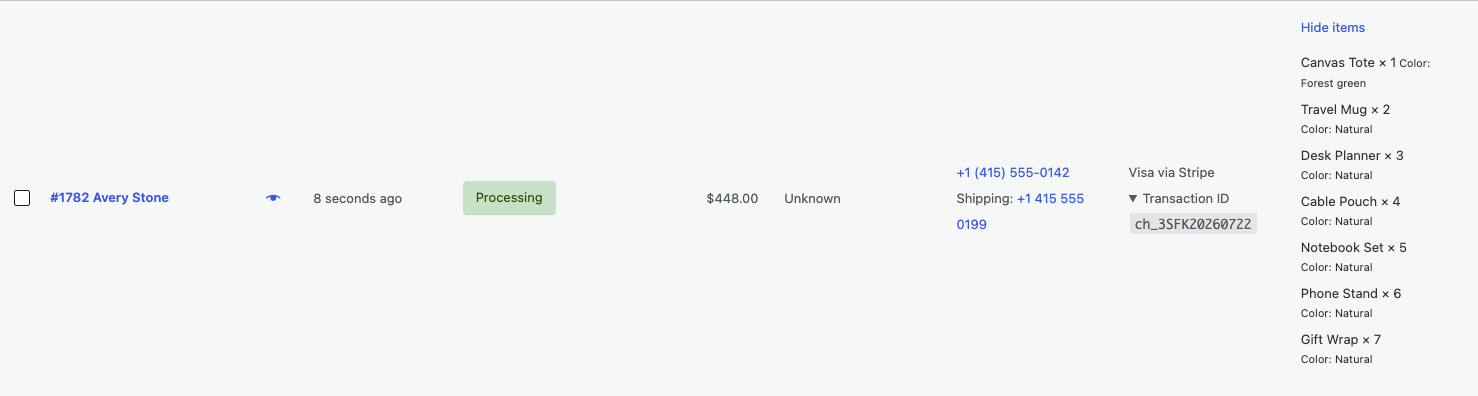
Purchased Items for WooCommerce Orders adds a Purchased Items column to the classic and HPOS WooCommerce Orders lists. Select View items on one row to load a bounded local list of product names and quantities. Nothing is read from that order's line items before the click, and the plugin never edits the order.
Real interface
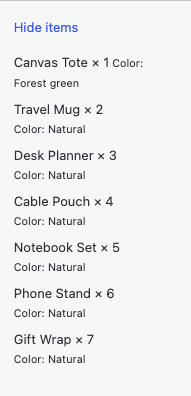
The screenshot above is captured from the real 0.1.13 plugin on a native WooCommerce Orders screen. The wider order-row context is available in orders-list-pro-row.png.
Requirements
| Component | Requirement |
|---|---|
| WordPress | 6.2 or newer |
| PHP | 7.4 or newer |
| WooCommerce | 8.9 or newer, active |
| User access | Shop manager or administrator allowed to manage WooCommerce orders |
| Planned Pro offer | One site, $39/year after a 14-day no-card trial; checkout pending |
Install and use Free
- Confirm WooCommerce 8.9 or newer is active.
- Open Plugins > Add New > Upload Plugin.
- Upload the Free 0.1.13 ZIP, install it, and activate it.
- Open WooCommerce > Orders.
- Confirm the Purchased Items column is visible. Use Screen Options if it is hidden.
- Select View items on one order row.
- Confirm up to five product names and quantities appear in that row.
- Select Hide items to collapse the result.
The request stays inside your WordPress administration area. It is protected by a nonce and WooCommerce order-management capability.
Verify the result
- Use a test order containing one or more line items.
- Load WooCommerce > Orders and do not select View items yet.
- Confirm the row shows only the button, not an eager item list.
- Select View items and compare the shown names and quantities with the order.
- For an order with more than five items, confirm Free shows a bounded prefix and a general message telling you to open the order for the rest.
- Deactivate Free, reload the page, and confirm the column disappears without changing the order.
What Free changes
Free adds one keyboard-operable control to each authorized order row. After a click, it uses two prepared, read-only, hard-limited local queries to show at most five line items. It reads one extra row only to determine whether more items exist; it does not count or load the complete order.
Free does not load product objects, SKUs, images, protected item metadata, exact full-order counts, packing tools, exports, filters, frontend output, or remote data.
What Pro adds
When the Pro add-on and its product-bound license are active, the same on-demand control can:
- show up to twenty-five line items from a maximum twenty-six-row read; and
- append bounded, non-protected variation details from one batched metadata query.
Pro still does not load product objects or SKU data. Free's five-item view remains available if Pro is deactivated, unlicensed, expired, or unable to reach the license service.
Activate or manage Pro
If you have received the Pro ZIP and a license key:
- Keep Free installed and active.
- Upload and activate the Pro 0.1.13 ZIP.
- Open WooCommerce > Purchased Items Pro.
- Enter the license key and select Activate Pro.
- Return to WooCommerce > Orders and open one test row.
The Pro page is also where an authorized administrator can check or deactivate the license. License checks do not run from the Orders list.
Supported boundary
This release supports WooCommerce's native classic and HPOS Orders lists. It does not claim support for WooCommerce Analytics, frontend pages, REST responses, feeds, emails, exports, custom order tables, or third-party screens that replace the native column hooks.
Troubleshooting
The Purchased Items column is missing
Confirm WooCommerce 8.9 or newer is active, your role can manage WooCommerce orders, and Purchased Items is enabled under Screen Options.
View items returns Request denied
Reload the Orders page and try again. The nonce may have expired, or the current account may not have WooCommerce order-management capability.
The result says more items are in the order
That is the intended bound. Free shows up to five items and Pro up to twenty-five. Open the order to see everything.
Variation details are missing
Variation details require active Pro. Protected metadata, unsafe values, and details beyond the bounded response are intentionally omitted.
A row cannot be loaded
The plugin returns a generic error and does not change the order. Confirm the order still exists and that your account can manage it.
Roll back safely
- Deactivate Pro and select View items on a test order.
- Confirm Free still shows its bounded five-item result.
- Deactivate Free and reload WooCommerce > Orders.
- Confirm the Purchased Items column and its controls disappear immediately.
- Open the test order and confirm its items, quantities, and variation data are unchanged.
- Install a previous deterministic ZIP only when a version rollback is required.
There is no order-item migration or packing state to reverse.
Uninstall and data removal
Free stores no settings or business data. Normal Pro uninstall preserves its license and update state so an accidental deletion can be recovered.
To remove this product's three owned Pro options intentionally, back up the site, define STOREFIXKIT_DELETE_DATA as true in wp-config.php, and then delete Pro. Remove that constant after cleanup. The owned options are sfk_piol_pro_license, sfk_piol_pro_update, and sfk_piol_pro_update_cache.
Orders, line items, item metadata, products, customers, inventory, payments, and WooCommerce settings are never deleted.
Privacy, security, and resource use
- Only authorized WooCommerce order managers can request the local item view.
- Every request is nonce-protected and limited to one validated order ID.
- Free sends no data to StoreFixKit or another service.
- Pro sends only the license key, site URL, and product key to the StoreFixKit license service, and only when an authorized administrator submits the Activate, Check license now, or Deactivate action. Merely opening the protected license page makes no remote request.
- No order, customer, phone, line-item, payment-method, or transaction data is sent to StoreFixKit.
- The View items action is a local WordPress AJAX request, not a StoreFixKit request.
- There is no telemetry, custom table, cron job, queue, frontend asset, eager line-item read, or business-data write.
Frequently asked questions
Does the Orders screen load every order's items?
No. It reads no line items until an authorized user selects View items on one row.
Why does Free stop at five items?
The hard limit keeps the Orders list predictable. Open the order when you need the complete item list.
Does it change quantities or stock?
No. It reads saved names and quantities and never writes orders, products, or inventory.
Does it send purchased items to StoreFixKit?
No. License actions never include order, customer, item, payment, or transaction data.
Commercial evidence boundary
No sales are claimed. The internal $10,000 MRR target is an unverified product-selection hypothesis, not a forecast or guarantee. At $39 per year it would require about 3,077 active annual customers, while the paying-market size and StoreFixKit acquisition capacity remain unmeasured.
Support, feedback, and reviews
Use StoreFixKit Support. Include the Free and Pro versions, WordPress and WooCommerce versions, whether HPOS is enabled, your user role, approximate item count, whether Free or Pro was active, the expected result, the actual result, and the shortest repeatable steps.
Replace product names and variation values with neutral examples. Never send administrator passwords, API keys, customer details, order exports, real order contents, payment details, transaction IDs, or a complete license key.
For product feedback, say whether the first value appears only after a click, whether the bound is clear, and whether the column disappears after deactivation. Once an official WordPress.org listing exists, support can provide the exact review link; this document does not assume that listing is already public.