Free 0.1.4 and Pro 0.1.4 documentation.
Product Subtitle adds one short plain-text line below a WooCommerce product name. It does not replace the product title, SEO title, product template, price, gallery, or buy form.
Requirements
| Component | Requirement |
|---|---|
| WordPress | 6.2 or newer |
| PHP | 7.4 or newer |
| WooCommerce | 8.9 or newer, active |
| Free field | One plain-text subtitle, maximum 160 characters |
| Pro plan | One site, $79/year after a 14-day trial |
Add a product subtitle with Free
- Install and activate WooCommerce.
- Install Product Subtitle for WooCommerce from WordPress.org after its directory listing is approved, or upload the supplied Free 0.1.4 ZIP.
- Open WooCommerce > Product Subtitle.
- Enable storefront output and choose Product pages, Shop and archive product cards, or both.
- Edit one product, open Product data > General, enter one Product subtitle, and update the product.
- View the published product in every enabled location.


Verify the storefront result
- Confirm the original product title is unchanged.
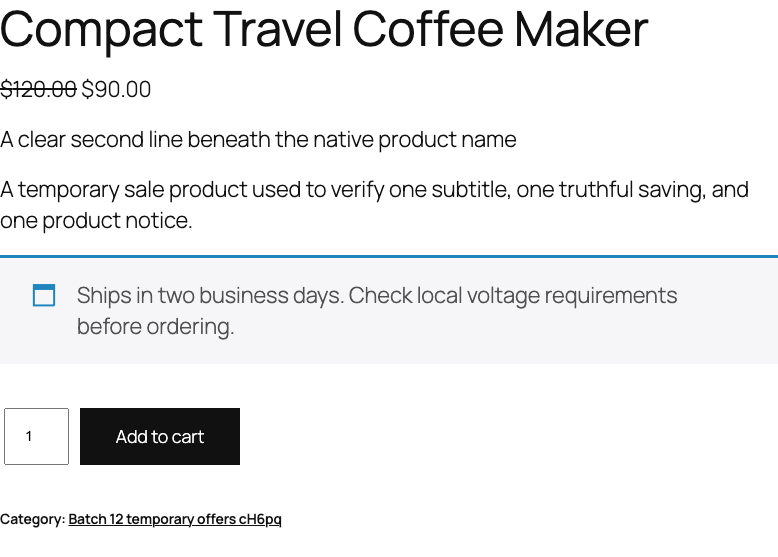
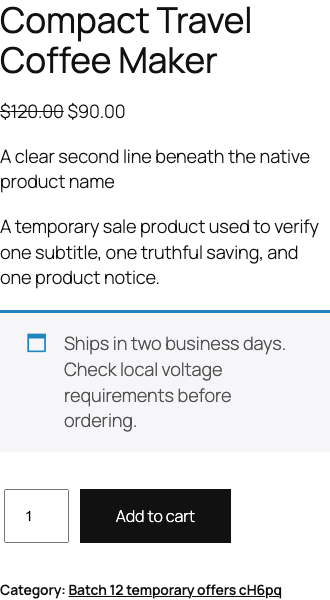
- Confirm one subtitle appears directly below the title on the selected surface.
- Confirm the subtitle is plain text even if markup was pasted into the editor.
- Disable storefront output and confirm the subtitle disappears immediately.
- Re-enable it and check one desktop and one narrow mobile viewport.
What Free changes
Free stores _sfk_ps_subtitle only on the edited product and stores the three display switches in sfk_ps_settings. It renders an escaped paragraph on enabled native WooCommerce product or archive hooks.
Free does not filter the_title, change an SEO title, inject schema, accept HTML or shortcodes, copy product descriptions, scan the catalog, create a table, schedule a job, load a storefront script or stylesheet, or call StoreFixKit from the storefront.
What Pro adds
Pro reuses the same subtitle in cart, checkout, order details, and WooCommerce emails. It can also supply one bounded fallback subtitle only when a product has no saved Free subtitle.

When order output is enabled, Pro snapshots the resolved subtitle into one private order-line field at checkout. Later product edits therefore do not silently rewrite historical order and email output.
If Pro, billing, or the license API is unavailable, the product's Free subtitle and Free storefront locations continue locally. A fallback never overrides a real product subtitle.
Start the 14-day Pro trial
- Open the Product Subtitle product page.
- Select Start 14-day trial. No card is required to begin.
- Stripe returns to the StoreFixKit success page; a signed webhook creates a product-bound single-site license.
- Copy the key and download the Pro 0.1.4 ZIP.
- Keep Free active, upload and activate Pro, and paste the key in WooCommerce > Product Subtitle.
- Add a payment method before day 14 only if you want the $79/year subscription to continue. Without one, Stripe cancels it at trial end.
Privacy, security, and resource use
- Product saves require permission to edit that exact product and a product-bound WordPress nonce.
- The REST-exposed product field has an object-scoped authorization callback, a sanitizer, and a validator.
- Global settings require
manage_woocommerceand WordPress settings nonces. - Subtitles are plain text, capped at 160 characters, sanitized on write, and escaped on output.
- Free reads one owned product value in each eligible product context.
- There is no catalog query, custom table, cron, queue, telemetry, frontend asset, or storefront remote request.
- Pro license and update checks occur only through authenticated administrator actions.
Troubleshooting
The field is missing
Confirm WooCommerce 8.9 or newer and the Free plugin are active. In the classic editor, open Product data > General. In the supported block editor, check the product sidebar. Also confirm the current account can edit that product.
The subtitle is saved but not visible
Open WooCommerce > Product Subtitle, enable output, and select the relevant location. Confirm the product is published. A draft, disabled location, empty value, invalid over-limit value, or non-product page deliberately renders nothing.
The subtitle does not change the browser or search title
That is expected. This plugin deliberately avoids the_title and SEO metadata. Use the SEO plugin or product-title field that already owns those values.
The cart or email does not show a subtitle
Those locations require an active Pro license and their individual switches. New orders snapshot the subtitle at checkout; enabling the setting later does not rewrite old orders.
A fallback does not replace a product subtitle
That is expected. Product-owned Free data always wins. The Pro fallback applies only when the product subtitle is empty.
Rollback
- Back up the database and both current ZIPs.
- Record the display switches, Pro fallback, and extra locations.
- Deactivate Pro. Free product and archive subtitles should continue.
- Deactivate Free. Subtitle output disappears; product names, prices, templates, carts, and orders remain.
- Install the tested Free 0.1.0 and Pro 0.1.0 baseline ZIPs if an older-code comparison is required.
- Recheck a product page, archive card, cart, checkout, and disposable order before returning to 0.1.4.
Versions 0.1.0 and 0.1.4 use the same bounded settings and product meta and require no database migration.
Uninstall
Default uninstall preserves settings, product subtitles, and historical order subtitles for accidental recovery. Define STOREFIXKIT_DELETE_DATA as true before deletion to remove only StoreFixKit global options. Separately define STOREFIXKIT_DELETE_PRODUCT_DATA as true to remove only _sfk_ps_subtitle from products.
Historical _sfk_ps_order_subtitle values are never deleted by uninstall. Products, names, descriptions, SEO data, prices, stock, carts, customers, orders, and third-party metadata are never deleted.
StoreFixKit Support
Use StoreFixKit Support and include the affected URL, enabled locations, Free and Pro versions, WordPress and WooCommerce versions, editor type, theme, cache status, and redacted desktop/mobile screenshots. Never send credentials, customer or order data, API keys, or a full license key.
For feedback, describe the result you expected, what actually happened, and the shortest repeatable steps. After the issue is resolved, the support reply will include the correct WordPress.org review link once the official listing exists.