Free 0.1.4 and Pro 0.1.4 documentation.
Product Notice adds one plain-text message before a product's unchanged WooCommerce buy form. It is an informational note, not a required checkbox, purchase block, legal-compliance service, or checkout rule.
Requirements
| Component | Requirement |
|---|---|
| WordPress | 6.2 or newer |
| PHP | 7.4 or newer |
| WooCommerce | 8.9 or newer, active |
| Notice input | Plain text, maximum 240 characters |
| Pro category rules | At most 25 saved rules and 25 product categories evaluated |
| Pro plan | One site, $79/year after a 14-day trial |
Add a product notice with Free
- Install and activate WooCommerce.
- Install Product Notice for WooCommerce from WordPress.org after its directory listing is approved, or upload the supplied Free 0.1.4 ZIP.
- Edit the product that needs a notice.
- Open Product data > General.
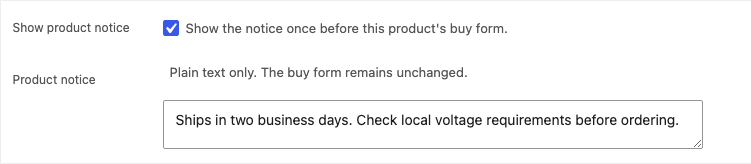
- Enter one Product notice, enable Show product notice, and update the product.
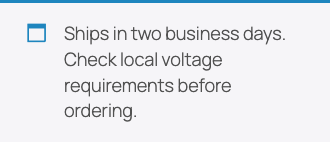
- View the published product and confirm the note appears once before the native buy form.
Verify the storefront result
- Confirm the notice text is complete and readable.
- Confirm it appears once before the product's native quantity and Add to cart controls.
- Confirm the native form still adds the product normally.
- Disable the notice and confirm only the note disappears.
- Check desktop and a 390-pixel mobile viewport for overlap and horizontal overflow.

What Free changes
Free stores _sfk_pn_enabled and _sfk_pn_notice only on the edited product. On that published product page, it reads the two owned values and emits one escaped woocommerce-info note through WooCommerce's documented pre-form hook.
Free does not block a purchase, require acknowledgment, change price or stock, alter a template, scan the catalog, schedule a task, create a table, load a storefront script or stylesheet, collect telemetry, or call StoreFixKit from the storefront.
What Pro adds
Pro adds one global fallback and up to 25 category fallback notices. A real Free product notice always wins. When no product notice exists, the lowest configured matching category ID wins; the global fallback is last. Each product can opt out of all Pro fallbacks.
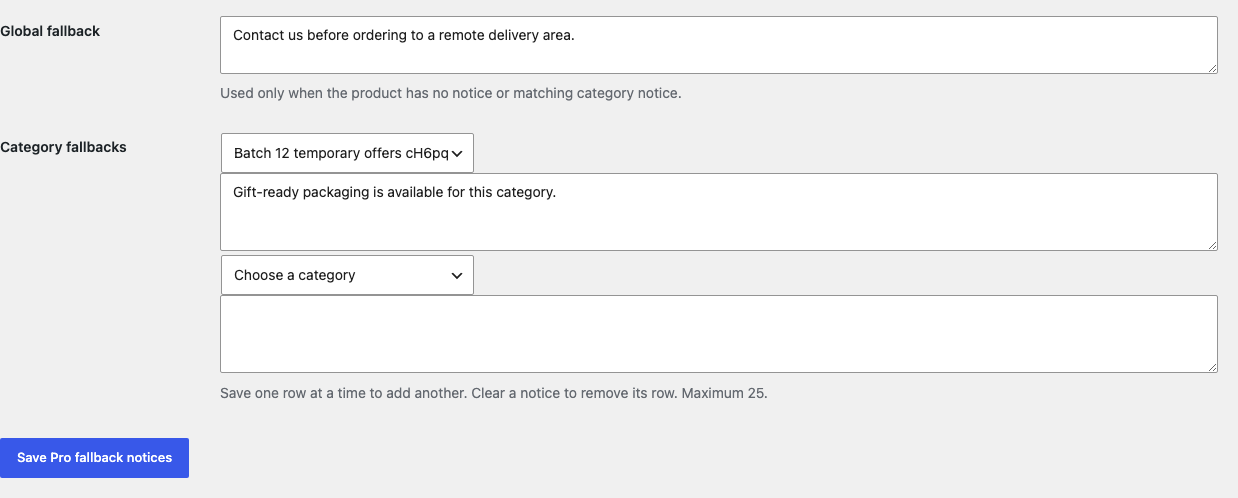

The fallback order is deterministic:
- Enabled non-empty Free product notice.
- Empty result when the product opts out.
- Lowest-ID configured category notice among at most 25 product categories.
- Global fallback.
- No output when none applies or Pro is unavailable.
Start the 14-day Pro trial
- Open the Product Notice product page.
- Select Start 14-day trial. No card is required to begin.
- Stripe returns to the StoreFixKit success page; a signed webhook creates a product-bound single-site license.
- Copy the key and download the Pro 0.1.4 ZIP.
- Keep Free active, upload and activate Pro, and paste the key in WooCommerce > Product Notice.
- Add a payment method before day 14 only if you want the $79/year subscription to continue. Without one, Stripe cancels it at trial end.
Privacy, security, and resource use
- Product writes require permission to edit that exact product and a product-bound nonce.
- Pro settings require
manage_woocommerce, a WordPress settings nonce, valid current product-category IDs, and bounded plain text. - Notices are stripped to plain text, capped at 240 characters, and escaped on output.
- Free performs exactly two owned product-meta reads in the eligible product context; Pro may perform one additional opt-out read.
- Over-budget, malformed, mismatched, unpublished, duplicated, or uncertain state renders nothing rather than changing the form.
- There is no purchase validation, price or stock mutation, catalog scan, custom table, cron, queue, telemetry, frontend asset, or storefront StoreFixKit request.
- Pro license and update checks occur only through authenticated administrator actions.
Troubleshooting
The notice fields are missing
Confirm WooCommerce 8.9 or newer and Free are active. Edit a product, open Product data > General, and confirm the current account can edit that product.
The notice is saved but not visible
Confirm Show product notice is enabled, the text is non-empty and within 240 characters, and the product is published. The output requires the page's queried product to match WooCommerce's current product object.
A category fallback is not used
Confirm Pro is active, the license is valid, the product has no enabled Free notice, the product has not opted out, and the rule points to a current product category. A Free product notice intentionally takes priority.
The wrong category fallback appears
When several configured categories match, the lowest numeric category ID wins. This fixed rule avoids unpredictable category order. Use a product-specific Free notice when one product needs a different message.
The notice does not stop Add to cart
That is expected. This release provides information only. It does not implement acknowledgment, age gates, legal consent, validation, checkout blocks, or compliance certification.
Rollback
- Back up the database and both current ZIPs.
- Record the product notice, enabled flag, fallback rules, and product opt-out.
- Deactivate Pro. Product-owned Free notices should continue; fallbacks stop.
- Deactivate Free. Notice output disappears and the native buy form remains.
- Install the tested Free 0.1.0 and Pro 0.1.0 baseline ZIPs if an older-code comparison is required.
- Recheck product, category, global, opt-out, desktop, mobile, and Add to cart behavior before returning to 0.1.4.
Versions 0.1.0 and 0.1.4 use the same bounded options and product meta and require no database migration.
Uninstall
Default uninstall preserves notice data and settings for accidental recovery. Define STOREFIXKIT_DELETE_DATA as true before deletion to remove only Pro settings and license state. Separately define STOREFIXKIT_DELETE_PRODUCT_DATA as true to remove only _sfk_pn_enabled, _sfk_pn_notice, and _sfk_pn_disable_fallback from products.
Products, names, descriptions, categories, prices, stock, carts, customers, orders, refunds, templates, and third-party metadata are never deleted.
StoreFixKit Support
Use StoreFixKit Support and include the affected URL, whether the expected source is product/category/global, selected category names, opt-out state, Free and Pro versions, WordPress and WooCommerce versions, theme, cache status, and redacted desktop/mobile screenshots. Never send credentials, customer or order data, API keys, legal documents, or a full license key.
Support can diagnose plugin behavior but cannot decide whether a notice satisfies a law, regulation, product-safety duty, or contractual disclosure requirement. Obtain qualified advice for those decisions.