Free 0.1.3 and Pro 0.1.3 documentation.
Change Place Order Button Text replaces only the words on WooCommerce's final standard checkout button. Free sets one 1-to-40-character plain-text label for classic and block checkout. Pro can add payment-method-specific labels for documented exact contexts, with an important Checkout Block limitation explained below.
Requirements
| Component | Requirement |
|---|---|
| WordPress | 6.2 or newer |
| PHP | 7.4 or newer |
| WooCommerce | 8.9 or newer, active |
| Free rule | One plain-text label from 1 to 40 characters |
| Pro plan | One site, $39/year after a 14-day no-card trial |
Install Free
- Confirm WooCommerce is active.
- In WordPress, open Plugins > Add New > Upload Plugin.
- Upload the Free 0.1.3 ZIP, select Install Now, and then select Activate.
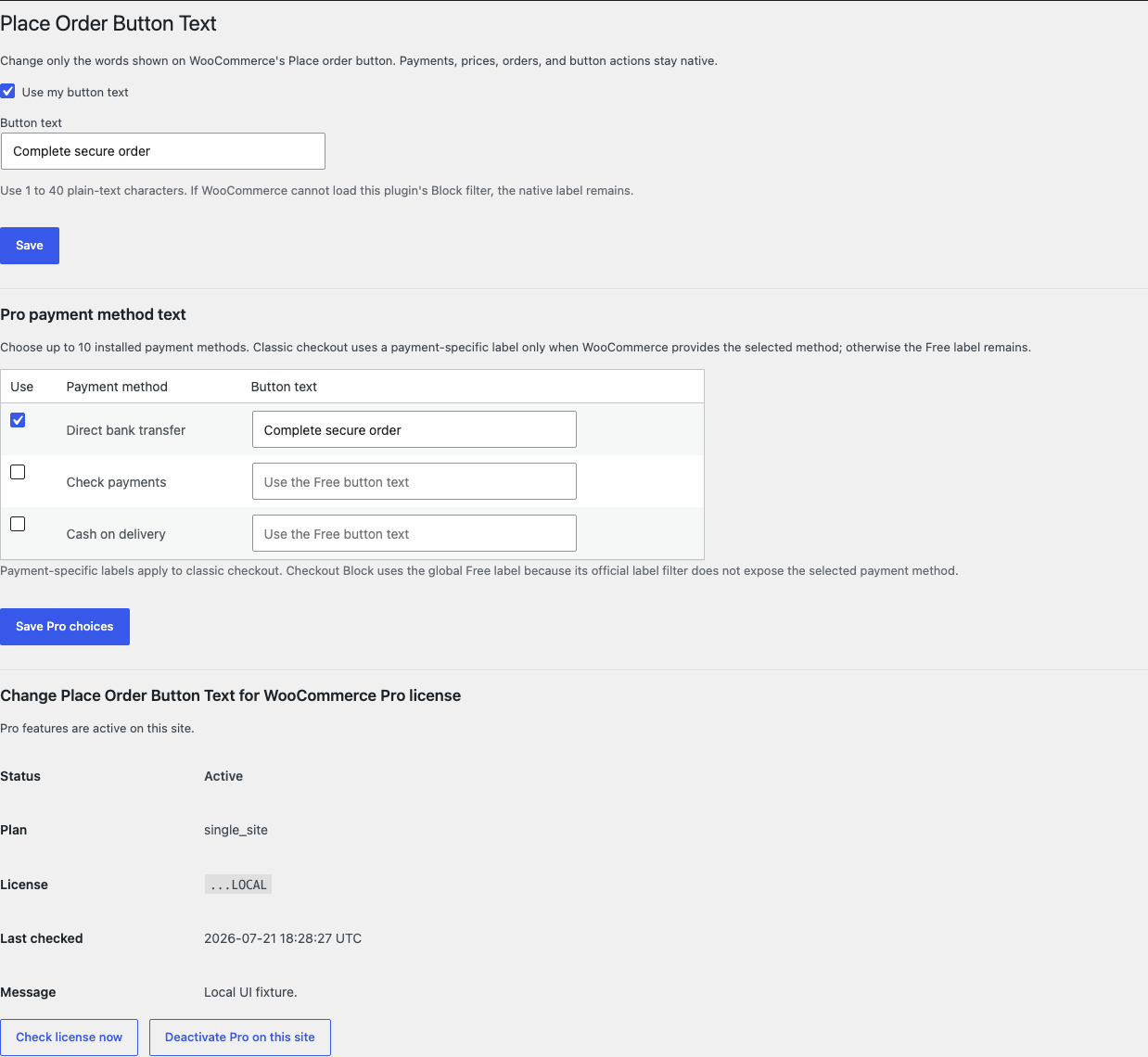
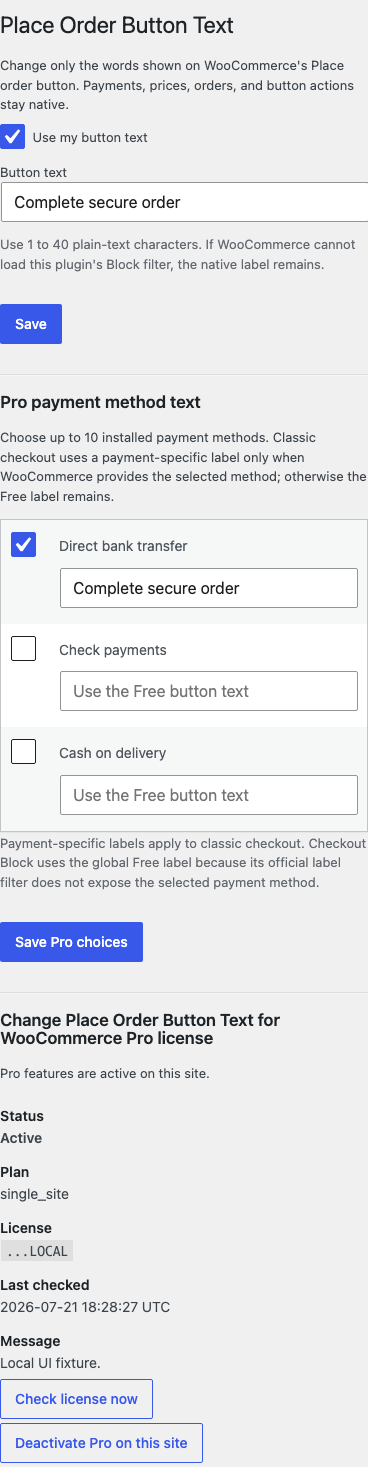
- Open WooCommerce > Place Order Button Text.
- Select Use my button text.
- Enter Button text, such as
Buy noworPay now. - Keep the label between 1 and 40 plain-text characters.
- Select Save.
Verify the result
Test the checkout type your store actually uses.
- Add an ordinary product to the cart.
- Open checkout while signed out.
- Confirm only the final standard place-order button's words changed.
- Confirm prices, payment methods, validation, and order totals are unchanged.
- Place a test order with a safe test payment method.
- Confirm the normal WooCommerce order and payment flow still completes.
- Turn off Use my button text and confirm the native label returns.
If your store has both classic and block checkout pages, repeat the test on both.
What Free changes
Free stores one plain-text label and returns it through WooCommerce's documented classic checkout text filter. On the Checkout Block, it loads a small checkout-only script and uses WooCommerce's official placeOrderButtonLabel filter.
The plugin does not change the button element, HTML, icon, style, click behavior, validation, disabled state, payment payload, redirect, endpoint, or order creation. Invalid, empty, marked-up, or over-limit text falls back to WooCommerce's incoming native label.
What Pro adds
Pro lets you save labels for up to ten installed payment methods.
- Keep Free active.
- Install and activate the matching Pro 0.1.3 ZIP.
- Activate the product license.
- Open WooCommerce > Place Order Button Text.
- Under Pro payment method text, select Use beside a payment method.
- Enter a 1-to-40-character Button text.
- Select Save Pro choices.
Classic checkout uses a payment-specific label only when WooCommerce provides an exact selected payment-method context. Otherwise the valid global Free label remains.
Classic checkout and Checkout Block differ
Classic checkout can provide the selected payment method to the server-side button text filter. That allows a valid Pro payment-method label to replace the global Free label.
WooCommerce's current official Checkout Block placeOrderButtonLabel filter does not expose the selected payment method. Checkout Block therefore always uses the global Free label in this release. Payment-method-specific Pro labels are supported only on classic checkout. The plugin does not inspect page text, watch the DOM, read payment details, or guess the selected gateway.
Express payment buttons and gateways that replace the standard place-order component are outside this release. The plugin leaves those components unchanged.
Troubleshooting
The label did not change
Confirm Use my button text is selected and the text contains 1 to 40 plain-text characters. Clear checkout and full-page caches, then test the standard WooCommerce checkout button rather than an express-payment button.
Classic checkout changed but Checkout Block did not
Confirm the Checkout Block scripts are loading without browser errors and that no optimization tool removed WooCommerce script dependencies. If the official registry is unavailable, the script exits and the native label remains.
A Pro payment-method label works in classic checkout but not Checkout Block
That is the documented safe boundary. The current block filter does not expose the selected payment method, so the plugin uses the global Free label instead of guessing.
An express-payment button stayed unchanged
That is expected. Apple Pay, Google Pay, PayPal express, and gateway-owned components can use their own buttons and are not replaced.
The order button behaves differently
Deactivate the plugin and retest. This product changes only the label through official filters. Another checkout customization, payment gateway, template override, or optimization tool may own the behavior.
Roll back safely
- Back up the WordPress database and keep the exact Free and Pro ZIPs you installed.
- Deactivate Pro and confirm the global Free label remains.
- Turn off Use my button text or deactivate Free.
- Confirm WooCommerce's native button label returns immediately.
- Place a test order to confirm native checkout behavior.
- To return to an earlier version, install the previous deterministic ZIP, activate it, and repeat the classic and block checks.
The plugin writes no order, payment, cart, customer, gateway, product, field, or template data. Disabling it removes its label filters and checkout-only script.
Uninstall and data removal
Normal uninstall preserves StoreFixKit settings and the license for accidental recovery.
Define STOREFIXKIT_DELETE_DATA as true before deletion only when you deliberately want to remove this product's owned settings. Free removes sfk_pobt_settings; Pro removes sfk_pobt_pro_settings and its own license option. Orders, payments, carts, sessions, customers, products, gateways, checkout fields, and templates are never deleted.
Privacy, security, and resource use
- Settings changes require the
manage_woocommercecapability and WordPress nonce checks. - All labels are plain text and limited to 40 characters.
- Pro stores at most ten labels for installed payment-method IDs.
- The block script loads only on checkout and is designed to stay below 1 KB gzip.
- Checkout makes no StoreFixKit or third-party remote request.
- No personal data, order details, payment details, or visitor behavior is stored or sent.
- No custom table, cron event, queue, telemetry, or frontend CSS is added.
Frequently asked questions
Does changing the label change what the button does?
No. The click handler, validation, payment, order creation, and redirect remain WooCommerce or gateway behavior.
Can I add HTML, an icon, or custom styling?
No. The field accepts plain text only. The plugin does not alter markup or CSS.
Can Pro always show a different label for every payment method?
No. Payment-method-specific Pro labels are supported on classic checkout only. Checkout Block uses the global Free label.
Can this rename express-payment buttons?
No. Gateway-owned or express-payment components are outside the supported surface.
Support and feedback
Use StoreFixKit Support. Include the checkout page URL, whether it uses classic checkout or Checkout Block, expected and actual label, selected payment method, whether the standard or an express button is affected, Free and Pro versions, WordPress and WooCommerce versions, gateway name, cache/optimization status, and redacted desktop/mobile screenshots.
Do not send administrator passwords, API keys, card or payment details, customer data, order exports, or a complete license key. For feedback, describe the shortest repeatable checkout setup and say whether the native label returns after deactivation.