Free 0.1.5 and Pro 0.1.5 documentation.
Personalization Text Box for WooCommerce does one job: it asks a shopper for a short plain-text answer on a selected product and keeps that sanitized answer with the cart line and historical WooCommerce order item. It does not add prices, upload files, calculate options, change stock, edit orders, or send customer text to StoreFixKit.
Requirements
| Component | Requirement |
|---|---|
| WordPress | 6.0 or newer |
| PHP | 7.4 or newer |
| WooCommerce | 8.0 or newer, active |
| Products | Simple or variable WooCommerce products |
| Access | A user who can edit WooCommerce products |
Install the free plugin
- Install and activate WooCommerce.
- Install Personalization Text Box for WooCommerce from WordPress.org after its directory listing is approved, or upload the supplied Free 0.1.5 ZIP for testing.
- Activate the plugin.
If WooCommerce is unavailable, the plugin registers no product, cart, checkout, or order behavior. WordPress continues loading and displays one admin notice.
Add a text box to one product
- Open Products and edit the product.
- In Product data > General, turn on Personalization text box.
- Write the Field label the shopper should see, such as
Name to print. - Choose whether the answer is required.
- Set a character limit from 1 to 120.
- Select Update.
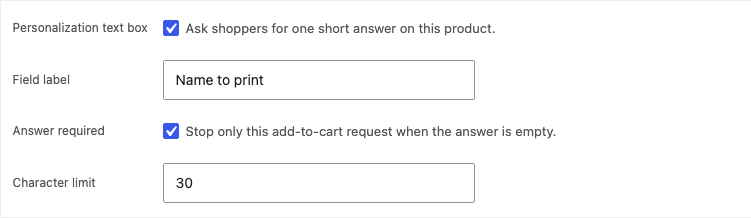
The field is hidden until the product is enabled and has a valid configuration. A product-specific Free field wins over a reusable Pro assignment.
Test the shopper workflow
Open the product in a private browser window. Enter a short answer and add the product to the cart. The same escaped label and answer should appear with that cart line, through checkout, in the order admin, and in standard WooCommerce order-item output.
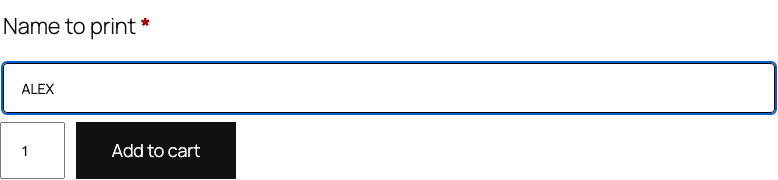
Two copies of the same product with different answers remain separate cart lines. The plugin adds a line hash for that purpose; it never changes the product ID, variation, price, quantity, or stock.
Required and invalid answers
When the field is required, an empty answer rejects only that add-to-cart request and shows a field-specific message. An answer longer than the saved limit is also rejected. Existing cart contents and checkout remain untouched.
If the product setting is missing, malformed, or disabled, the plugin renders no field, accepts WooCommerce's normal add-to-cart path, and writes no plugin data.
Free and Pro
Free adds one text field to each product you configure. Pro adds up to three reusable short fields and assigns them by product category or tag, with explicit product exceptions.
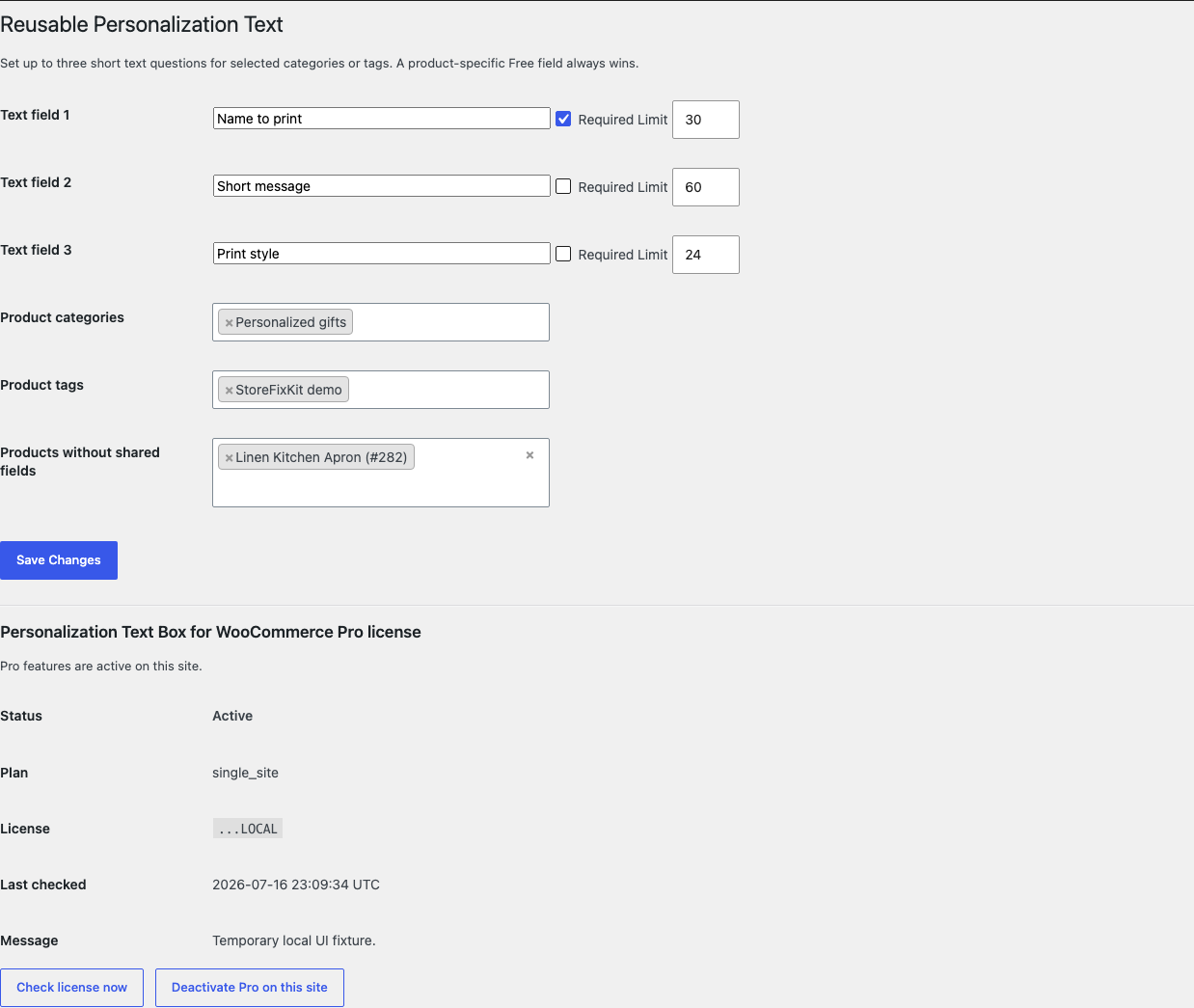
An explicit exception prevents the shared fields from appearing on that product. A product with its own Free configuration uses the product-specific field instead of the shared rule.
Start the 14-day Pro trial
- Open the product page.
- Select Start 14-day trial. No card is required to begin.
- Stripe returns to the StoreFixKit success page and the signed webhook creates a license bound to Personalization Text Pro.
- Copy the license key and download the Pro 0.1.5 ZIP.
- Add a payment method through Add payment method / manage billing before day 14 to continue the $49 annual subscription. Stripe cancels the subscription at trial end when no payment method has been added.
Install and activate Pro
- Keep WooCommerce and the Free plugin active.
- Upload and activate the Pro ZIP beside Free.
- Open WooCommerce > Personalization Text.
- Paste the product license key and select Activate Pro.
- Define up to three labels, required choices, and character limits.
- Choose only the categories or tags that need the shared fields, then save.
Use Check license now to refresh status or Deactivate Pro on this site before moving the license. A failed license or network check cannot disable saved Free product fields.
Privacy and data ownership
- The shopper answer is personal data when it identifies or describes a person.
- It is stored only in WooCommerce cart-item data and historical order-item metadata.
- Retention and erasure follow the merchant's WooCommerce order policy.
- Customer text is not written to product metadata, WordPress options, StoreFixKit logs, analytics, or telemetry.
- The plugin makes no public remote request during product, cart, checkout, or order processing.
Safety and resource use
- No product price, stock, visibility, tax, shipping, coupon, payment, order status, fulfillment, refund, or subscription change.
- No custom table, cron event, frontend JavaScript, frontend stylesheet, telemetry, or customer cookie.
- Free stores four bounded product configuration keys. Pro stores one bounded reusable rule option and its license state.
- The plugin performs no add-to-cart database write. WooCommerce owns the cart and later order-item write.
- Pro or license API failure leaves the Free field working locally.
Troubleshooting
The field is not visible
Confirm WooCommerce and Free are active, the product was updated after enabling the field, and the label and limit are valid. Clear page caches and test the canonical product page. A theme must still render WooCommerce's add-to-cart form and woocommerce_before_add_to_cart_button hook.
The answer is rejected
Check whether the field is required and whether the answer exceeds the saved limit. Test plain text without browser autofill or copied formatting. The maximum supported limit is 120 characters.
Two answers merged into one cart line
Confirm Free 0.1.5 is active and the shopper submitted the field through the product form. Different sanitized answers should receive different line hashes. A custom quick-add interface that bypasses the normal WooCommerce product form is outside this release boundary.
The answer is missing from an order email
Open the order in WooCommerce admin first. If the order item contains the value, verify that the email template still renders ordinary order-item metadata. A custom template that removes all item metadata can hide values owned by any extension.
Rollback
- Back up the database and retain Free and Pro 0.1.5 plus the previous known-good ZIPs.
- Deactivate Pro and Free.
- Install the previous ZIPs.
- Activate Free first, then Pro.
- Confirm the product setting and reusable rules remain saved.
- Test one optional answer, one required empty answer, and two different answers for the same product.
The verified 0.1.5 -> 0.1.4 -> 0.1.5 drill preserves owned product settings, Pro settings, and historical order-item data. Rollback does not edit products, stock, totals, orders, or payments.
Uninstall
Deleting Free removes only _sfk_pt_enabled, _sfk_pt_label, _sfk_pt_required, and _sfk_pt_max_length product configuration. Deleting Pro removes sfk_pt_pro_rules and its license option. Historical WooCommerce order-item metadata remains intact so old orders do not lose fulfillment instructions.
StoreFixKit Support
Use StoreFixKit Support and include the product ID, product type, field label, required choice, character limit, Free and Pro versions, WooCommerce version, expected result, actual result, and screenshots. For an order display issue, state whether ordinary item metadata appears, but remove customer names, messages, addresses, credentials, and full license keys.