Last updated: 2026-07-22
Free 0.1.13 and Pro 0.1.13 documentation.
Payment Details for WooCommerce Orders adds one read-only Payment details column to the classic and HPOS WooCommerce Orders lists. Free shows the payment-method title already saved on the current order. Pro can place the saved transaction ID inside a closed, keyboard-operable disclosure. The plugin never contacts a payment gateway or changes a payment.
Real interface
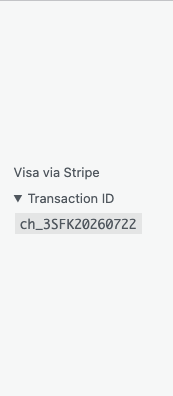
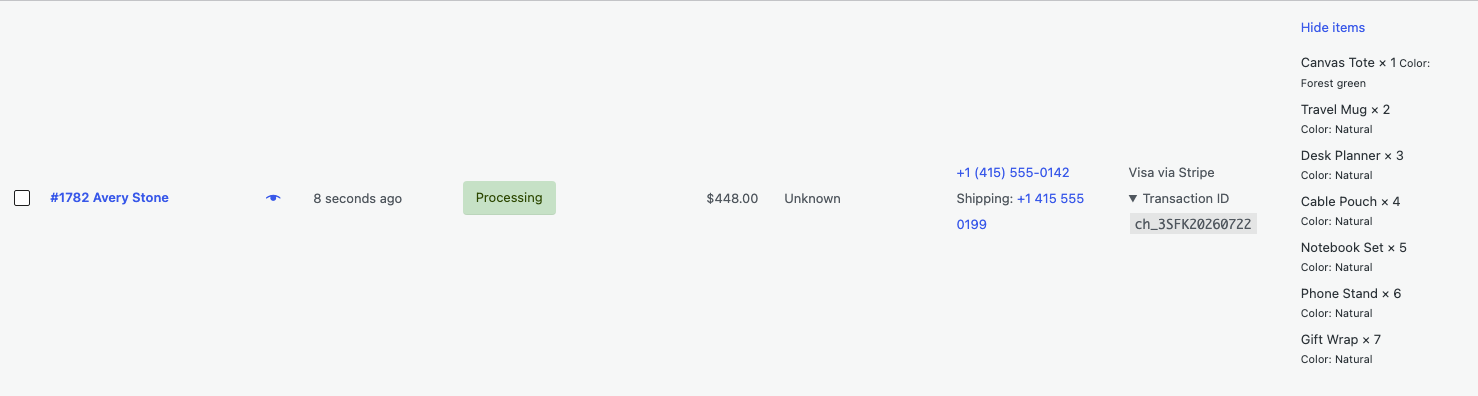
The screenshot above is captured from the real 0.1.13 plugin on a native WooCommerce Orders screen. The wider order-row context is available in orders-list-pro-row.png.
Requirements
| Component | Requirement |
|---|---|
| WordPress | 6.2 or newer |
| PHP | 7.4 or newer |
| WooCommerce | 8.9 or newer, active |
| User access | A role allowed to view WooCommerce orders |
| Planned Pro offer | One site, $39/year after a 14-day no-card trial; checkout pending |
Install and use Free
- Confirm WooCommerce 8.9 or newer is active.
- Open Plugins > Add New > Upload Plugin.
- Upload the Free 0.1.13 ZIP, install it, and activate it.
- Open WooCommerce > Orders.
- Confirm the Payment details column is visible.
- If it is hidden, open Screen Options, select Payment details, and apply the change.
There is no Free settings page. The column reads the saved payment-method title from each current order row and displays it as escaped plain text.
Verify the result
- Use a test order with a known saved payment method.
- Open WooCommerce > Orders.
- Confirm the same payment-method title appears in that order's Payment details column.
- Confirm Free does not show a transaction ID.
- Deactivate Free and reload the Orders list.
- Confirm the added column disappears and the payment and order remain unchanged.
What Free changes
Free registers one column on WooCommerce's classic and HPOS Orders screens. It reads only the payment-method title from the order object already bound to the current row.
Free does not add payment capture, refund, void, retry, gateway requests, sorting, filtering, transaction editing, order editing, export, frontend output, JavaScript, or a settings page.
What Pro adds
When the Pro add-on and its product-bound license are active, the same column can show the saved transaction ID inside a native <details> control. The control starts closed and can be opened with a keyboard. Empty, malformed, or over-limit IDs are omitted while the Free payment-method title remains.
The transaction ID is the value already saved on the WooCommerce order. Pro does not verify it with the gateway and cannot prove settlement, capture, refund, dispute, or payout status.
Free payment-method output remains available if Pro is deactivated, unlicensed, expired, or unable to reach the license service.
Activate or manage Pro
If you have received the Pro ZIP and a license key:
- Keep Free installed and active.
- Upload and activate the Pro 0.1.13 ZIP.
- Open Plugins > Installed Plugins.
- Find Payment Details for WooCommerce Orders Pro and select License.
- Enter the license key and select Activate Pro.
- Return to WooCommerce > Orders and open Transaction ID on one test row.
Activating, refreshing, or deactivating a license is an explicit administrator action. Opening the Orders list does not contact StoreFixKit or a payment gateway.
Supported boundary
This release supports WooCommerce's native classic and HPOS Orders lists. It does not claim support for WooCommerce Analytics, gateway dashboards, settlement reports, frontend pages, REST responses, feeds, emails, exports, custom order tables, or third-party screens that replace the native column hooks.
Troubleshooting
The Payment details column is missing
Confirm WooCommerce 8.9 or newer is active, your role can view orders, and Payment details is enabled under Screen Options.
One row is empty
Open that order and confirm it has a saved payment-method title. Missing, malformed, or row-mismatched values intentionally produce no added output.
Transaction ID is not available
Transaction IDs require active Pro and a nonempty value saved on the order. Some gateways or payment methods do not save one. The plugin does not query the gateway to fill a missing value.
The gateway dashboard shows different wording or status
This column shows local WooCommerce values only. Use the gateway's own dashboard or support process for authoritative payment state.
Roll back safely
- Deactivate Pro and reload WooCommerce > Orders.
- Confirm the Free payment-method title remains and the transaction disclosure is gone.
- Deactivate Free and reload the Orders list.
- Confirm the added Payment details column disappears immediately.
- Confirm the test order, transaction ID, and payment state are unchanged.
- Install a previous deterministic ZIP only when a version rollback is required.
There is no payment or order migration to reverse.
Uninstall and data removal
Free stores no settings or business data. Normal Pro uninstall preserves its license and update state so an accidental deletion can be recovered.
To remove this product's three owned Pro options intentionally, back up the site, define STOREFIXKIT_DELETE_DATA as true in wp-config.php, and then delete Pro. Remove that constant after cleanup. The owned options are sfk_pdol_pro_license, sfk_pdol_pro_update, and sfk_pdol_pro_update_cache.
Orders, payment methods, transaction IDs, gateway data, customers, products, and WooCommerce settings are never deleted.
Privacy, security, and resource use
- The Orders screen is available only to users with WooCommerce order-view capability.
- Payment and transaction values are escaped, bounded, and tied to the current order row.
- Free sends no data to StoreFixKit or another service.
- Pro sends only the license key, site URL, and product key to the StoreFixKit license service, and only when an authorized administrator submits the Activate, Check license now, or Deactivate action. Merely opening the protected license panel makes no remote request.
- No order, customer, phone, item, payment-method, transaction, or gateway data is sent to StoreFixKit.
- The Orders screen makes no StoreFixKit request and no gateway request.
- There is no telemetry, custom table, cron job, queue, JavaScript, stylesheet, order query, payment mutation, or order write.
Frequently asked questions
Does it capture, refund, or retry a payment?
No. It only displays values already saved on the current WooCommerce order.
Does the transaction ID prove the payment settled?
No. It is a local saved identifier, not a live gateway-status check.
Does it send payment details to StoreFixKit?
No. License actions never include order, customer, payment-method, transaction, or gateway data.
Can I sort or filter orders by payment method?
No. This release provides one read-only display column.
Commercial evidence boundary
No sales are claimed. The internal $10,000 MRR target is an unverified product-selection hypothesis, not a forecast or guarantee. At $39 per year it would require about 3,077 active annual customers, while the paying-market size and StoreFixKit acquisition capacity remain unmeasured.
Support, feedback, and reviews
Use StoreFixKit Support. Include the Free and Pro versions, WordPress and WooCommerce versions, whether HPOS is enabled, your user role, the payment gateway name, whether a transaction ID is saved, the expected result, the actual result, and the shortest repeatable steps.
Replace the payment title with a neutral example and show only whether a transaction ID exists. Never send administrator passwords, API keys, customer details, order exports, payment credentials, gateway payloads, full transaction IDs, or a complete license key.
For product feedback, say whether the local payment title is useful, whether the transaction disclosure is understandable, and whether native output returns after deactivation. Once an official WordPress.org listing exists, support can provide the exact review link; this document does not assume that listing is already public.