Free 0.1.2 and Pro 0.1.2 documentation.
Send Orders to Another Email adds private Bcc recipients to selected native WooCommerce admin order emails. It keeps the original recipient, template, attachments, trigger, and delivery method unchanged. It is a recipient-routing tool, not an SMTP or email-delivery service.
Requirements
| Component | Requirement |
|---|---|
| WordPress | 6.2 or newer |
| PHP | 7.4 or newer |
| WooCommerce | 8.9 or newer, active |
| Email source | Native WooCommerce New Order admin email; Pro also supports Cancelled Order and Failed Order |
Install and configure Free
- Install and activate WooCommerce.
- Install Send Orders to Another Email for WooCommerce from WordPress.org after its directory listing is approved, or upload the supplied Free 0.1.2 ZIP.
- Open WooCommerce > Order Email Copy.
- Enter one valid Private copy address.
- Select Send the private copy, then select Save email copy.

The header preview should show the saved address after Bcc:. This confirms that the address passed validation and that the feature is enabled. It does not prove that the receiving mailbox will accept the message.
Test one disposable order
- Confirm the normal WooCommerce New Order email is enabled under WooCommerce > Settings > Emails.
- Place a disposable order through the same checkout used by customers.
- Confirm the original store recipient still receives the native New Order email.
- Confirm the private-copy mailbox receives the same native message.
- Check spam and quarantine folders if either copy is delayed.
- Remove or cancel the disposable order according to the store's normal test procedure.
The plugin does not create a second email job. It appends one validated Bcc header while WooCommerce is already building the native message.
What Free changes
Free runs only for the native new_order email. When the setting is enabled and the address is valid, it appends that address to the existing header string as Bcc. It does not replace To, Reply-To, templates, attachments, subject lines, or email triggers.
When the feature is disabled, the address is invalid, the email identifier is different, or WooCommerce supplies an unexpected header value, the original headers are returned unchanged.
What Pro adds
Pro accepts up to five unique valid private-copy addresses in total and lets the store select New Order, Cancelled Order, and Failed Order admin emails. Put one address on each line and select only the messages those recipients should receive.
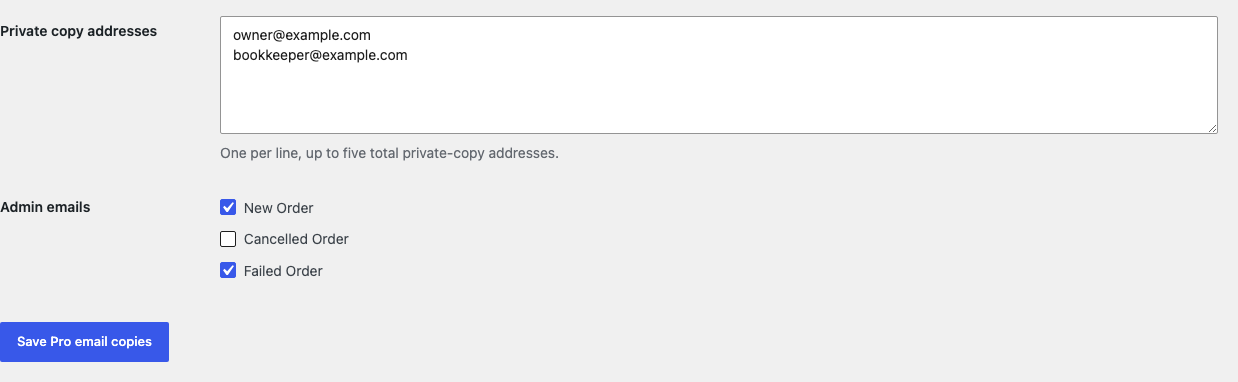
Pro does not add customer emails, subscription emails, custom status emails, marketing campaigns, delayed sends, conditional code, an email builder, or an SMTP provider. If Pro, billing, or the license service is unavailable, the complete Free New Order rule continues locally.
Start the 14-day Pro trial
- Open the Send Orders to Another Email product page.
- Select Start 14-day trial. No card is required to begin.
- Stripe returns to the StoreFixKit success page; the signed webhook creates a product-bound single-site license.
- Copy the license key and download the Pro 0.1.2 ZIP.
- Keep Free active, upload and activate Pro, and paste the key in WooCommerce > Order Email Copy.
- Add a payment method before day 14 only if you want the $99/year subscription to continue. Without one, Stripe cancels it at trial end.
Privacy, security, and resource use
- Settings require
manage_woocommerceand WordPress nonces. - Addresses reject invalid values and header line breaks; duplicates are removed case-insensitively.
- The final Pro list is capped at five addresses.
- The plugin never stores email bodies, attachments, order details, customer details, or a delivery log.
- There is no cron job, queue, custom table, historical order scan, frontend asset, telemetry, or storefront StoreFixKit request.
- The only storefront-independent work is one bounded header pass when WooCommerce is already generating an eligible admin email.
Troubleshooting
The header preview says Disabled
Enter a complete email address, select Send the private copy, and save again. WordPress disables the rule when the address fails validation.
The preview is correct but no message arrives
The routing setting is valid, but delivery is a separate system. Confirm the native WooCommerce message was generated, inspect the site's mail log if one already exists, check spam and mailbox rules, and test the site's SMTP or hosting mail configuration. StoreFixKit does not repair sender authentication, DNS, SMTP, mailbox rejection, or provider throttling.
The original store recipient stopped receiving email
Deactivate Free and Pro and place another disposable order. This plugin never removes the original recipient, so the same failure without StoreFixKit points to WooCommerce email settings or delivery infrastructure. Include the before-and-after result in a support request.
A Pro address receives the wrong email type
Open the Pro settings, verify the checked native email names, save, and create a matching disposable order state. Custom email plugins can use different identifiers and are outside this release's three supported native IDs.
The same address appears more than once
The plugin removes duplicates from its own list and does not add an address already present in the header. Check WooCommerce settings and other email-recipient plugins for a separate copy rule.
Rollback
- Back up the database and both current ZIPs.
- Record the current Free address, Pro addresses, and selected email names.
- Deactivate Pro, then Free. Native WooCommerce recipients return immediately because no template or order data was changed.
- Install the tested Free 0.1.0 and Pro 0.1.0 baseline ZIPs if an older-code comparison is required.
- Activate Free first, then Pro, and repeat one disposable New Order test.
- Return to 0.1.2 with the same process after the comparison.
Versions 0.1.0 and 0.1.2 use the same bounded options and require no schema migration.
Uninstall
Default uninstall preserves settings so an accidental deletion is reversible. To erase only StoreFixKit-owned options during uninstall, define STOREFIXKIT_DELETE_DATA as true before deleting the plugins. Free removes sfk_oec_settings; Pro removes sfk_oec_pro_settings and sfk_oec_pro_license.
WooCommerce email settings, templates, orders, customers, recipients owned by other plugins, and site mail configuration are never deleted.
StoreFixKit Support
Use StoreFixKit Support and include the affected native email name, expected private-copy mailbox with most of the address redacted, whether the header preview is correct, whether the original recipient received the message, Free and Pro versions, WordPress and WooCommerce versions, mail/SMTP plugin name, and a screenshot with customer information removed. Never send credentials, order contents, full customer data, API keys, SMTP passwords, or a full license key.