Documentation & Setup Guide
LinguaKit – Complete Setup & Multilingual SEO Tutorial
Go from a single-language WordPress or WooCommerce site to clean subdirectory URLs (/de/, /es/, /ja/, /ar/) with hreflang sitemaps, quality checks, and visual click-to-edit in under 10 minutes.
1. Prerequisites & Permalinks
- WordPress 5.8+ (tested up to 7.1) and PHP 7.4+ with
sodium(oropenssl),mbstring, andDOMenabled. - Pretty Permalinks: go to Settings → Permalinks and select Post name (or any non-plain structure). Subdirectory language URLs require WordPress rewrite rules.
- Single-site activation: on multisite networks, activate LinguaKit individually on each site you want to translate.
- No concurrent multilingual plugin: deactivate TranslatePress, WPML, or Polylang before activating LinguaKit (see Polylang Legacy Bridge below if you have existing Polylang posts).
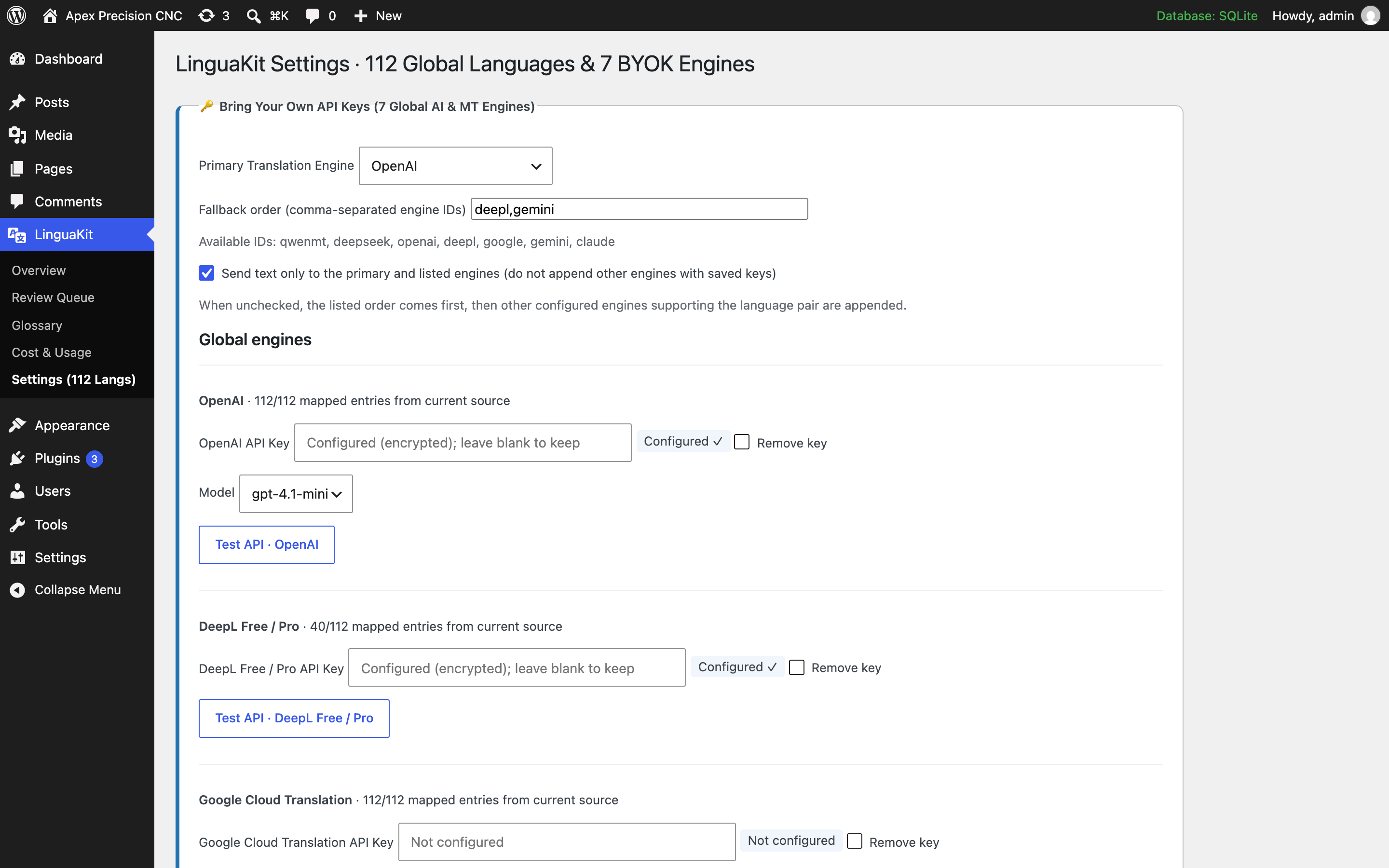
2. Choosing & Testing a BYOK Engine (7 Providers)
Open LinguaKit → Settings (112 Langs). Paste an API key for any provider below—keys are encrypted at rest with your site's WordPress salts and never touch StoreFixKit servers.
| Provider | Models / Modes | Billing Unit | Best For |
|---|---|---|---|
| OpenAI | gpt-4.1-mini, gpt-4o-mini, gpt-4.1 | Tokens | All-round B2B copy, technical specs, all 112 entries |
| DeepL Free / Pro | Auto Free (:fx) / Pro | Characters | High-fluency European languages; 500k chars/mo free tier |
| Google Cloud Translation | v2 Neural MT | Characters | Broad global language coverage & predictable pricing |
| Google Gemini | gemini-2.5-flash, gemini-2.0-flash | Tokens | Long technical pages (1M context) at low token cost |
| Anthropic Claude | claude-3-5-haiku-latest, claude-sonnet-4 | Tokens | Brand voice & editorial landing pages |
| Alibaba Qwen-MT | qwen-mt-flash, turbo, plus | Tokens | Native glossary injection & high-volume CJK/export sites |
| DeepSeek | deepseek-chat | Tokens | Ultra-economical high-volume catalogs |
Hello → Hola).
3. Selecting Languages & Switcher Style
- Confirm Website Source Language matches your site's actual content (e.g.,
enfor English orzhfor Simplified Chinese). Once translations exist, the source language locks to prevent cross-language contamination. - In the Target Languages (112) matrix, tick individual languages or click a one-click regional preset (Top 12 Global Trade, + All Europe, + APAC & ASEAN, + Middle East & Africa). RTL languages display an
RTLbadge. - Choose Frontend Switcher Style: Smart Auto displays inline pills for ≤3 languages and a compact searchable dropdown for 4+ languages. You can also place the switcher anywhere in Elementor or Gutenberg with the shortcode
[linguakit_switcher]. - Set a Monthly Budget Cap, tick Enable Translation, and click Save Settings.
4. Preflight, Scanning & 90% Publish Gate
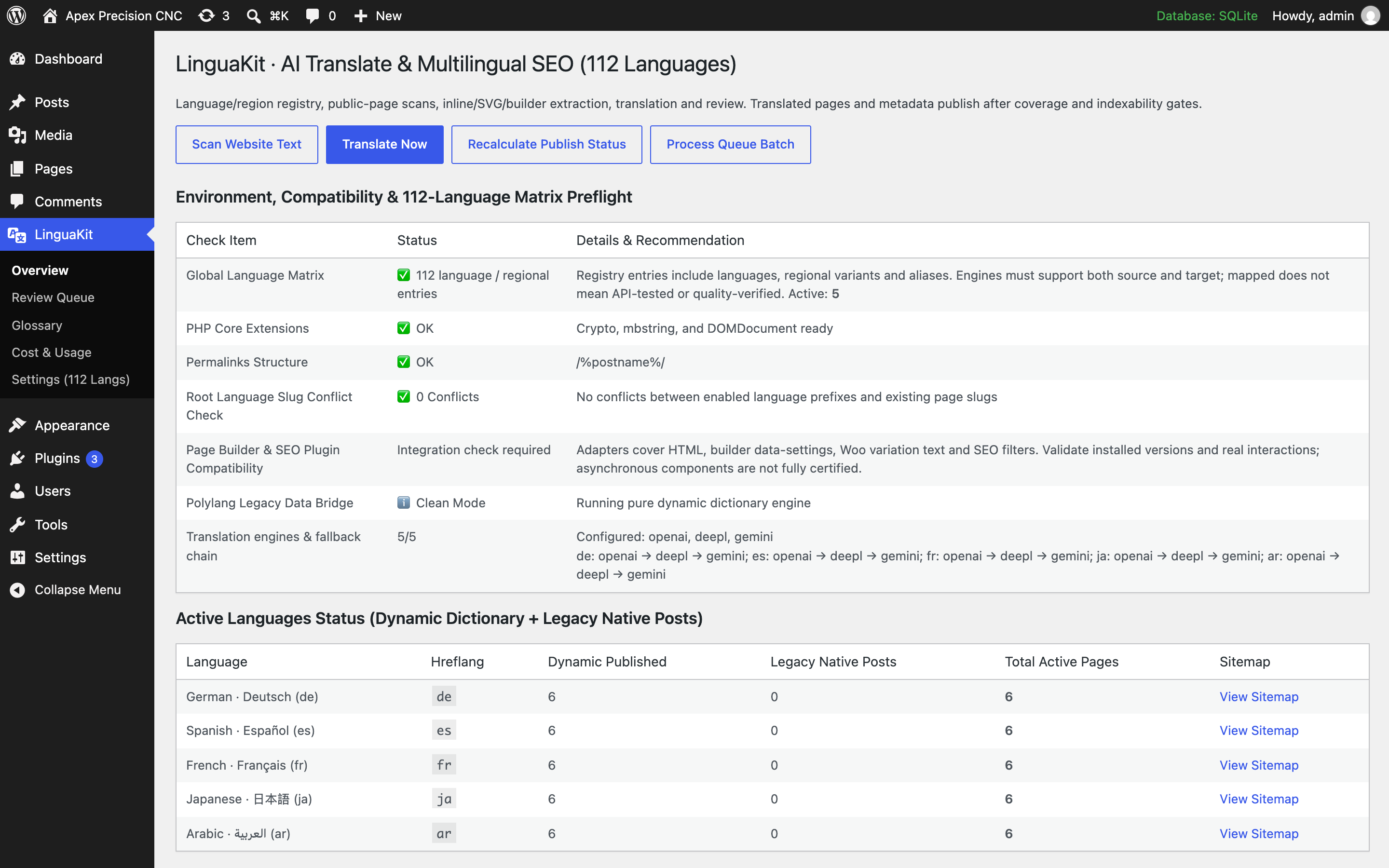
Open LinguaKit → Overview and verify the Preflight Check table:
- Root Language Slug Conflict Check: if you already have a root page whose slug matches an enabled language code (for example a page at
/de/), LinguaKit automatically withholds that language from routing andhreflangso your existing page is never hijacked. - Click Scan Website Text to extract visible HTML, headings, WooCommerce product copy, Elementor widgets, inline SVG labels, and SEO titles/descriptions from public pages (respecting
noindex). - Click Translate Now (or let WP-Cron process batches every 5 minutes). Each page publishes to its language sitemap and
hreflangonce ≥90% of its strings pass the quality gate.
5. Visual Click-to-Edit (?ts_edit=1) & Glossary
Visit any translated URL (such as /de/) while logged in as an administrator:
- Verify the translated headings, navigation, and searchable language switcher on the live page.
- Click Edit this translation in the top WordPress Admin Bar (adds
?ts_edit=1). - Click any highlighted text block on the page. The editor modal shows the exact Field, Source, and Translation.
- Refine the wording and click Save and lock. Locked translations are immediately live and immune to future AI overwrites.
For recurring brand names, model numbers (e.g., XR-400), or mandatory industry terms, add rules under LinguaKit → Glossary with Do not translate or a fixed target translation per language.
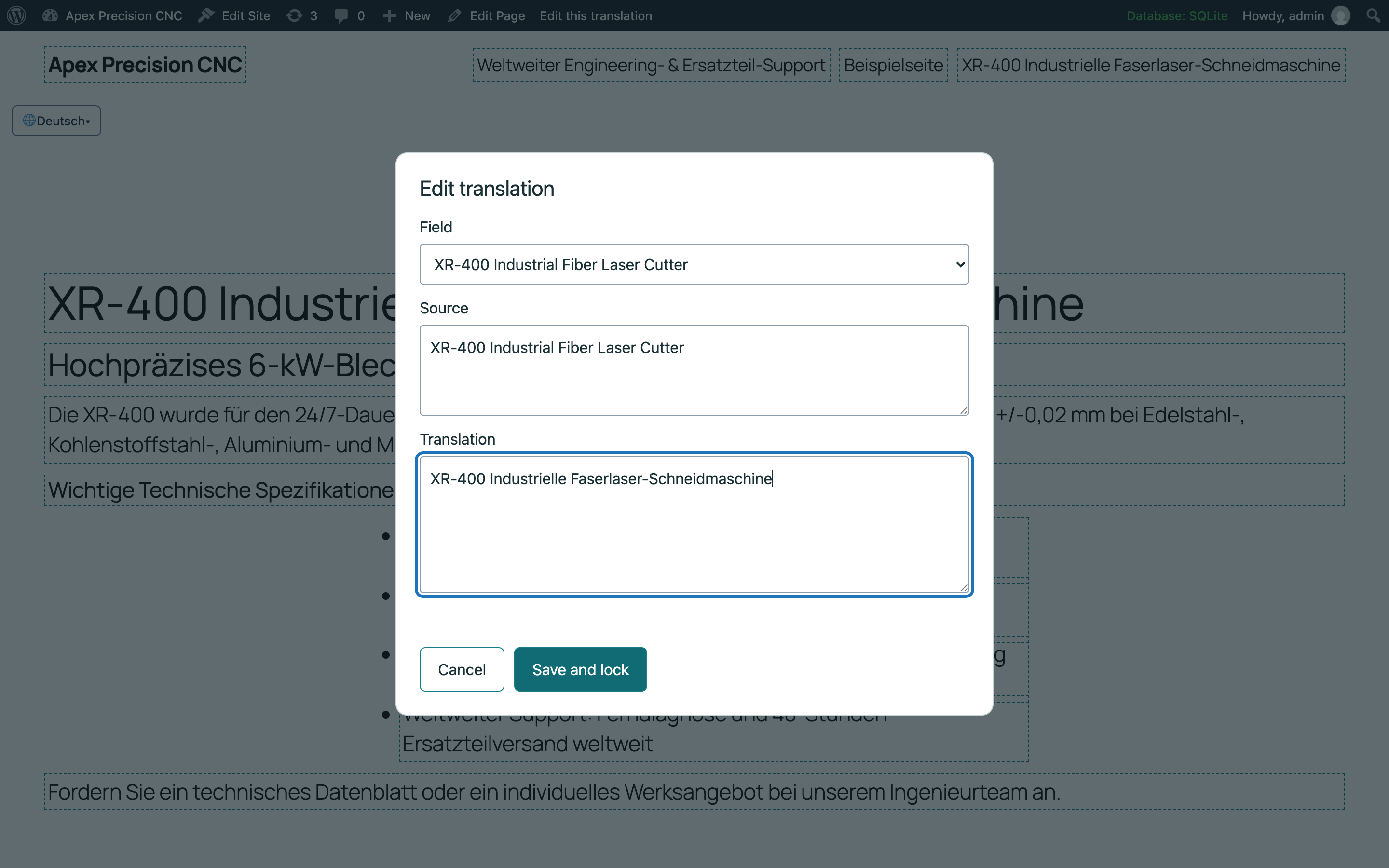
?ts_edit=1 mode to edit and lock human translations.6. Quality Gate Review Queue & Monthly Budget Cap
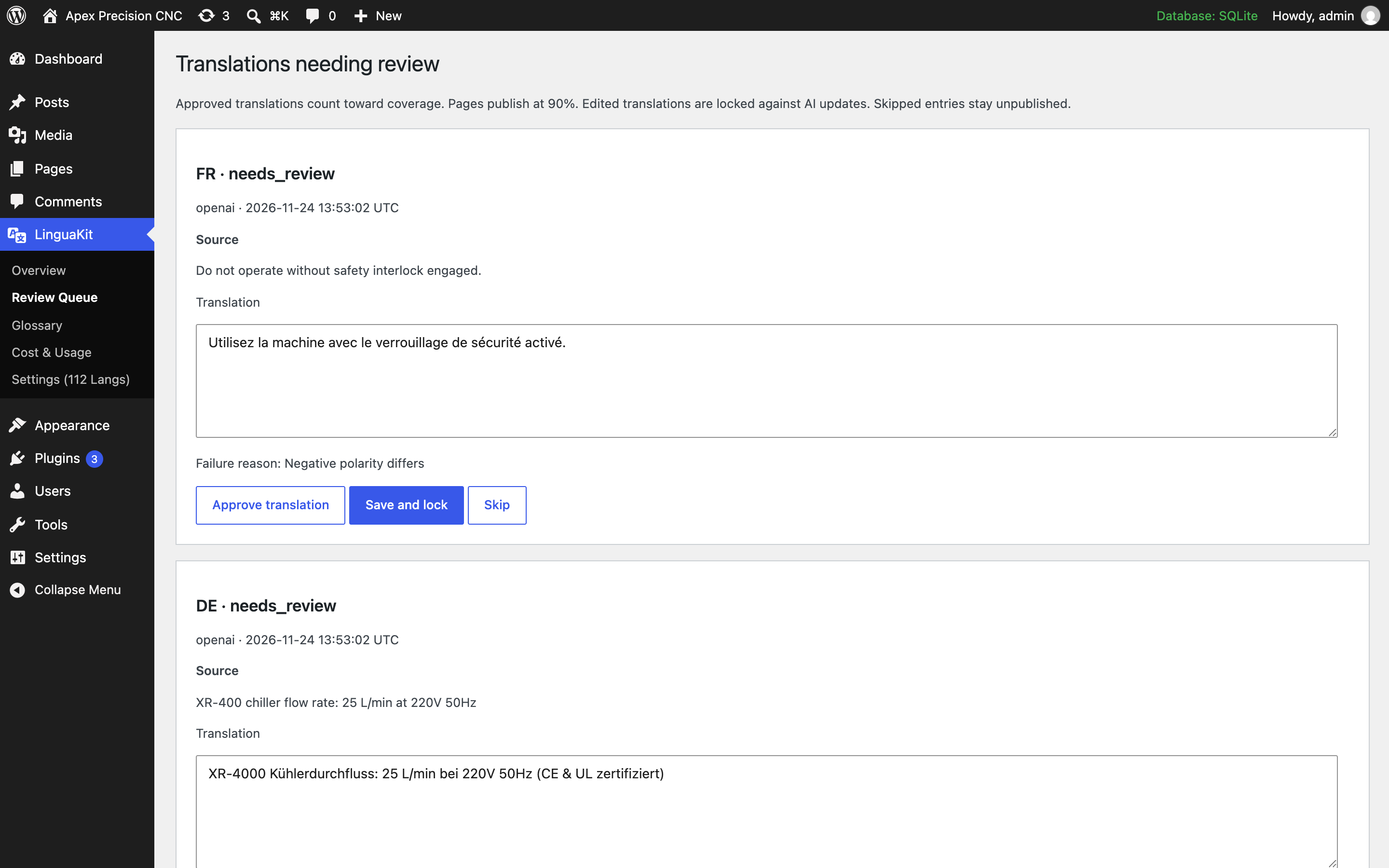
Strings that fail any deterministic check—such as missing inline HTML placeholders, altered numbers/units, hallucinated certifications, flipped negations, omissions, or repeated sentences—are routed to LinguaKit → Review Queue with plain-language failure reasons. Edit and approve them in one click.
Track monthly token/character usage under LinguaKit → Cost & Usage. If spend reaches your Monthly Budget Cap, new paid batches pause cleanly while existing translated pages stay live.
7. Google Search Console & Multilingual SEO Checklist
- Open LinguaKit → Overview and click View Sitemap next to each active language (
/ts-sitemap-de-1.xml,/ts-sitemap-es-1.xml, etc.). Confirm HTTP 200 and clean localized URLs. - View page source on a translated URL and confirm:
<html lang="...">(plusdir="rtl"for RTL), self-referencing<link rel="canonical">, and reciprocal<link rel="alternate" hreflang="...">+x-default. - Submit each
/ts-sitemap-{lang}-1.xml(or your sitemap index) in Google Search Console → Sitemaps. - Do not block translated subdirectories in
robots.txtor add auto-IP redirects that trap Googlebot on one language.
8. Migrating from Polylang & Clean Uninstall
Migrating from Polylang: Deactivate Polylang (do not delete your posts) and activate LinguaKit. The Preflight table will automatically report Polylang Legacy Data Bridge: Bridged, continuing to serve existing translated posts alongside new dynamic languages.
Clean Uninstall: Deleting LinguaKit via Plugins → Delete drops all {prefix}ts_* tables, deletes all plugin options and cron jobs, and removes temporary indexability meta while leaving all original WordPress posts, WooCommerce products, and Elementor layouts intact.