Free 0.1.1 and Pro 0.1.1 documentation.
From Price for WooCommerce Variations does one job: it replaces a true variable-product price range such as $19-$49 with WooCommerce's formatted minimum display price and a short prefix such as From. It does not change any saved product, variation, cart, checkout, tax, currency, or order price.
Requirements
| Component | Requirement |
|---|---|
| WordPress | 6.2 or newer |
| PHP | 7.4 or newer |
| WooCommerce | 8.9 or newer, active |
| Products | Native WooCommerce variable products with unequal display prices |
| Access | A user who can manage WooCommerce |
Install the free plugin
- Install and activate WooCommerce.
- Install From Price for WooCommerce Variations from WordPress.org after its directory listing is approved, or upload the supplied Free 0.1.1 ZIP for testing.
- Activate the plugin.
- Open WooCommerce > From Price.
If WooCommerce is unavailable, the plugin registers no price filter. WordPress continues loading and shows one admin notice.
Turn on the store-wide display
- Open WooCommerce > From Price.
- Select Show From price for variable products with a real price range.
- Keep
Fromor enter a short prefix such asStarting atorPrices from. - Select Save changes.
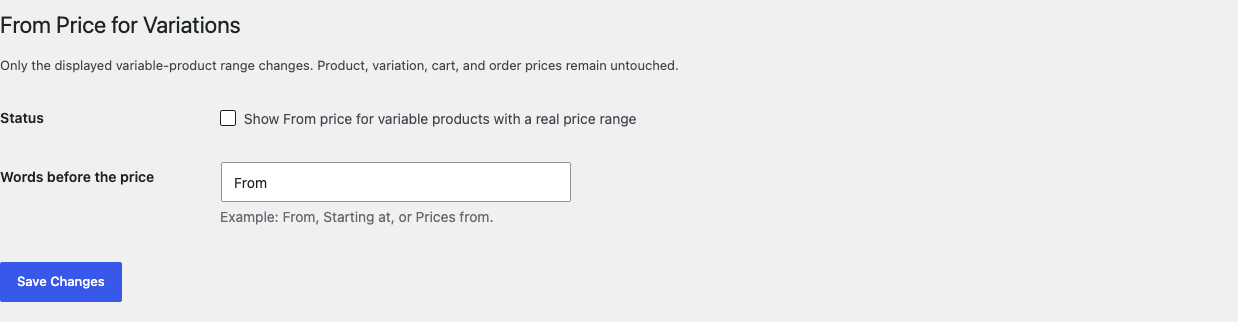
The prefix is plain text and is limited to 40 characters. When it is empty, the translated From fallback is used. HTML, shortcodes, badges, discount calculations, and links are not rendered from the field.
Test a variable product
- Choose a variable product with at least two purchasable variations that have different displayed prices.
- Open its shop card and product page in a private browser window.
- Confirm the original minimum-to-maximum range is replaced by the prefix plus minimum price.
- Select a variation and confirm WooCommerce still shows its own selected-variation price.
- Add the variation to the cart and confirm the cart, tax, checkout, and order use the saved variation price.
- Test a simple product and an equal-price variable product; both should keep their original WooCommerce HTML.

The minimum is obtained from WooCommerce's display-aware variation price and formatted with wc_price. The result therefore follows the store's WooCommerce currency and tax-display configuration. The plugin does not implement its own variation scan or price formula.
When the original price remains
The original WooCommerce HTML is returned when:
- the setting is off and no active Pro assignment applies;
- the product is not a native variable product;
- the minimum or maximum is missing, malformed, negative, or nonnumeric;
- the minimum and maximum displayed prices are equal;
- WooCommerce, the product object, or the required methods are unavailable.
Returning the original value is safer than guessing a price.
Free and Pro
Free applies the From-price display store-wide. Pro can apply it to selected products or categories even when the Free switch is off, add one short suffix, and keep selected products on Free behavior.

The behavior is deliberately bounded:
- When the Free store-wide switch is on, every eligible variable-product range uses the Free display unless a matching Pro assignment supplies Pro wording.
- When the Free switch is off, a product checkbox, selected product, or selected category can enable the Pro display.
- Products that keep Free behavior and the product Ignore Pro assignments checkbox ignore Pro assignments; they still follow the current Free switch.
- A matching Pro assignment can replace the prefix and add one suffix such as
per set. - The selected variation's own browser behavior remains WooCommerce's job.
Pro does not change grouped products, bundles, dynamic pricing, sale calculations, discount badges, variation JavaScript, schema, feeds, exports, REST responses, admin price columns, or caches.
Start the 14-day Pro trial
- Open the product page.
- Select Start 14-day trial. No card is required to begin.
- Stripe returns to the StoreFixKit success page and the signed webhook creates a license bound to From Price Pro.
- Copy the license key and download the Pro 0.1.1 ZIP.
- Add a payment method through Add payment method / manage billing before day 14 to continue the $39 annual subscription. Stripe cancels the subscription at trial end when no payment method has been added.
Install and activate Pro
- Keep WooCommerce and Free active.
- Upload and activate the Pro ZIP beside Free.
- Open WooCommerce > From Price Pro.
- Paste the From Price license key and select Activate Pro.
- Enter the Pro words before and, if needed, after the price.
- Choose selected products or categories.
- Add exceptions only where the current Free behavior should remain.
- Save and test a selected product, a selected category, an exception, an equal-price variable product, and a simple product.
Use Check license now to refresh status or Deactivate Pro on this site before moving the license. A failed license or network check cannot disable the saved Free store-wide display.
SEO, feeds, and structured data
This release filters native WooCommerce variable price HTML. It does not promise to change structured data, a merchant feed, REST response, custom block, theme-specific field, social preview, cached copy, or an already indexed search result.
After enabling the display, inspect the visible archive, product page, page source, structured-data test, product feed, and cache used by the store. If policy requires one consistent value across every publication channel, use a broader catalog-governance workflow and test each owner separately.
Safety and resource use
- No saved product, variation, regular, sale, cart, checkout, tax, currency, order, refund, or subscription price mutation.
- No product or variation write during storefront rendering.
- No plugin-owned variation query or scan, custom price formula, template override, custom table, cron event, frontend JavaScript, frontend stylesheet, telemetry, customer cookie, or storefront remote request.
- Uses WooCommerce's cached display-price methods and formatter only when a native variable range is rendered.
- Invalid state, missing WooCommerce, inactive Pro, or unavailable licensing returns the previous price HTML unchanged.
Troubleshooting
The price range is still visible
Confirm WooCommerce and Free 0.1.1 are active, the Free switch is enabled or an active Pro assignment applies, and the product is a native variable product with unequal displayed prices. Clear product, page, object, and CDN caches.
A Product Collection block still shows a range
Confirm the block uses WooCommerce's native variable price HTML filter and clear its cache. A custom block that builds price markup from REST, JavaScript, or its own template is outside this release boundary. The plugin does not inject selectors or replace block templates.
The selected variation shows a normal price
That is intentional. This release changes the initial variable-product range only. WooCommerce remains responsible for the price shown after the shopper selects a variation.
The wrong minimum appears
Check variation regular and sale prices, tax display, customer location, currency switcher, and dynamic-pricing extensions. The plugin uses the minimum display price WooCommerce returns; it does not calculate a separate business price.
An equal-price product did not change
That is intentional. A single price is clearer than adding a From prefix when every available variation has the same displayed price.
An exception still uses From price
An exception keeps Free behavior. If the Free store-wide switch is on, it still receives the Free display. Turn off the Free switch when the desired model is Pro assignments only.
Rollback
- Back up the database and retain Free and Pro 0.1.1 plus the previous known-good ZIPs.
- Deactivate Pro and Free.
- Confirm WooCommerce immediately returns its original variable price ranges.
- Install the previous ZIPs.
- Activate Free first, then Pro.
- Confirm the Free switch, prefix, Pro assignments, suffix, and exceptions remain saved.
- Test one unequal-price product, one equal-price product, one simple product, one Pro match, and one exception.
The verified package-replacement drill preserves owned settings. Deactivation restores WooCommerce's original price HTML without editing product or order data.
Uninstall
Deleting Free removes only sfk_fp_settings. Deleting Pro removes _sfk_fp_enabled, _sfk_fp_opt_out, sfk_fp_pro_rules, and its license option.
Product and variation prices, sale schedules, tax settings, currencies, carts, orders, customers, and unrelated options remain unchanged. The release drill verifies historical WooCommerce order data survives both uninstalls.
StoreFixKit Support
Use StoreFixKit Support and include the product ID, product type, minimum and maximum displayed variation prices, tax display, currency, Free switch, matching Pro assignment, Free and Pro versions, WooCommerce version, theme or block name, cache/CDN details, exact page URL, expected result, actual result, and screenshots. Remove customer data, credentials, payment details, and full license keys.