Free 0.1.1 and Pro 0.1.3 documentation.
Thank You Page for Contact Form 7 does one job: after Contact Form 7 confirms that an AJAX email submission succeeded, it opens a published page on the same WordPress site. It does not redirect spam, invalid forms, aborted submissions, or failed mail.
Requirements
| Component | Requirement |
|---|---|
| WordPress | 6.0 or newer |
| PHP | 7.4 or newer |
| Contact Form 7 | 6.0 or newer, active |
| Destination | A published WordPress page on the same site |
| Browser flow | Contact Form 7 AJAX and JavaScript for the redirect |
Install the free plugin
- Install and activate Contact Form 7.
- Install Thank You Page for Contact Form 7 from WordPress.org after its directory listing is approved, or upload the release ZIP supplied for testing.
- Activate the plugin.
- Open Contact > Thank You Page.
The free plugin needs no StoreFixKit account, license key, remote service, or scheduled task.
Create the first mapping
- Choose the Contact Form 7 form.
- Choose a published internal thank-you page.
- Turn the mapping on.
- Select Save changes.
- Open the public form in a private browser window and send one real test message.
The confirmation shown after saving is: Your form now opens this thank-you page after a successful submission.
What a visitor sees
Contact Form 7 first processes the submission. Only its documented wpcf7mailsent event starts the redirect. The browser checks that the destination is on the current WordPress origin, waits for the configured delay when Pro is active, and navigates once.

The plugin deliberately does nothing when:
- Contact Form 7 reports spam, invalid input, an aborted request, or failed mail.
- The selected form no longer exists.
- The selected page is missing, private, draft, trashed, or on another origin.
- Contact Form 7 runs without AJAX or the browser has no JavaScript.
- The same success event fires again after navigation has already started.
In those cases, Contact Form 7 keeps its normal feedback. The plugin never invents a success state.
Free and Pro
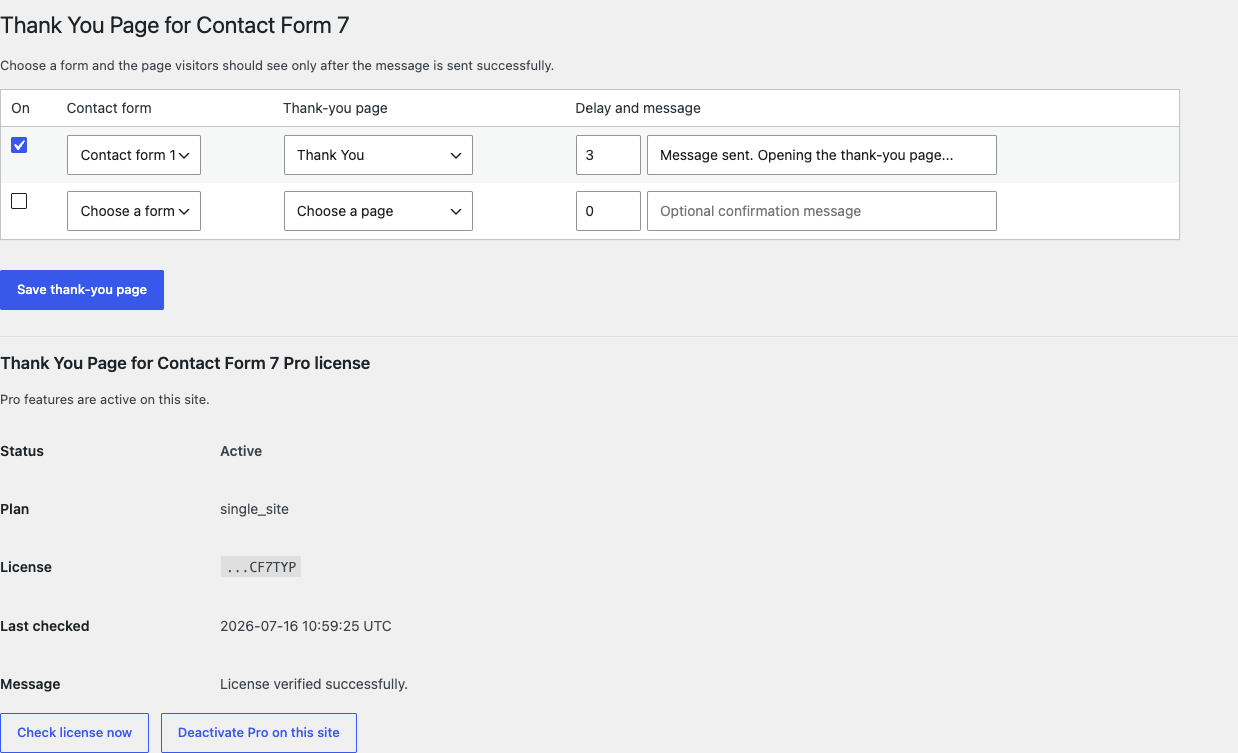
Free keeps working with one enabled form-to-page mapping. Pro raises the safety limit to 1,000 mappings and adds a per-form delay from zero to ten seconds plus an accessible confirmation message.
Pro does not unlock external URLs, submitted-field query strings, custom scripts, webhooks, form-entry storage, or analytics. Those are outside this product's safety boundary.
Start the 14-day Pro trial
- Open the product page.
- Select Start 14-day trial. No card is required to begin.
- Stripe returns to the StoreFixKit success page after checkout.
- Wait for the signed webhook to create the product-bound license.
- Copy the license key and download the Pro 0.1.3 ZIP.
- Before day 14, use Add payment method / manage billing if you want the annual subscription to continue. Without a payment method, Stripe cancels it at the end of the trial.
Install and activate Pro
- Keep the free plugin and Contact Form 7 active.
- Open Plugins > Add New > Upload Plugin and upload the Pro ZIP.
- Activate the Pro add-on.
- Return to Contact > Thank You Page.
- Paste the StoreFixKit license key into the Pro license panel and select Activate Pro.
The panel shows the status, site count, last check, and only the final characters of the key. Check license now refreshes the status. Deactivate Pro on this site releases the activation without deleting the free mapping.
Privacy, security, and resource use
- Submitted names, email addresses, messages, and other form fields are never stored by this plugin.
- The only free setting is the owned
sfk_cf7_typ_settingsoption. - Settings writes require Contact Form 7's form-edit capability and a WordPress nonce.
- Form and page IDs are checked on save; output is escaped.
- Public pages make no remote request and no server write for a redirect.
- The frontend script loads only when a rendered Contact Form 7 form has an enabled mapping.
- There is no custom table, cron event, telemetry, or analytics request.
Troubleshooting
A successful form stays on the same page
Confirm that the public form uses Contact Form 7's AJAX flow and that JavaScript is enabled. Open the browser console, submit again, and check whether another optimization or form add-on prevents the documented wpcf7mailsent event. Also confirm that the mapping is enabled for the exact form shown on the page.
The wrong page opens
Open Contact > Thank You Page, check the selected page title, and save again. Pro sites should check every row because each form has its own destination.
Validation errors redirect
That is not expected. Clear page and CDN caches, disable other Contact Form 7 redirect snippets or add-ons, and retest with only Contact Form 7 plus StoreFixKit active. This plugin does not listen to validation, spam, aborted, or mail-failed events.
Pro controls disappear
Free keeps working. Check that the Pro add-on is active, select Check license now, and verify that the key belongs to this product and this site. A temporary StoreFixKit API outage never removes the saved free mapping.
There is a conflict after an update
Take a screenshot of the visible error, note the WordPress, PHP, Contact Form 7, Free, and Pro versions, then use the rollback steps below. Do not delete the Contact Form 7 form or destination page.
Rollback
- Back up the database and the current plugin ZIPs.
- Deactivate the current Free and Pro versions.
- Install the previous known-good ZIPs.
- Reactivate Free first, then Pro.
- Confirm the saved mapping and send one real test message.
The plugin has no schema migration and does not modify Contact Form 7 forms or WordPress pages. A previous version can read the owned setting. If only Pro is rolled back or removed, Free keeps working with the first valid mapping.
Uninstall
Deleting the free plugin removes only sfk_cf7_typ_settings. Deleting Pro removes only its own license option. Contact Form 7 forms, WordPress pages, form submissions handled by other products, and site content remain untouched.
StoreFixKit Support
Use StoreFixKit Support and include the public form URL, WordPress version, Contact Form 7 version, Free and Pro versions, the last four license characters, the expected page, the actual result, and screenshots. Never send a full license key, Stripe secret, WordPress password, or customer form message.