Free 0.1.0 and Pro 0.1.0 documentation.
Auto Complete Virtual Orders lets a gateway-paid order whose line items are all native virtual products arrive as Completed through WooCommerce's own payment-complete status filter. It is one bounded status decision, not an order scanner, bulk updater, or fulfillment engine.
Requirements
| Component | Requirement |
|---|---|
| WordPress | 6.2 or newer |
| PHP | 7.4 or newer |
| WooCommerce | 8.9 or newer, active |
| Supported order | A gateway-paid order whose every line item is a native virtual product |
| Pro plan | One site, $49/year after a 14-day trial |
Enable the Free switch
- Install and activate WooCommerce.
- Install Auto Complete Virtual Orders for WooCommerce from WordPress.org after its listing is approved, or upload the supplied Free 0.1.0 ZIP.
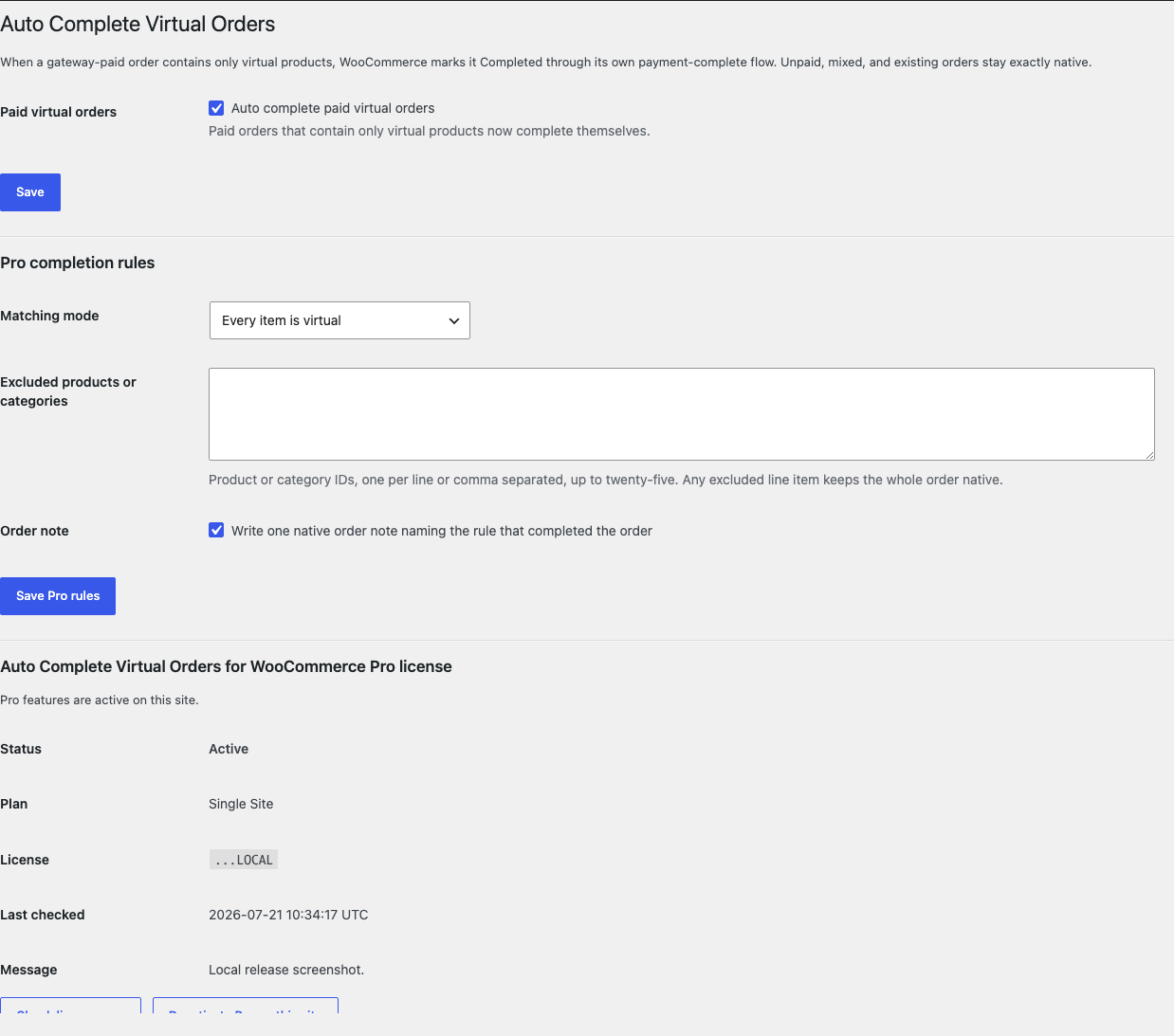
- Open WooCommerce > Auto Complete Virtual Orders.
- Enable Auto complete paid virtual orders.
- Select Save.
Verify one paid test order
- Create or reuse one native virtual product.
- Place one gateway-paid test order containing only that product.
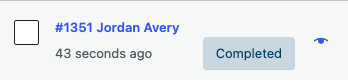
- Open WooCommerce > Orders and confirm the new order arrived as Completed.
- Place one order that mixes in a physical product and confirm it keeps its native status.
- Confirm every existing order kept the status it already had.

What Free changes
Free stores one local option, sfk_acvo_settings, containing the enabled switch. When WooCommerce's native payment-complete status filter runs for a paying order, Free loops that order's line items once. Only when every line item resolves to a native virtual product does it return Completed; native Completed mail then behaves as WooCommerce ships it.
Free never touches unpaid orders, manual-gateway orders awaiting payment, mixed or physical orders, existing orders, drafts, refunds, or subscriptions. It runs no background scan, bulk update, retroactive completion, cron, queue, or Action Scheduler job, and changes no product, price, stock value, coupon, cart, checkout, webhook, report, or customer record.
What Pro adds
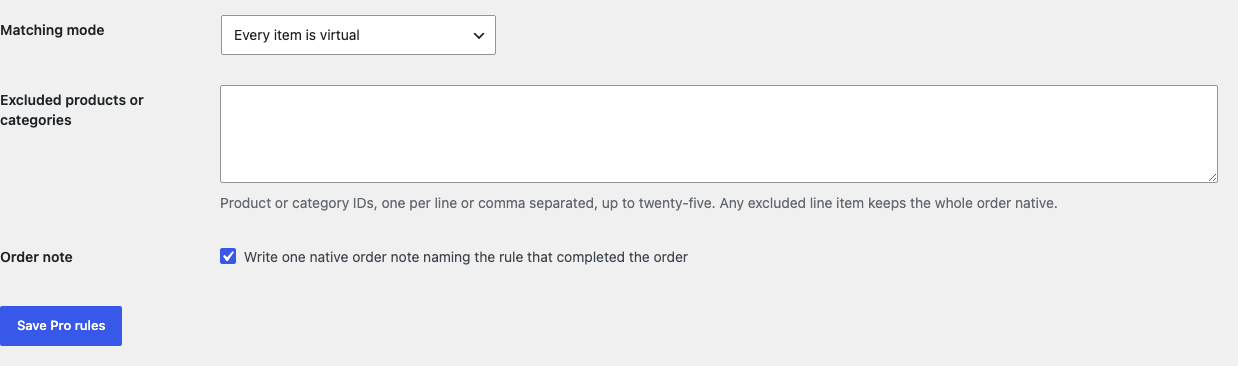
Pro adds three bounded local choices:
- all-virtual or virtual-plus-downloadable matching with one selector;
- at most twenty-five excluded products or categories, where any excluded line item leaves the whole order native;
- at most one native order note naming the rule that completed the order.
If Pro, Stripe, the network, or the StoreFixKit license API is unavailable, the valid Free all-virtual switch continues locally.
Start the 14-day Pro trial
- Open the Auto Complete Virtual Orders product page.
- Select Start 14-day trial. No card is required to begin.
- Stripe returns to StoreFixKit after checkout; a signed webhook creates a product-bound license.
- Copy the license key and download the Pro 0.1.0 ZIP.
- Keep Free active, upload and activate Pro, then activate its license.
- Add a payment method before day 14 only if you want the $49/year subscription to continue. Without one, Stripe cancels it at trial end.
Compatibility boundary
This release decides one status through WooCommerce's native woocommerce_payment_complete_order_status filter. A gateway that never calls the native payment-complete flow, such as a manual bank transfer still awaiting review, keeps its native status on purpose.
StoreFixKit does not add gateway-specific rules, capture payments, issue refunds or invoices, deliver files or licenses, or complete subscription and membership workflows. It does not scan or bulk-update existing orders to force consistency.
Privacy, security, and resource use
- Settings writes require
manage_woocommerceand WordPress's settings nonce. - The Pro exclusion list is capped at twenty-five products or categories and sanitized before storage.
- The decision runs only inside the native payment-complete call and loops the paying order's items once.
- At most one native order note is written, and only on the exact order the Pro rule completed.
- The storefront performs no StoreFixKit or third-party HTTP request and stores no personal data.
- There is no order scan, custom table, cron, Action Scheduler job, queue, telemetry, JavaScript, or stylesheet.
Troubleshooting
A paid virtual order stayed Processing
Confirm the Free switch is saved, every line item is a native virtual product, and the gateway actually ran WooCommerce's payment-complete flow. One physical, missing, or malformed line item intentionally keeps the whole order native.
A bank transfer or cash on delivery order did not complete
Manual gateways awaiting payment do not fire the native payment-complete flow, so nothing changes. StoreFixKit does not force a transition outside that flow.
Older orders did not change
Free and Pro decide only new payment-complete calls. There is deliberately no retroactive completion or bulk update; use WooCommerce's own bulk actions for history.
A downloadable product kept the order on Processing
A downloadable-but-not-virtual product does not match the Free rule. Pro's virtual-plus-downloadable mode covers it; confirm Pro is active and that mode is saved.
No order note appears
Confirm Pro is active, the order note switch is saved, and the Pro rule rather than a person completed the order. Free writes no order notes at all.
Rollback and uninstall
- Back up the database and keep the deterministic 0.1.0 Free and Pro ZIPs.
- Deactivate Pro and confirm the Free all-virtual switch still completes a paid test order.
- Deactivate Free and confirm new paid virtual orders keep WooCommerce's native status while existing orders remain unchanged.
- Reinstall the 0.1.0 Free ZIP, then the matching Pro ZIP if needed.
- Test one paid virtual order and one mixed order before relying on the restored release.
The verified release drill installed a synthetic 0.0.1 baseline, updated to 0.1.0, downgraded, rolled forward, deactivated, and exercised both uninstall modes while preserving WooCommerce product and order data.
Normal uninstall preserves Free settings, Pro settings, and the license for accidental recovery. Define STOREFIXKIT_DELETE_DATA as true before deletion only when you deliberately want Free to remove sfk_acvo_settings and Pro to remove sfk_acvo_pro_settings plus its license option. Orders, order notes, statuses, products, prices, stock, carts, customers, and third-party data are never deleted.
StoreFixKit Support
Use StoreFixKit Support and include the affected order ID without customer data, the payment gateway, each line item's product type, expected and actual status, Free and Pro versions, WordPress and WooCommerce versions, other order or automation plugins, and redacted screenshots. Never send credentials, customer or order contents, API keys, payment details, or a complete license key.
For feedback, describe the shortest repeatable setup and whether a plain gateway-paid virtual order completes on a default store. After resolution, support will provide the correct WordPress.org review link once the official listing exists.